

You can start a blog for free on any of the best free blogging sites 2026 has to offer, because starting a blog costs nothing to try, at least on paper.Last updated: September 2026. Platform features and free-plan limits below were checked directly against each provider’s own support documentation (Wix Help Center, WordPress.com Support, Substack Support) rather than third-party summaries.
Figures that could not be confirmed against a current, official source, such as Medium’s total readership, are stated as approximate rather than presented as fact.
You can start a blog for free on any of the platforms below, because starting a blog costs nothing to try, at least on paper. Every platform covered here, including Wix, WordPress.com, self-hosted WordPress, Substack, Medium, and Blogger, lets you publish your first post today without entering a credit card.
The catch shows up later, in the fine print: a subdomain instead of your own web address, ads you didn’t choose, a storage cap you’ll eventually hit, or a wall where monetization tools should be.
This guide covers the best free blogging sites 2026 has to offer, what each restricts on its no-cost tier, and how to match a platform to what you’re building, whether that’s a hobby blog, a small business site, a newsletter, or a portfolio. By the end you should be able to pick one with a clear sense of what you’re trading away, instead of finding out three months in.
The Best Free Blogging Sites 2026: Platforms Compared
Here’s a quick blogging platform comparison before the details. Plans and limits change, so confirm current terms on the provider’s site before committing.
| Platform | Best for | Custom domain, free plan | Ads, free plan | Ease of use |
| Wix | Beginners wanting design control | No (Wix subdomain) | Yes | High |
| WordPress.com | Simple personal blogging | No (.wordpress.com subdomain) | Yes | High |
| Self-hosted WordPress | Full ownership, long-term projects | Yes, via your own hosting | Depends on host | Moderate |
| Blogger | Bare-bones free blogging | Yes, at no extra cost | No | High |
| Substack | Newsletter-first writers | Yes, one-time $50 fee | No | High |
| Medium | Writers wanting built-in readers | No | No (platform ads only) | High |
How to Think About “Free” Before You Pick a Platform
Every platform sits somewhere on a line between two things: how easy it is to get started, and how much control you keep over your site. Wix and WordPress.com lean toward easy, meaning you sign up, pick a design, and start typing. Self-hosted WordPress leans toward control, since you own the software, the data, and the domain outright, but you’re responsible for hosting.
A person testing whether they enjoy blogging benefits from the easy end. A person building a long-term web presence benefits from control, because switching platforms after you’ve built an audience and search rankings is genuinely painful.
The free plans below follow one consistent pattern: the platform absorbs the cost of hosting your site by putting its own branding on it, capping your storage, or limiting what you can do with the content once you’ve written it.
Hosted Blog Builders (Easiest to Start)
Hosted builders handle everything technical for you, including hosting, updates, and security, in exchange for less control over the finished product. They’re the right starting point if you want to publish today and figure out the rest later.
Wix
Wix’s free plan is a genuine website builder with blogging attached, not a stripped-down teaser. A guided setup asks about your goals and generates a starting design, and the post editor handles text, images, and embedded media without friction.
The real constraints: your site lives at an address like accountname.wixsite.com/sitename, Wix places its own ad on every page, and you’re capped at 500MB of storage and 1GB of bandwidth (Wix Help Center). There’s no way to accept payments or connect Google Analytics on this tier. You can also customize a chosen template extensively, but you can’t swap the underlying template without effectively starting a new site.
Wix suits someone who wants a working blog within the hour and isn’t sure yet whether they’ll stick with it. It’s a weaker fit if you already know you want a distinctive, unusual design, since you’re working inside Wix’s editor rather than raw code. The theme library runs to hundreds of options, but you’re customizing within them rather than replacing the underlying structure freely.
WordPress.com
It’s worth separating this clearly from self-hosted WordPress: WordPress.com is a hosted service, similar in spirit to Wix, run entirely by Automattic, the company behind it. You sign up, pick a design, and start publishing with hosting handled for you.
The dashboard is intuitive for organizing posts and media, and the mobile app handles quick edits well. Free-tier limits include a yourblog.wordpress.com address, an Automattic ad banner you don’t control, and 1GB of storage for uploads (WordPress.com Support). Plugins, most SEO tools, and monetization sit behind a paid upgrade.
This fits personal, hobby-level blogging, such as journaling, opinion writing, or covering a niche interest, where you want something that works without touching code. It’s a weaker fit once you want fine control over performance, SEO plugins, or monetization, since those live behind a paid tier rather than being toggled on from the free dashboard.
Blogger
Blogger, Google’s long-running free platform, hasn’t changed much in years, which is both its strength and its limit. Setup is minimal, it integrates cleanly with Google AdSense and Analytics, and it’s one of the few free platforms that lets you connect a custom domain at no extra cost.
The tradeoff is a genuinely limited design and feature set, plus a support experience that’s mostly community forums. It’s reasonable if you want the simplest, most Google-integrated free option around. It’s a poor fit if you’re planning to grow into anything more complex, since there’s little room to grow into.
Self-Hosted WordPress: Free, With an Asterisk
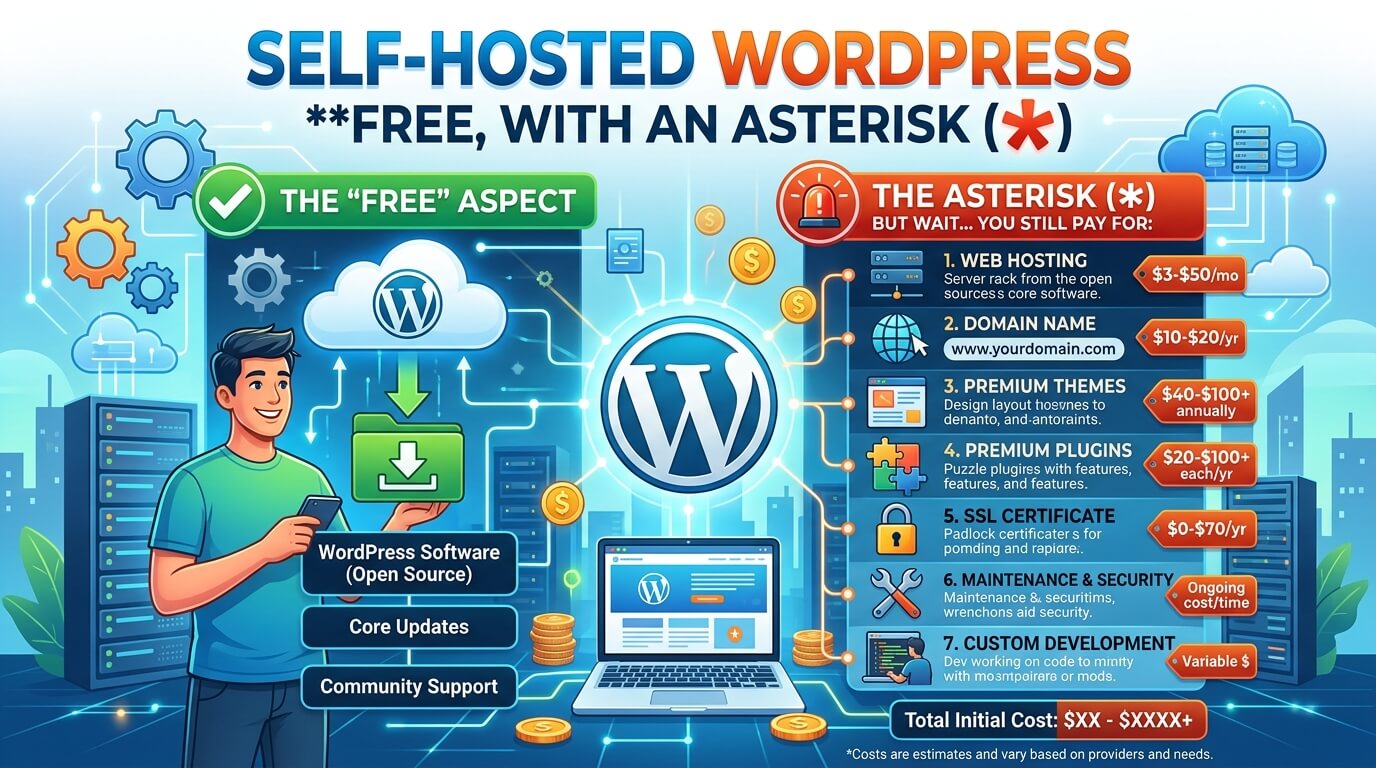
This is where most confusion starts, so it’s worth being precise. The WordPress software, meaning the actual content management system, is free and open-source. Running it as a live website requires two more things: a domain name and web hosting, and neither is guaranteed to be free.
Free blog hosting providers for WordPress exist (InfinityFree is the commonly cited example) and will genuinely get a site online at no cost, but expect ad-heavy backend interfaces and support many users describe as unreliable. Budget hosting, commonly a few dollars a month, removes that risk and is worth treating as the practical floor for self-hosted WordPress, even though that means it isn’t strictly free. Most beginner hosts also handle the WordPress installation for you with one click, so the harder part is usually picking a reliable host, not running the software itself.
In exchange, you get full ownership of your content and domain, access to a very large library of free plugins and themes, and no platform that can restrict or remove your site. WordPress powers a large share of the web: figures from 2026 industry trackers put it roughly in the 40-43% range of all sites, depending on methodology (W3Techs; WPZOOM). That scale also means an enormous community and a plugin for nearly anything you’d want.
WordPress.com (the hosted service above) and WordPress.org (the free software you self-host) are easy to confuse because they share a name and the same editor. WordPress.com is like a furnished apartment: quick to move into, but limited by what the landlord allows. Self-hosted WordPress.org is land you build on yourself, with more setup involved, but it’s genuinely yours.
Developer-Friendly Options: Ghost and Astro
For readers comfortable with code, two more names come up often: Ghost and Astro.
Ghost is built specifically for writing and publishing, with newsletter delivery and membership or subscription tools built into the core software rather than bolted on as plugins. The Ghost software itself is free and open-source, similar to WordPress, but genuinely free hosting for it is limited, so self-hosting on your own server is the realistic free path, since Ghost’s own managed hosting service, Ghost(Pro), is paid. It suits someone who wants a cleaner, less bloated editing experience than WordPress and is willing to handle setup themselves.
Astro isn’t a blogging platform in the traditional sense; it’s a JavaScript framework for building fast, content-focused static sites, blogs included. There’s no dashboard and no built-in audience, so you write in code and Markdown, and the framework compiles everything into lightweight HTML. Free static-site hosting options such as GitHub Pages, Cloudflare Pages, and Netlify’s free tier all pair well with Astro, so total hosting cost can stay at zero. It fits developers who want full design and performance control and don’t need a beginner-friendly editor.
Neither Ghost nor Astro belongs on a beginner’s shortlist of the best free blogging sites 2026 has for someone who just wants to write, but for a technical audience, both are worth knowing about.
Newsletter-Style Platforms: Substack and Medium
These work differently from the builders above, focusing less on a standalone website and more on publishing into an existing or growing subscriber base.
Substack
Substack combines blog publishing with email newsletters, sending each post directly to subscribers’ inboxes as well as hosting it as a web page. The writing interface is deliberately simple, with code blocks and polls available for more technical writers. Design customization is minimal, limited to a few color and layout toggles, and every free Substack shares the same visual structure at yourblog.substack.com. A custom domain costs a one-time $50 fee (Substack Support), and paid subscriptions carry a 10% platform cut on top of payment processing fees. Substack fits a writer who wants to focus on writing and audience-building over visual branding.
Medium
Medium’s pitch is access to an existing, active readership rather than starting from zero traffic. The platform has historically reported reach in the tens of millions of monthly readers, though Medium doesn’t publish a current, verifiable figure, so treat any specific number you see as approximate. Publishing is close to frictionless: sign up, hit “Write,” and start typing, with no dashboard to learn. The tradeoff is control: every post uses the same layout and URL structure (medium.com/@username), with no real customization, and Medium can remove content that violates its guidelines since it’s their platform. Medium fits someone who wants to publish quickly and benefit from built-in distribution, particularly through its Partner Program for eligible writers.
Free Plan Limitations You Should Check Before Committing
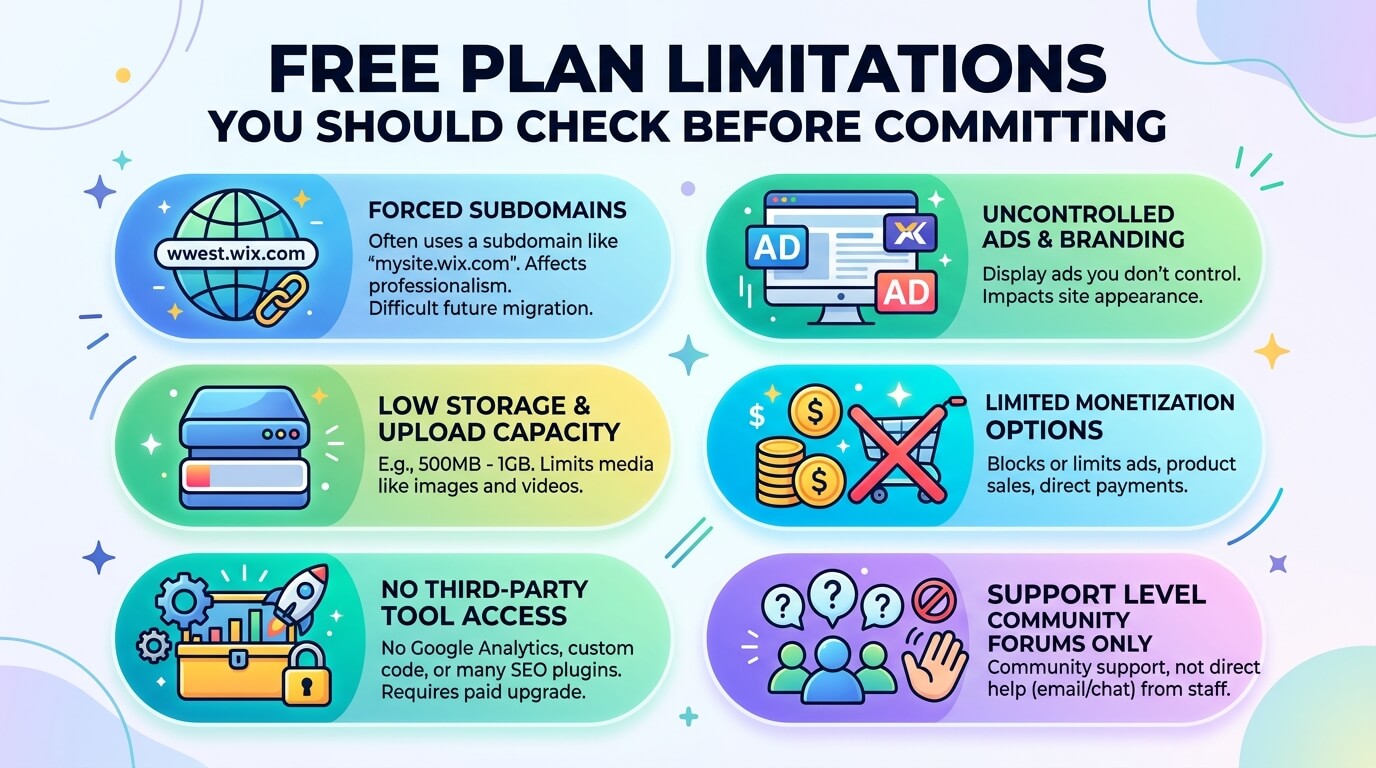
The same handful of restrictions recur across every platform listed above:
- Domain address: most free plans put you on a subdomain rather than your own domain, which affects how professional your blog looks and complicates a later migration.
- Platform branding and ads: Wix and WordPress.com both display ads you don’t control on free-tier sites.
- Storage and upload limits: typically 500MB to 1GB on hosted builders, which is fine for text-heavy blogs but tight if you’re uploading a lot of images or video.
- Monetization restrictions: most free tiers block or heavily limit ads, product sales, or direct payments.
- Third-party tool access: Google Analytics, custom code, and many SEO plugins usually require a paid upgrade.
- Support level: community forums instead of direct support, on most free tiers.
Which of the Best Free Blogging Sites 2026 Fits Your Goal
- Trying blogging as a hobby: Wix or WordPress.com, for fast setup and nothing to lose by switching later.
- Building a small business presence: self-hosted WordPress once you’re ready for modest hosting costs.
- Building an audience through writing, not a website: Medium for existing reach, or Substack if you want that audience delivered to inboxes.
- Building a portfolio alongside a blog: a builder like Wix, since it combines page-building with blogging in one editor.
- Comfortable with code and want full control: self-hosted WordPress or a static-site option like Ghost or Astro, trading setup effort for performance and flexibility.
How to Make Money on a Free Blog
Monetization on a genuinely free plan is limited by design, since platforms want you to upgrade before you earn meaningfully. A few paths still exist. Google AdSense is the common starting point once a blog has enough traffic to qualify, though most free hosted-builder plans restrict third-party ad code until you upgrade. Substack and Medium build monetization into the platform itself. Affiliate marketing, meaning linking to products and earning a commission on sales, works on nearly any platform that allows external links, free tiers included, and needs no platform approval.
Realistically, meaningful blog income takes sustained traffic and consistent publishing over months, not weeks, regardless of platform. The platforms that monetize best on a free tier tend to be the ones that build it in structurally, such as Substack’s subscriptions and Medium’s Partner Program, rather than the hosted builders, which mostly treat monetization as a paid-plan feature.
When It’s Time to Upgrade
A few concrete signals, rather than a vague sense you’ve outgrown the free plan:
- You’re regularly hitting your storage limit.
- A subdomain is affecting how visitors perceive your site’s credibility.
- You’re ready to run ads, sell something, or accept payments, and your plan blocks it.
- You need analytics or SEO tools locked behind a paid tier.
- Your traffic has grown enough that support response time matters.
If none of these apply yet, staying free costs you nothing but flexibility, which is a reasonable trade while you’re still finding out whether blogging is something you’ll keep doing.
Frequently Asked Questions
Is any blogging platform actually 100% free, with no hidden costs?
Among the best free blogging sites 2026, Wix, WordPress.com, Blogger, Substack, and Medium all let you publish indefinitely for free, within their built-in limits, including a subdomain, platform ads on Wix and WordPress.com, and capped storage. Self-hosted WordPress is the exception: the software is free, but a live site needs hosting, which is only free through third-party providers with real reliability tradeoffs.
What’s the real difference between WordPress.com and WordPress.org?
WordPress.com hosts everything for you, with real limits on its free plan. WordPress.org is the free software you install on hosting of your own choosing, trading setup effort for full control.
Can I use my own domain name on a free blog?
Blogger and self-hosted WordPress support a custom domain without extra platform fees, though hosting costs still apply for self-hosted WordPress. Substack charges a one-time $50 fee. Wix, WordPress.com, and Medium require a paid plan.
Which free blogging site is best for making money?
Substack and Medium build monetization into their free tiers. Self-hosted WordPress offers the widest range overall, including ads, products, affiliate links, and memberships, once you’ve covered basic hosting.
Do blogs on free platforms rank on Google?
Yes, because Google indexes based on content quality and relevance, not which platform hosts it. A subdomain can complicate long-term SEO if you later move to a custom domain, since you’d need to manage redirects to keep any rankings you’ve built.
Is Blogger still worth using in 2026?
For the simplest, no-cost way to publish, particularly if you’re already using Google Analytics or AdSense, yes. For anyone planning to grow into a more developed site, its limited feature set makes it a weaker long-term choice than WordPress or Wix.
Can I switch platforms later without losing my content?
Generally yes, though difficulty varies. WordPress, in both versions, has strong export and import tools. Wix, Medium, and Substack make exporting text straightforward, but you’ll typically lose your original URL structure, meaning some manual cleanup after a move is normal.
Read More: https://linkneon.com/wp-file-download-review/
Conclusion
There’s no single best answer among the best free blogging sites 2026 offers; there’s only the platform that matches what you’re actually trying to do. To test whether you enjoy blogging at all, Wix or WordPress.com gets you writing today with nothing to lose. If you’re building something long-term, the setup cost of self-hosted WordPress pays for itself the first time you need a feature a free hosted plan doesn’t allow. If the goal is an audience more than a website, Substack or Medium skip the site-building step entirely.
The practical next move: pick one platform, publish five posts, and see how the free-tier limits actually feel before deciding whether to pay for anything.