


If you are planning a new website or rebuilding an old one, web development services are what turn your idea into a working site. That covers the front end your visitors see, the back end that stores and processes data, and everything that keeps the site fast, secure, and easy to find in search engines. Whether you need a simple business website, an online store, or a custom web application, knowing how development works helps you make better decisions and avoid expensive mistakes.
This guide walks you through the process step by step, the way an experienced consultant would explain it to a client. You will learn what development work includes and which type of build fits your business. It also covers who should build it, what happens at each stage of a project, the quality standards to insist on, what drives cost, and how to choose a provider you can trust.
What Are Website Development Services?
Web development services are the professional work of planning, coding, testing, launching, and maintaining websites and web applications. They include building the user interface, setting up servers and databases, connecting third-party tools through APIs, and keeping the site secure and fast after launch.
In practice, a development team will typically handle:
- Responsive layouts that work on phones, tablets, and desktops
- Interactive features such as contact forms, logins, search, and shopping carts
- Databases that store your content, products, and customer information
- Integrations with payment processors, CRMs, email tools, and analytics
- Security measures that protect your site and your users’ data
- Performance tuning so pages load quickly and rank well
- Ongoing maintenance after the site goes live
How Website Development Differs From Web Design
You will often hear “web design” and “web development” used together, but they are different jobs. Web design decides how your site looks and feels: layout, colors, typography, and user experience (UX). Web development makes that design work in a real browser, with real data, at real speed. Many agencies offer both. If you hire them separately, make sure the designer and developer talk early, because a design that cannot be built efficiently costs you time and money.
|
Factor |
Website Development |
Web Design |
|
Main focus |
Functionality, performance, and security |
Visual style, user interface (UI), and UX |
|
Core skills |
Programming, databases, problem-solving |
Typography, color theory, visual hierarchy |
|
Typical tools |
Code editors, Git, frameworks such as React or Django |
Design and prototyping tools such as Adobe XD or Sketch |
|
What you receive |
A working website or web app |
Wireframes, mockups, and prototypes |
Types of Website Development Services
Most projects combine several of the web development services below. Read through them so you can describe exactly what you need when you request quotes.
Front-End Development
Front-end development (also called client-side development) is everything your visitors see and click: navigation menus, buttons, forms, images, and animations. Front-end developers build it with three core languages:
- HTML sets the structure of each page
- CSS controls colors, fonts, spacing, and how the layout adapts to different screens
- JavaScript adds interactivity, such as dropdown menus, sliders, and instant form validation
Larger projects usually use a framework such as React, Next.js, Angular, or Vue.js so the interface stays consistent and easier to maintain.
Back-End Development
Back-end development (also called server-side development) powers what visitors do not see. When someone submits a form, the back-end code processes the information, saves it in a database, and sends a confirmation back to the page. Back-end developers handle user authentication, data processing, routing, and connections to other systems.
Here is a useful rule: if your site only displays information and never stores anything users enter, you may not need a custom back end at all. If you need logins, user profiles, orders, bookings, or saved preferences, you do.
Full-Stack Development
Full-stack developers work on both the front end and the back end. Hiring a full-stack developer or team means one group understands the whole system. That makes it easier to spot problems early and keep the interface and the data layer working smoothly together, which is especially helpful on smaller projects that cannot justify separate specialists.
Custom Web Application Development
A web application lets users complete tasks inside the browser: managing accounts, booking appointments, viewing dashboards, or collaborating on documents. Client portals, internal business tools, and software-as-a-service (SaaS) products all fall into this category. Custom apps take more planning than standard websites, so expect a longer discovery phase and more testing.
WordPress and CMS Development
A content management system (CMS) lets your team publish and edit content without touching code. WordPress is the most widely used CMS by far: it runs 40.1% of all websites and 58.6% of sites whose CMS is known, as of October 2026. Other options include Drupal, Joomla, and Webflow. CMS developers customize themes, build page templates, configure plugins, and connect the CMS to your other tools. Because WordPress is built on PHP, look for strong PHP skills if you choose it.
E-commerce Development
E-commerce development covers building and maintaining an online store. Typical work includes product catalogs, shopping carts, checkout flows, and payment gateway integration with providers such as Stripe, PayPal, or Square. Stores are often built on platforms such as Shopify, WooCommerce, Magento, or BigCommerce. Some brands choose headless commerce, which pairs a commerce back end with a custom front end for more design freedom. Prioritize a fast, simple checkout, because every extra step gives a buyer a reason to leave.
API Development and Integration
An API (Application Programming Interface) lets your website exchange data with other software. Developers use APIs to connect your site to payment processors, shipping carriers, marketing platforms, CRMs, and ERP systems. They may also build your own API, usually as a REST or GraphQL service, so a mobile app or partner system can use your data.
Progressive Web App Development
A progressive web app (PWA) is a website that behaves more like an installed app. Users can add it to their home screen, and with the right setup it can load quickly on slow connections and keep working offline. A PWA is worth considering if your customers return often on mobile but you do not want to build separate iOS and Android apps.
Website Redesign and Migration
You do not always need to start from scratch. Redesign and migration services cover modernizing an outdated site, moving from one CMS or platform to another, or rebuilding the front end while keeping your content. If you migrate, insist on a plan for 301 redirects and URL mapping. Without it, you can lose the search rankings your old pages earned.
Website Speed Optimization
Speed optimization improves how quickly your pages load and respond. Typical techniques include image compression, code splitting, caching, and choosing the right rendering approach. Server-side rendering (SSR) generally suits content-focused and SEO-focused pages, while client-side rendering (CSR) suits highly interactive tools. The targets to aim for are covered in the quality standards section below.
Website Maintenance and Support
Launch is the beginning of your website’s life, not the end. A maintenance plan usually includes software and plugin updates, security monitoring, backups, uptime monitoring, bug fixes, and small content changes. Skipping maintenance is a common reason sites become slow, insecure, or broken over time.
Custom Development, CMS, or Website Builder: Which Do You Need?
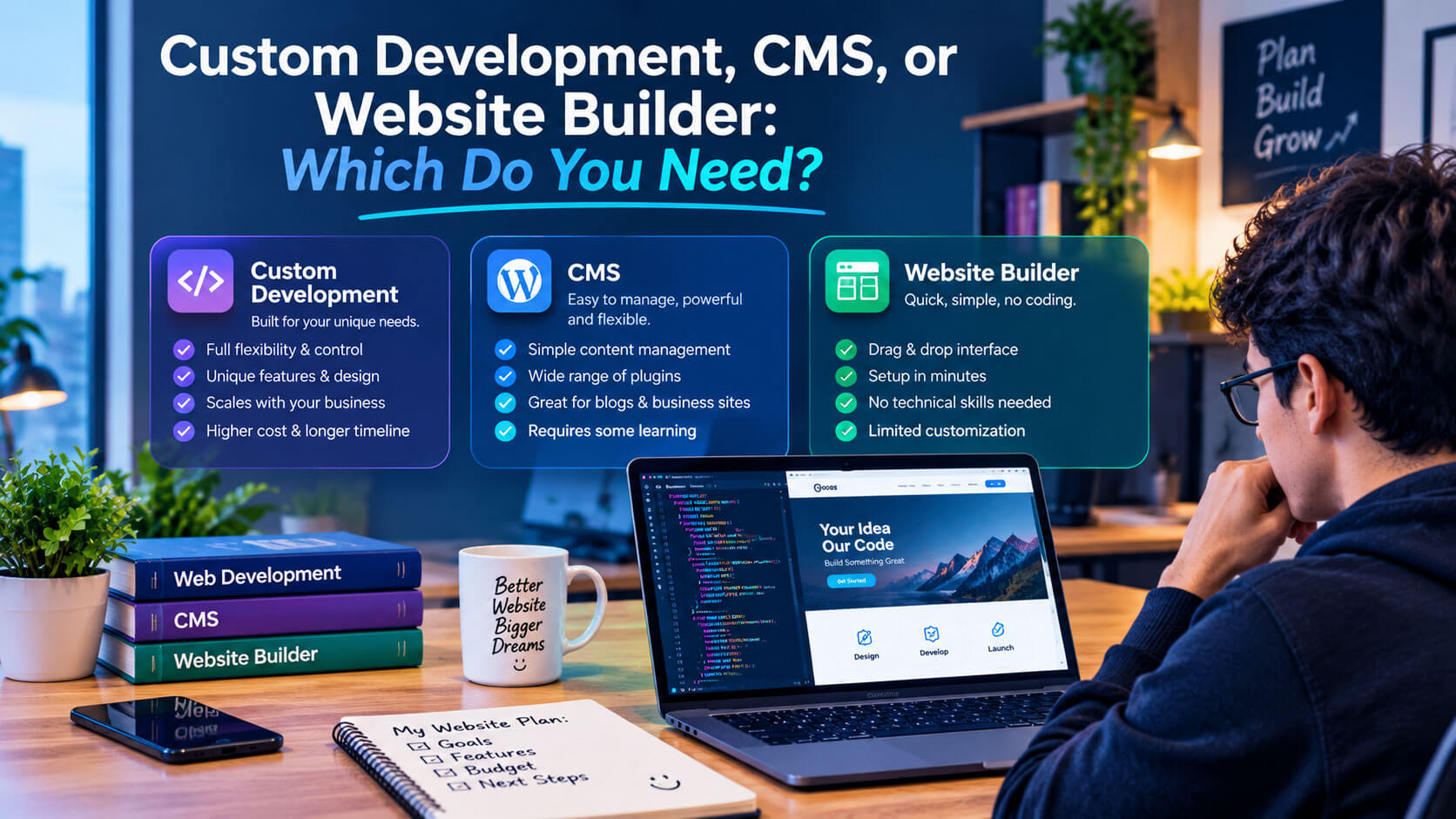
Before you request quotes, decide which approach fits your budget, goals, and team. This single choice shapes your cost, timeline, and flexibility more than almost anything else.
[Image suggestion: A simple decision flowchart that leads to website builder, CMS, or custom development. Alt text: “Flowchart for choosing between a website builder, a CMS, and custom web development”]
|
Approach |
Best for |
Flexibility |
Who can update content |
Examples |
|
Custom development |
Unique features, web apps, high growth |
Highest |
Usually developers, unless a custom admin panel is built |
React, Node.js, Django, Laravel |
|
CMS-based build |
Content-driven business sites and blogs |
High, through themes and plugins |
Your team |
WordPress, Drupal, Webflow |
|
Website builder |
Simple sites and fast, low-budget launches |
Limited |
Your team |
Wix, Squarespace |
A quick way to decide:
- Choose a website builder if you need a simple site quickly and do not expect complex features.
- Choose a CMS if content marketing matters and your team will publish often.
- Choose custom development if your site is core to how you deliver your product or service, or if off-the-shelf tools cannot do what you need.
Who Should Build Your Website: Freelancer, Agency, or In-House Team?
Once you know what you need, decide who will provide your web development services. Each hiring model has real trade-offs.
|
Option |
Strengths |
Limitations |
Best for |
|
Freelance developer |
Lower overhead, direct communication |
Limited capacity; one person may not cover design, back end, and QA |
Small sites and well-defined projects |
|
Web development agency |
Full team (design, development, QA, project management) |
Higher cost than a freelancer |
Mid-size to large projects and businesses without technical staff |
|
In-house team |
Deep product knowledge, always available |
Salaries, benefits, recruiting, and management |
Companies whose website or app is a core, ongoing product |
If you are weighing an in-house hire, budget realistically. The median annual pay for web developers in the United States was $92,650 in May 2025, before benefits and equipment. For many small and mid-size businesses, outsourcing web development services to a freelancer or agency is more cost-effective until there is enough ongoing work to justify a full-time role.
What Happens During a Website Development Project
Knowing the stages of a typical project helps you plan your own time, because several of them need your input.
[Image suggestion: A horizontal process diagram showing the eight project stages from discovery to post-launch improvements. Alt text: “Web development project stages from discovery and wireframes to launch and post-launch improvements”]
Discovery and Goal Setting
Every good project starts with clear answers to a few questions:
- What should the website achieve: leads, sales, bookings, or information?
- Who is your target audience, and what should they do on the site?
- What content will you publish, and who will maintain it?
- What are your budget and launch deadline?
Your role: come prepared with goals, examples of sites you like, and a list of must-have features. Vague goals are a frequent cause of scope creep, where a project keeps growing beyond its original plan.
Sitemap and Wireframes
The team creates a sitemap, a plan of every page and how pages connect, and wireframes, simple layouts that show where content will sit on each page. This page hierarchy shapes both navigation and internal linking for SEO. Wireframes are cheap to change, so this is the right time to rethink structure, not after development begins.
Visual Design
Designers turn the wireframes into polished mockups with your colors, typography, imagery, and brand style. Many teams also create a small design system, a set of reusable components that keeps buttons, forms, and menus consistent across every page.
To get the most out of this stage:
- Share your brand guidelines (logo files, colors, fonts) before design starts.
- Approve key templates first, such as the homepage and one service or product page, before the designer moves on to the rest.
- Ask to see mobile versions, not just desktop mockups, because many of your visitors will arrive on a phone.
- Check every state, including button hover effects, form error messages, and empty search results, so nothing is left for developers to guess.
- Send consolidated feedback. One combined list from your team is faster and clearer than scattered comments from several people.
Building the Interface
Front-end developers convert the approved designs into working pages that respond to different screen sizes and behave the same way across modern browsers. Expect to review a staging site, a private test version, as the build progresses.
Building the Server and Database
If your project needs one, back-end developers set up three things:
- Application logic: the rules for how the site responds to each request
- Database structure: how your data is organized, stored, and retrieved
- Hosting infrastructure: where and how the site runs, from managed hosting to cloud platforms such as Amazon Web Services (AWS), Google Cloud, or Microsoft Azure
Testing and Quality Assurance
Before launch, quality assurance (QA) catches bugs and confirms everything works as intended.
|
Test type |
What it checks |
|
Unit testing |
Individual pieces of code in isolation |
|
Integration testing |
Different parts of the system working together |
|
Functional testing |
Whether each feature does what the requirements say |
|
Cross-browser and device testing |
Consistent behavior across browsers and screen sizes |
|
Performance testing |
Load speed and responsiveness |
Your role: test the staging site yourself, especially forms, checkout, and any task your customers will perform.
Launch
A clean launch usually includes these steps:
- Registering your domain through an ICANN-accredited registrar, for a term of one to ten years
- Pointing the domain to your host through the Domain Name System (DNS)
- Installing an SSL/TLS certificate so the site loads over HTTPS
- Finalizing on-page SEO, including page titles, meta descriptions, and image alt text
- Publishing legal pages such as a privacy policy and, where needed, a cookie notice
- Setting up analytics so you can measure results from day one
Post-Launch Improvements
After launch, review your analytics and user feedback, fix issues, and keep improving. The strongest websites change steadily based on what real visitors do.
A practical plan for the first few months:
- Watch the first 30 days closely. Check that forms, checkout, and email notifications work with real traffic.
- Use Google Search Console to confirm your pages are being indexed and to monitor its Core Web Vitals report.
- Find where visitors drop off in your analytics, such as a form people abandon or a page they leave quickly.
- Collect direct feedback from customers and your own team.
- Keep a running improvement list and review it with your developer every quarter.
Quality Standards to Expect From Any Professional Build
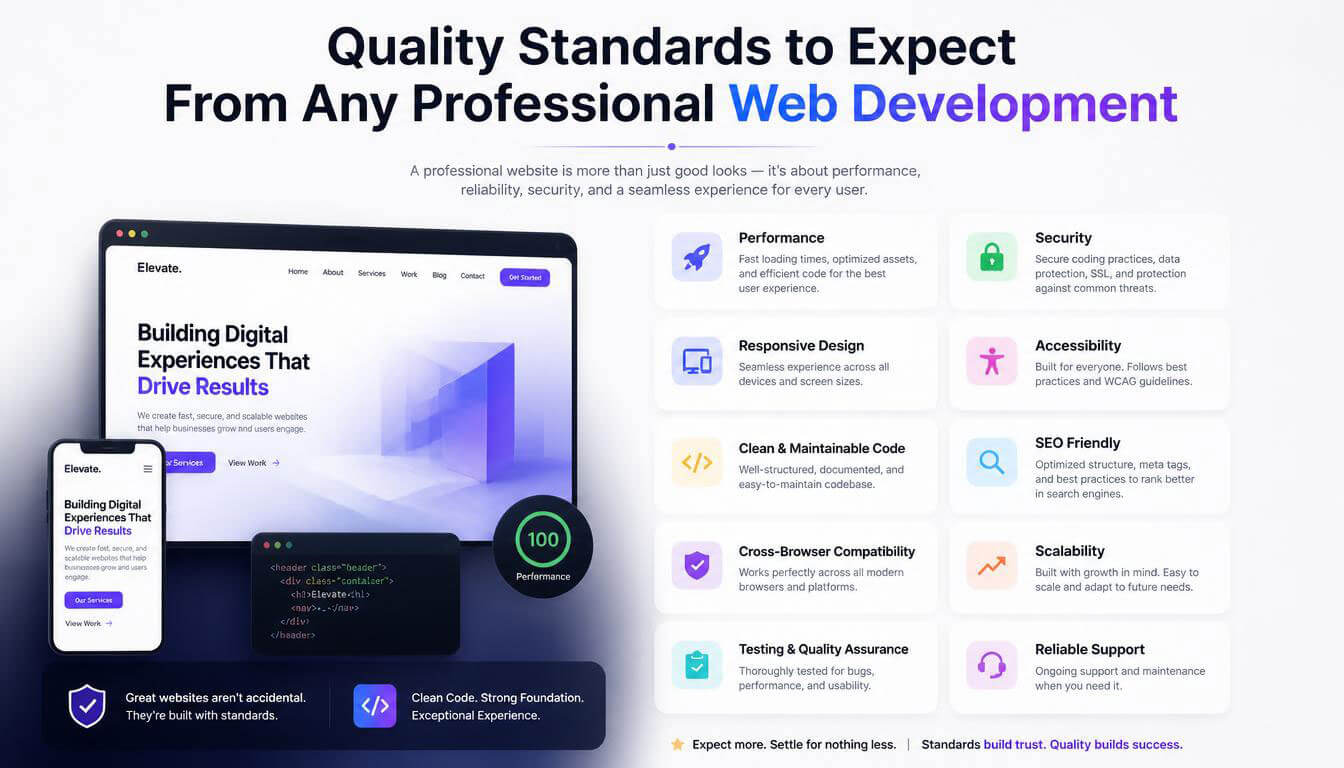
Whoever you hire, hold their web development services to these standards. They apply to a five-page business site just as much as to a large web app.
Mobile-Responsive Layouts
A responsive website adjusts its layout to every screen size, from a wide desktop monitor to a small phone. Test it yourself on your own phone before you approve the launch.
Core Web Vitals Performance
[Image suggestion: Three gauges showing the good thresholds for LCP, INP, and CLS. Alt text: “Core Web Vitals good thresholds: LCP 2.5 seconds, INP 200 milliseconds, CLS 0.1”]
Google measures real-world page experience with three Core Web Vitals. Ask your developer to target the “good” thresholds:
|
Metric |
What it measures |
“Good” threshold |
|
Largest Contentful Paint (LCP) |
How quickly the main content appears |
2.5 seconds or less |
|
Interaction to Next Paint (INP) |
How quickly the page responds to clicks and taps |
200 milliseconds or less |
|
Cumulative Layout Shift (CLS) |
How much the layout jumps around while loading |
0.1 or less |
Google’s ranking systems use Core Web Vitals, but relevant, helpful content still matters more. Think of speed as something that supports good content, not a replacement for it. Fast pages also tend to improve conversions and reduce bounce rates.
Search-Friendly Code
Good development makes your site easy for search engines to crawl and understand. Look for:
- Semantic HTML elements such as <header>, <nav>, <main>, and <footer>
- One clear H1 per page and a logical heading structure
- Clean, readable URL slugs
- An XML sitemap submitted to search engines
- Descriptive alt text on meaningful images
Accessibility and ADA Compliance
Web accessibility means people with disabilities can use your site, including people who rely on screen readers or keyboard navigation. For US businesses, this is also a legal matter. The U.S. Department of Justice has stated that the Americans with Disabilities Act (ADA) applies to the websites of businesses open to the public. The Web Content Accessibility Guidelines (WCAG), published by the W3C, are the most widely used technical benchmark, and Level AA conformance is a common target.
In practice, ask for:
- Sufficient color contrast between text and background
- Full keyboard navigation
- Descriptive alt text and properly labeled form fields
- Semantic HTML first, with ARIA attributes only where needed, because overusing ARIA can make accessibility worse
This is general guidance, not legal advice. If accessibility compliance is a concern for your business, talk to a qualified attorney.
Website Security
Attackers constantly scan websites for weaknesses. A secure build should include:
- HTTPS across the entire site
- Secure user authentication, with properly hashed passwords
- Protection against common risks listed in the OWASP Top 10, such as injection attacks
- A Content Security Policy (CSP) and correctly configured Cross-Origin Resource Sharing (CORS)
- Regular updates and security audits
- Optional passkeys for safer, passwordless sign-in
Room to Scale
A scalable site can handle more traffic, products, and features without a full rebuild. Ask how the proposed architecture, database, caching, and hosting will cope if your traffic doubles.
Understanding the Technology Stack
You do not need to become a developer, but understanding the basics of a technology stack helps you judge proposals and ask better questions.
Front-End Technologies
Every website uses HTML, CSS, and JavaScript. Most modern projects add a JavaScript framework such as React, Angular, or Vue.js, and often a CSS framework such as Bootstrap or Tailwind CSS. The specific choice matters less than whether your developer knows it well and whether other developers could take over later.
Back-End Languages and Frameworks
The back end can be built with many languages. The table below shows the most common options and where each tends to fit.
|
Language |
Common frameworks |
Where it fits well |
|
PHP |
Laravel, Symfony |
WordPress sites and many content-driven websites |
|
JavaScript (Node.js) |
Express.js |
Real-time features, APIs, and teams using JavaScript end to end |
|
Python |
Django, Flask |
Data-heavy applications, automation, and AI features |
|
Java |
Spring |
Large enterprise systems |
|
C# |
.NET |
Businesses already invested in Microsoft technologies |
|
Ruby |
Ruby on Rails |
Fast development of new web applications |
Databases
Most websites store data in a relational database such as MySQL or PostgreSQL, which organizes data in structured tables queried with SQL. NoSQL databases such as MongoDB or Redis suit specific needs, such as flexible data structures or high-speed caching. For most business sites, a relational database is the sensible default.
Hosting, Deployment, and Version Control
Professional teams track every code change with version control using Git, usually hosted on GitHub, GitLab, or Bitbucket. This protects your project if a developer leaves and makes it easy to roll back mistakes. Simple sites are often hosted on platforms such as Netlify or Vercel, while larger applications run on cloud platforms. Ask where your code will live and make sure you can access it.
How AI Is Changing Website Development Projects
Artificial intelligence (AI) tools are now a normal part of development. In Stack Overflow’s 2025 Developer Survey, 84% of developers said they use or plan to use AI tools in their development process, while 46% said they do not trust the accuracy of AI output.
That combination tells you what to expect. Developers use AI coding assistants to draft code, write tests, and speed up routine tasks, but experienced people still need to review the output, design the architecture, and check security. When you evaluate a provider, ask how they use AI and how they review AI-generated code. A team that uses AI with strong review can work efficiently. A team that relies on it without review creates risk for you.
What Affects the Cost of Website Development Services?
[Image suggestion: An infographic of the main cost factors grouped by scope, features, and ongoing costs. Alt text: “Factors that affect the cost of building a website”]
There is no single price for a website, and you should be wary of anyone who quotes one before understanding your project. The cost of web development services depends mainly on these factors:
|
Cost factor |
Why it changes the price |
|
Type of build |
A brochure site takes far less work than an online store or custom web app |
|
Number of unique page templates |
Each distinct layout needs its own design and development |
|
Features and functionality |
Logins, search, bookings, and dashboards add complexity |
|
Custom code vs. CMS vs. builder |
Custom work offers the most flexibility but takes the most time |
|
Integrations |
Each connection to a payment, CRM, or ERP system needs building and testing |
|
Content and migration |
Moving or creating large amounts of content adds work |
|
Accessibility and security requirements |
Higher standards require more development and testing time |
|
Ongoing maintenance |
Hosting, updates, monitoring, and support are recurring costs |
Common Pricing Models
Providers usually charge in one of three ways. Knowing them helps you compare quotes that look very different on paper.
|
Pricing model |
How it works |
Best for |
Watch out for |
|
Fixed price |
One agreed price for a defined scope |
Projects with clear, stable requirements |
Changes outside the scope cost extra, and quotes may include a buffer for risk |
|
Hourly (time and materials) |
You pay for the hours actually worked |
Projects whose scope is still evolving |
Less predictable budget; ask for estimates and regular time reports |
|
Monthly retainer |
A set monthly fee for reserved time or ongoing services |
Maintenance, updates, and continuous improvement |
Clarify what happens to unused hours and what counts as out of scope |
Whichever model you choose, tie payments to clear milestones, such as an initial deposit, design approval, and launch. That way, payment follows progress you can see.
How to Get an Accurate Quote
The more clearly you describe your project, the more accurate and comparable your quotes will be. Send every provider the same short brief that includes:
- Your goals and target audience
- A list of pages and must-have features
- Any integrations you need (payments, CRM, email marketing)
- Examples of websites you like, and why
- Who will create and maintain the content
- Your budget range and launch date
How to Choose a Website Development Services Provider
Choosing the right provider matters more than choosing the right technology. Use the steps below to compare your options fairly.
Review Relevant Portfolio Work
Look for live projects similar to yours in size, industry, and complexity, and open them on your phone. Check that they load quickly and work smoothly. If possible, ask to speak with one or two past clients.
Ask the Right Questions Before You Sign
Strong providers will answer these clearly:
- How do you run discovery, and what do you need from me?
- Which technology stack do you recommend for my project, and why?
- How do you test for speed, accessibility, and security?
- How will we communicate, and how often will I see progress?
- How do you use AI tools, and how do you review the code they produce?
- What exactly is included in the price, and what counts as extra?
Watch for Red Flags
Be cautious if a provider:
- Quotes a fixed price before understanding your requirements
- Cannot show relevant, live work
- Promises guaranteed first-page Google rankings
- Avoids putting the scope, timeline, and payment terms in writing
- Plans to register your domain or hosting in their own name
Confirm Ownership and Post-Launch Support
Before you sign, make sure the contract states that you own your domain, your content, and the final code, and that you will have administrator access to your hosting and CMS. Also confirm what support looks like after launch: response times, maintenance plans, and the cost of future changes.
Pre-Launch Checklist: What to Confirm Before Your Website Goes Live
Use this checklist in your final review with your developer:
- The site displays and works correctly on your own phone, tablet, and desktop
- Every form, checkout, and booking flow has been tested with real submissions
- Core Web Vitals meet the “good” thresholds on key pages
- The whole site loads over HTTPS with a valid SSL/TLS certificate
- Color contrast, keyboard navigation, and alt text have been checked for accessibility
- Page titles, meta descriptions, and the XML sitemap are in place
- Old URLs redirect correctly if you migrated from a previous site
- Analytics and Google Search Console are set up
- Backups and security monitoring are active
- You have administrator access to your domain, hosting, CMS, and code repository
Frequently Asked Questions About Website Development Services
What do web development services include?
Web development services typically include planning, front-end and back-end development, database setup, third-party integrations, testing, launch, and ongoing maintenance. Depending on the project, they can also include CMS setup, e-commerce development, speed optimization, accessibility improvements, and technical SEO.
How long does it take to build a website?
It depends on the type of site, the number of unique pages, the features, and how quickly you provide content and feedback. A simple CMS-based business site moves much faster than a custom web application. The most reliable estimate comes after a discovery phase, so ask each provider for a timeline broken down by project stage.
Can I update the website myself after launch?
Yes, if the site is built on a CMS or a website builder, or if a custom admin panel is included in the project. Make this a requirement from the start, and ask for a short training session at handover.
Do I need to hire a separate web designer?
Not necessarily. Many agencies include design and development in one project. If you hire a freelance developer, check whether they also design or whether you will need a separate designer, and make sure the two work together from the wireframe stage.
How often should a website be maintained?
Software, plugins, and security patches need regular attention, often monthly or whenever critical updates are released. You should also review performance, broken links, and analytics at least every few months. A maintenance plan is the simplest way to stay on top of this.
Will AI make my website cheaper to build?
AI tools can speed up some routine development tasks, but planning, design decisions, code review, security, and testing still need experienced people. Judge quotes on quality, scope, and support rather than expecting AI alone to cut the price.
Your Next Steps
You now have a clear picture of how websites are planned, built, and maintained, and what separates a professional build from a risky one. To put it into action:
- Define your goals, audience, and must-have features.
- Decide between a website builder, a CMS, or custom development.
- Choose your hiring model: freelancer, agency, or in-house.
- Send the same written brief to at least three providers.
- Compare portfolios, answers to your questions, and contract terms, not just price.
- Confirm ownership, quality standards, and post-launch support in writing.
Take these steps and you will be ready to invest in web development services with confidence, and to end up with a website that keeps working for your business long after launch.