

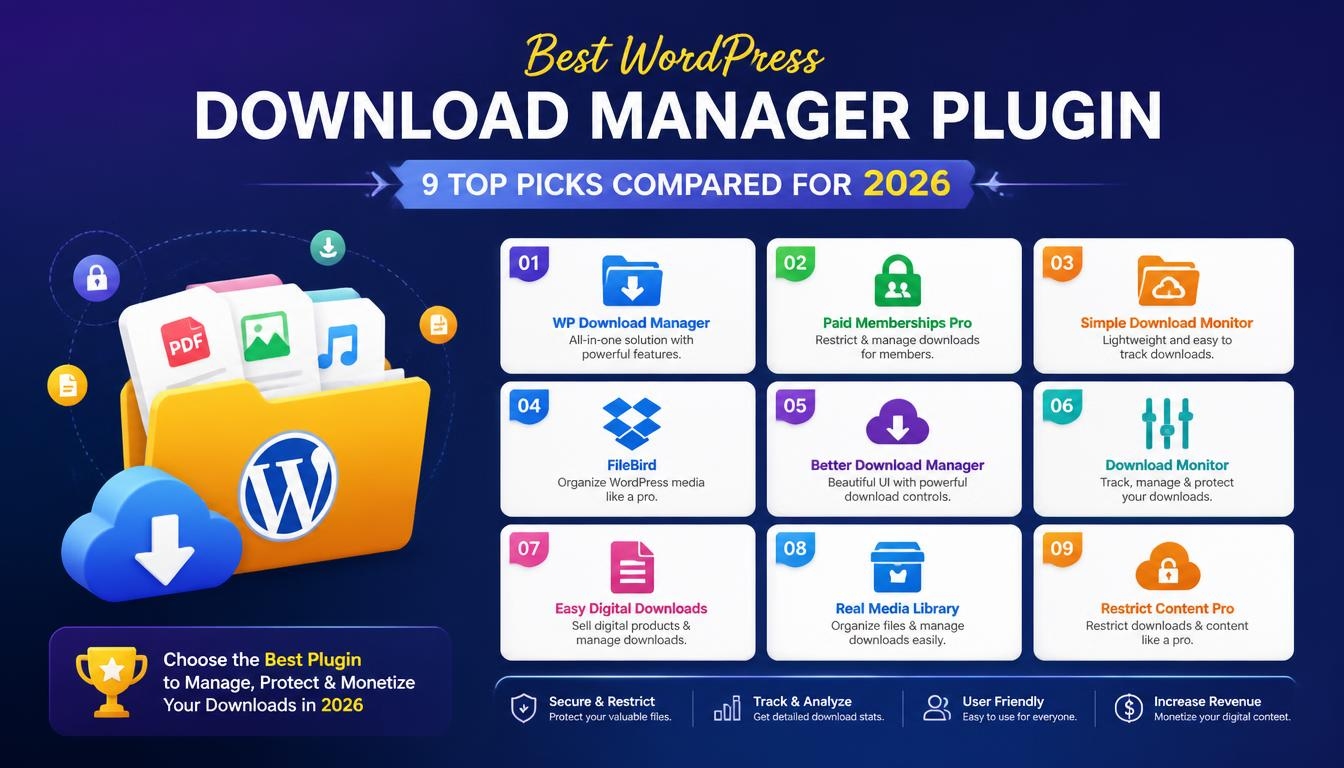
You upload a free checklist, share the link and hope for the best. A week later, you still have no idea how many people grabbed it. Meanwhile, the link to your paid ebook has quietly landed on a public forum. WordPress gives you a plain file link and little else, with no download tracking and no way to lock anything. The best WordPress download manager plugin closes that gap by keeping your files in one place and putting you back in charge. With W3Techs putting WordPress on 40.2% of all websites as of October 2026, a lot of people are guessing.
So which tool deserves your files? This guide walks you through what a download manager does, the features worth caring about and 9 plugins worth a look in 2026. You’ll find free, lightweight picks alongside paid tools that let you sell files. There’s also a comparison table, a pricing breakdown, setup steps and the mistakes people make most. By the end, you’ll know which best WordPress download manager plugin suits your site.
What Is a WordPress Download Manager Plugin?
A download manager sits between your files and the people who want them. Normally, you’d drop a file into the Media Library, copy the link and paste it into a post. Picture a wedding photographer sharing a pricing guide that way and adding a new version every season. Soon there are four PDFs with nearly identical names, and clients keep opening the old one. The Media Library was never built for that job. It’s a storage shelf, not a librarian.
A download manager turns that shelf into a proper library. Each file gets its own settings, from categories and tags to passwords and user role limits. Think of a yoga teacher who shares free stretching charts but keeps class workbooks for paying members. With a download manager, both sit in one place, and only the right people can open the workbooks. She can also see which charts get downloaded most.
Most people searching for the best WordPress download manager plugin are fixing one of three problems. Their files are messy, anyone can grab anything, or they have no idea what gets used. As one popular WordPress guide points out, default WordPress has no easy download tracking or permission controls. A download manager adds both without FTP or a single line of code. For a busy shop owner, that means less time chasing files and more time running the business.
Download Manager vs File Manager Plugin: What’s the Difference?
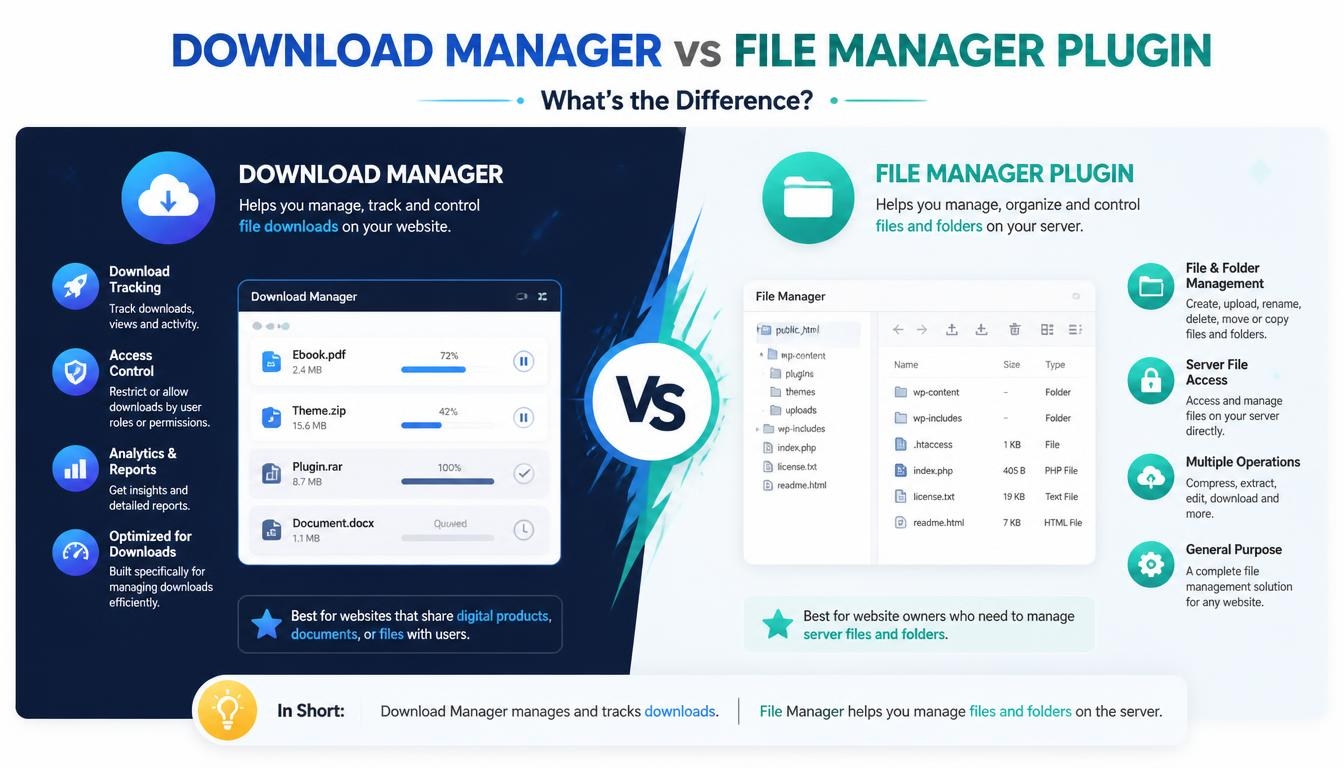
Before going further, it’s worth clearing up a mix-up that shows up in plenty of lists. Plugins like Advanced File Manager and File Manager often appear in download manager roundups, but they do a different job. This kind of tool is basically a replacement for an FTP connection. Imagine a bakery owner who just wants to share a holiday menu and installs one by mistake. Suddenly she’s staring at theme folders and server files instead of a tidy download button.
A download manager faces your audience, while a file manager faces your server. One decides who sees which files and tracks every download. The other lets you edit, upload or delete files behind the scenes. Giving someone file manager access just to share a PDF is like handing over your house keys so they can borrow a book. If your goal is sharing, protecting or selling files, the best WordPress download manager plugin is the right pick. Keep file managers for admin work.
Why Your WordPress Site Needs a Download Manager
Out of the box, WordPress treats every file exactly the same. It’s public and untracked, and anyone with the link can pass it around. That’s fine for a blog photo. It’s a problem for a realtor sharing a neighborhood report meant only for serious buyers, or a coach using a lead magnet to grow an email list. Once the link escapes, the coach loses the email and the realtor loses control.
Here’s what changes once you add a proper download manager:
- People can grab free files without signing up, while protected ones stay locked.
- Fewer people need back-end sign-ins. You don’t have to hand out admin passwords just to share a file.
- Front-end file forms let people send you job applications, article pitches or project briefs.
- Download counts and logs show which resources work and which ones nobody opens.
- Charging for or gating files becomes possible through a price, an email opt-in or a social share.
Put together, these changes make a real difference. Take a freelance designer who shares mockups with clients every week. Instead of emailing attachments back and forth, she posts one protected link per client and checks who has downloaded what. Fewer emails, fewer “did you get it?” messages. So the best WordPress download manager plugin isn’t just storage. It’s a quiet assistant.
Key Features to Look For in a Download Manager Plugin
To compare tools fairly, it helps to know what separates a solid download manager from a basic one. Features look alike on a sales page, but they behave very differently once your library grows. A teacher with twenty worksheets needs far less than a software company with thousands of files. The best WordPress download manager plugin for you is the one whose features fit your files and your audience. These four areas matter most.
Access Control and Download Protection
Not every file should be public, so protection comes first. Good plugins let you limit files by user role, require a sign-in or add a password lock. According to JoomUnited’s page, WP File Download can also cap how often a user downloads a file and add a time delay for access. Other tools add a CAPTCHA, block suspicious IP addresses or ask visitors to accept your terms first. A course creator selling a workbook would sleep better with even one of these switched on.
Download Tracking and Statistics
You can’t improve what you can’t see. A good statistics dashboard filters downloads by file, group and date range, and some add Google Analytics event tracking or exportable reports. Say a nonprofit shares annual reports with donors before a fundraising push. Seeing which report got the most downloads tells the team what donors actually care about. One catch: some plugins only count logged-in users, so the real number may be higher. Read your stats with that in mind.
File Organization and Versioning
Once you pass a few dozen files, structure starts to matter. Drag-and-drop sorting, a clear file tree, labels and a quick back-end search save real time. Versioning matters too, because the plugin should keep earlier copies whenever you replace a file. Think of a restaurant updating its catering menu every spring. With versioning, last year’s menu is one click away if the new prices need a rethink.
Cloud Storage and Page Builder Support
Heavy files can slow your hosting to a crawl. That’s why cloud sync with Dropbox, OneDrive or your own Nextcloud server is such a useful extra. With two-way sync, a file you add in the cloud appears on your site automatically. On the design side, look for Gutenberg blocks, Elementor widgets and support for builders like Divi, WPBakery or Avada. Your downloads should look like they belong.
Best WordPress Download Manager Plugins at a Glance
Short on time? This table shows where each tool shines, so you can shortlist your best WordPress download manager plugin in a minute. Prices are only included where they could be confirmed. For marketplace plugins with shifting prices, the license type is listed instead.
| Plugin | Best For | Free Version | Starting Price | Standout Feature |
| WP File Download | Advanced file libraries | No | $49 (1 year of updates) | Desktop-style file manager with cloud sync |
| Download Manager | Protected free downloads | Yes | Free (Pro available) | CAPTCHA, IP blocking and per-user limits |
| Download Monitor | Tracking download performance | Yes | Free (bundles from $39) | Downloads handled like posts, with versions |
| Easy Digital Downloads | Selling digital products | Yes | Free (Pro from $99.50/year) | Cart, checkout, licensing in Pro |
| Simple Download Monitor | Lightweight password-protected files | Yes | Free | Logs date, time and IP of each download |
| Shared Files | Document libraries | Yes | Free (paid from $7.99/month) | Front-end uploads and in-browser viewing |
| Use-your-Drive | Google Drive users | No | CodeCanyon license | Live Google Drive file browser |
| WP One Time File Download | Expiring links | No | CodeCanyon license | One-time download links |
| Lana Downloads Manager | Minimal setups | Yes | Free | Simple counter and download log |
9 Best WordPress Download Manager Plugins Reviewed
Now for the closer look. Each plugin gets a “best for” label, because needs vary so much from site to site. The best WordPress download manager plugin for a blogger sharing free checklists is rarely right for a store selling software. Read the ones that match your situation first.
1. WP File Download: Best Overall for Advanced File Management
WP File Download, built by JoomUnited, is the most complete tool on this list for a serious document library. According to its page, the back end works like a desktop file browser and saves changes instantly. Picture an accounting firm with hundreds of client forms, tax guides and checklists. Staff can drag files between sections and change who sees them without waiting on page reloads. Everything stays tidy even as the library grows.
The depth is what really sets it apart. Its page says old versions are backed up automatically, and up to 99 old versions can be stored. It also comes with five display layouts, including a table, an accordion-style file tree and a Google Drive-like view. There’s a document search engine that indexes files in the background, plus dedicated widgets and blocks for the major page builders. For selling, the store integration supports PayPal, Stripe and Bolt at no extra fee.
Pricing is refreshingly simple. JoomUnited lists the plugin at $49 with unlimited websites, and the all-add-ons plan at $69 with cloud sync for Google Drive, OneDrive, Dropbox and Amazon S3. There’s no auto-renewal, so you only renew if you want to. The page also shows an average rating of 4.9 out of 5 from 226 reviews. If you want the best WordPress download manager plugin for large, structured libraries, this is the one to try.
There are two things to keep in mind. One reviewer noted that searching inside document text is off by default and uses a lot of server resources on big collections. An earlier review also found leftover database tables after the plugin was removed. Neither is a deal-breaker for most sites. Just test heavy search features and plan a cleanup if you ever switch.
2. Download Manager: Best Free Plugin for Protected Downloads
Want strong protection without spending a cent? Download Manager is the first free plugin worth trying. As of October 2026, the WordPress.org directory shows 100,000+ active installs and a 4.1 rating from 1,006 ratings. Its listing covers password access, user role limits, download speed control and per-user download limits. CAPTCHA Lock and IP Block keep bots out, and visitors can be asked to accept your terms first. That’s a lot for zero dollars.
It even handles selling. According to its listing, you can price any item and offer license-based pricing such as Simple, Extended or Unlimited. Free items download directly, while paid ones go through a cart and checkout. A graphic designer selling icon packs on the side, for example, could offer different license levels without installing a separate store.
3. Download Monitor: Best for Tracking Download Performance
Download Monitor treats every download like a regular WordPress post. Each one can have categories, tags, metadata, multiple file versions and mirror links. Think of a podcast host sharing show notes and transcripts for every episode. If she already writes posts in WordPress, adding downloads feels completely familiar.
The plugin is well liked, too. Its listing shows a 4.5 out of 5 rating from 520 ratings and 80,000+ active installs. It also offers tools for turning download traffic into email subscribers, which suits anyone using lead magnets. The core plugin is free, and paid bundles are listed at $39, $99 and $159. Security researchers reported several issues in 2026, and the most recent listed fix arrived in version 5.3.4. Just keep it updated.
4. Easy Digital Downloads: Best for Selling Digital Products
If selling is your main goal, Easy Digital Downloads (EDD) was built for exactly that. It isn’t really a file library but a store for products that never ship, like ebooks, software, themes and templates. Its listing shows 40,000+ active installs, a 4.7 rating from 591 reviews and credit card payments through Stripe and PayPal. It also requires PHP 8.0, so check your hosting first.
The Pro version is where things get serious. It adds subscriptions, recurring payments, software licensing and content restriction for memberships, plus abandoned cart recovery. Paid plans start at $99.50 per year, and license keys renew automatically each year. An online course creator who wants monthly members instead of one-time buyers would find these features in one place. Budget for the renewal, though.
5. Simple Download Monitor: Best Lightweight Option for Password-Protected Files
Sometimes a big system is overkill, and you only want a few files with a password and a download record. Simple Download Monitor does exactly that, and its listing shows 20,000+ active installs with a 4.6 rating from 139 reviews. It password-protects files and logs each download’s date, time and user IP, giving you a simple audit trail. You can also add download buttons with shortcodes and change their text and colors. Think of a community choir sharing practice files with members only. It’s free, and it does the job.
6. Shared Files: Best for Building a Document Library
Shared Files sits nicely between a simple list and a full file manager. Its page describes it as a file explorer and download manager, and it’s WordPress Multisite compatible. It handles PDF, Word, PowerPoint, XLS, images and even YouTube videos. The free version includes a file list with a front-end uploader and lets people view supported files right in the browser. A school could use it to share permission slips, lunch menus and homework sheets with parents.
The paid plans add password protection, expiration dates and download limits per file. Pricing is listed at $7.99, $9.99 and $13.99 per month for the Lite, Pro and Max plans. That suits a consultant running a client portal with private files for each customer. Expiration dates mean old proposals stop floating around after a deal closes. For document-heavy businesses, it’s a strong fit.
7. Use-your-Drive: Best for Google Drive Users
If your files already live in Google Drive, copying them into WordPress feels like double work. Use-your-Drive from WP Cloud Plugins brings your Drive folders straight onto your pages. According to its CodeCanyon page, visitors browse, preview and download the real files live from Drive. The page also mentions 25,000+ customers since 2012 and 12,390 sales. Think of a property management company keeping lease templates and maintenance guides in Drive. Edit once, and the website shows the update.
It suits download centers, manuals and knowledge bases especially well. The developer also says it works with WooCommerce to deliver digital downloads straight from Drive. That keeps heavy files off your hosting. It’s sold as a paid license on CodeCanyon. For teams already working in Google Drive, it’s a natural fit.
8. WP One Time File Download: Best for Expiring Download Links
Sometimes the problem isn’t storage at all. It’s sharing. A photographer sends a gallery download to one client, and a month later it turns up on a forum. WP One Time File Download stops that by giving each person their own one-time link. According to its CodeCanyon page, you can set link expiration, email links after a form is submitted and run it on WordPress Multisite.
There’s one honest warning, though. Its CodeCanyon page lists version 2.6.4, updated October 17, 2021. That’s a long time without an update in WordPress terms. Before relying on it, test it on a staging site with your current WordPress version. If it behaves, it’s a handy niche tool. If not, move on.
9. Lana Downloads Manager: Best Minimal Free Plugin
Lana Downloads Manager keeps things about as simple as they get. According to its listing, it manages and logs local and remote files with a download counter. It works right after activation, so you can start adding files straight away. The listing shows 3,000+ active installations, support for WordPress 4.0 or higher and a price of zero. A hobby gardener sharing seed-saving guides on a personal blog is a good example of who it suits. She only wants to know how often the guides are downloaded.
It isn’t the right pick if you need access rules, selling or cloud sync. It has few extra features, which keeps it easy to learn. That’s exactly the appeal for small, personal sites. If your needs grow later, you can always move to a bigger plugin.
Free vs Premium WordPress Download Manager Plugins
Do you really need to pay? Free plugins handle protection, counters and basic organization surprisingly well. Premium tools earn their price once you need cloud sync, advanced versioning, deep page builder support or real ecommerce. A hobby blogger can stay free for years, while a law firm with thousands of client files could save hours with a paid tool. So the best WordPress download manager plugin for you might cost nothing at all. It depends on what your files are worth.
| Plugin | What’s Free | Paid Option | Price |
| WP File Download | No free version | Plugin / Plugin + All Addons / Bundle | $49 / $69 / $199 (1 year of updates, no auto-renewal) |
| Download Manager | Protection, limits, CAPTCHA, basic selling | Pro version | Listed on the developer’s site |
| Download Monitor | Core downloads, versions, stats | Basic / Popular / Complete bundles | $39 / $99 / $159 |
| Easy Digital Downloads | Cart, checkout, Stripe, PayPal | Pro passes | From $99.50/year (auto-renews) |
| Shared Files | Front-end uploads, in-browser viewing | Lite / Pro / Max | $7.99 / $9.99 / $13.99 per month |
| Simple Download Monitor | Full plugin | None | Free |
| Lana Downloads Manager | Full plugin | None | Free |
Check the renewal terms before you buy. A low starting price isn’t always the cheapest choice over two or three years. Do the math first.
How to Set Up a Download Manager Plugin in WordPress
Most of these plugins follow the same basic setup. Whichever one you pick, the steps below cover the essentials. Keep a test file handy before you start. Here’s the general process:
- Choose your plugin based on your main need: protection, tracking, selling or a document library.
- Install it from Plugins → Add Plugin (“Add New” in older versions). For premium plugins, download the zip file and click Upload Plugin.
- Open the plugin’s settings to choose allowed file types, maximum upload size and a display style.
- Create your categories before uploading, so files land in the right place from day one.
- Upload your files and set each one’s permissions, password or download limit.
- Add downloads to your pages with the plugin’s block, page builder widget or shortcode.
- Test as a logged-out visitor in a private browser window to check your restrictions.
- Check the statistics page after a few days to confirm downloads are being counted.
That testing step is the one people skip most. Imagine a membership site owner who thinks her premium guide is locked, only to find it open to everyone. A private browser window would have caught it in seconds. Whatever you decide is the best WordPress download manager plugin for your site, test it the way a stranger would. A few minutes now saves an awkward email later.
Common Mistakes to Avoid With Download Manager Plugins
Even a great plugin can cause trouble if a few habits slip. Most of these are easy to avoid once you know them. These are the most common mistakes:
- Skipping updates. Popular plugins get security fixes often. Download Monitor patched several issues in 2026. An outdated plugin is an open door.
- Turning on full-text search for a huge library. Searching inside documents is useful, but it can overload your server. Test it before switching it on site-wide.
- Trusting stats blindly. One review found that WP File Download only tracked downloads from logged-in users. If most visitors are anonymous, add Google Analytics tracking too.
- Forgetting leftover data. Deleting a plugin doesn’t always clear its database tables. Check before you switch tools.
- Using an abandoned plugin. Check the last update date before installing. A plugin nobody has touched in years may break on newer WordPress versions.
- Storing very large files on cheap hosting. Big videos and software packages belong in cloud storage, synced to your site.
Avoiding these keeps your download area fast, secure and accurate. Picking the best WordPress download manager plugin is only half the job. Looking after it is the other half. A quick check each month is plenty.
Final Thoughts on Choosing the Best WordPress Download Manager Plugin
There’s no single winner for everyone, and that’s perfectly fine. For a large, organized library with cloud sync and versioning, WP File Download is the overall pick. For strong free protection, Download Manager is the place to start. For lead magnets and tracking, Download Monitor shines, and for selling, Easy Digital Downloads is the specialist. Smaller sites will do well with Simple Download Monitor, Lana Downloads Manager, Shared Files or Use-your-Drive.
Start with what your files actually need: protection, tracking, selling or organization. Match that to each plugin’s strengths, then test your choice on a staging site. Picture the checklist from the start of this guide, now locked, tracked and organized. That’s how you find the best WordPress download manager plugin for your website. Then you can stop guessing.
Read More: https://linkneon.com/wp-file-download-review/
Frequently Asked Questions
What is the best free WordPress download manager plugin?
For most people, Download Manager is the strongest free choice. It includes password locks, CAPTCHA, IP blocking, per-user limits and even basic selling. If tracking matters more than protection, Download Monitor is a close second. Both are free to start, so try each one and keep whichever feels like the best WordPress download manager plugin for your site.
Can I restrict downloads to registered users only?
Yes. Many plugins let you allow only registered users or specific user roles. Paid tools like WP File Download go further with per-file permissions, download count limits and time-based access.
Can I sell digital files with a download manager plugin?
You can. Download Manager supports license-based pricing with a built-in cart and checkout, and WP File Download connects to the leading WordPress store plugin. If selling is your main goal, Easy Digital Downloads is the more complete option. It includes detailed sales reports, and its Pro version adds subscriptions and software licensing.
Do download manager plugins track download statistics?
Most do. They usually track download counts, user activity and your most popular files. Check whether the plugin records everyone or only signed-in members. Connect Google Analytics if you want a fuller picture.
Can a download manager handle large files?
Many can, thanks to features like download resuming and chunked uploads. For very large files, cloud storage is the smarter move. Plugins that sync with Google Drive, Dropbox, OneDrive or Amazon S3 keep heavy files off your hosting, while your files still show up on your site as usual.
Does a download manager work with Elementor and Gutenberg?
Most modern options do. WP File Download has dedicated widgets, modules and blocks for the major builders, and it also works with ACF, SiteOrigin, Themify, Beaver Builder and Live Composer. Download Monitor comes with its own Gutenberg block. Most plugins here also support shortcodes, which work in any builder.