


A generic-looking website is usually the first sign a business has outgrown its template. Custom WordPress development means building a site’s design, structure, and functionality specifically for one business, rather than starting from a pre-made theme or a drag-and-drop page builder someone else designed for thousands of other sites. The appeal is obvious: a site that looks like nobody else’s and does exactly what you need it to.
This article covers what custom WordPress development actually means in practice, how it compares to pre-built themes and page builders, the real costs and tradeoffs involved, and how to tell whether it’s the right move for your business right now or something to grow into later.
Key takeaways:
- Custom WordPress development means building a theme’s code and structure specifically for one business, not customizing a shared template.
- Costs typically range from roughly $2,000 for a simple build to $15,000 or more for complex projects, though actual pricing depends on scope and the developer you hire.
- The main real benefits are faster load times, a smaller security footprint, brand-exact design, and room to grow; none of these are automatic guarantees.
- A custom theme needs ongoing maintenance to stay compatible with WordPress updates, a cost that’s easy to overlook when budgeting for the initial build.
- It’s the right move once a template or page builder’s limits are concretely blocking the business, not before you know what the site actually needs to do.
What Custom WordPress Development Actually Means
WordPress itself is free, open-source software that powers the content management system (CMS) behind millions of sites. Most people interact with it through a pre-built theme, a template someone else designed that you install and customize with your own text, images, and colors. Custom WordPress development skips the pre-built theme entirely: a developer builds the theme’s code, layout, and features from scratch, or heavily modifies an existing foundation, to match your particular brand and business needs rather than a generic template.
This can mean a fully hand-coded theme, or it can mean a custom build on top of WordPress’s native block-editing system, known as Full Site Editing (FSE), which lets developers assemble custom layouts from reusable blocks rather than writing every template file by hand. Either approach counts as custom development because the end result is built around your own requirements, not adapted from someone else’s design.
It’s worth distinguishing custom development from customization, since the two get conflated often. Changing colors, fonts, and layout options inside a pre-built theme’s settings panel is customization; it’s still fundamentally the same theme other sites are running, just with your branding layered on top. Custom development changes the underlying code and structure itself, which produces a genuinely different result rather than a personalized version of something shared. A business that’s adjusted every available setting on a popular theme and still feels boxed in is usually running into this exact ceiling.
This distinction matters practically because it changes what you’re actually paying for. Hiring someone to “customize” a pre-built theme, adjusting its existing settings, adding your logo, tweaking colors, is a smaller, cheaper job than custom development, and it’s worth confirming which one a quote actually covers before agreeing to it. Some agencies use “custom” loosely to describe heavy customization of an existing theme rather than a ground-up build, which isn’t dishonest exactly, but it’s worth clarifying directly so expectations match what’s actually being delivered.
Custom Development vs. Pre-Built Themes vs. Page Builders
These three approaches solve the same basic problem, getting a WordPress site live, but they differ in how much control and ongoing effort each one asks of you.
| Approach | Design uniqueness | Technical skill needed | Typical cost | Best for |
| Pre-built theme | Low (shared with other sites using it) | Low | Free to a few hundred dollars | Getting online fast on a tight budget |
| Page builder (Elementor and similar drag-and-drop tools) | Moderate (visual customization within the builder’s limits) | Low to moderate | Free to a few hundred dollars, plus the builder’s own plan cost | Non-developers who want more visual control than a theme alone offers |
| Custom development | High (built for the business alone) | High (typically requires hiring a developer) | Varies widely by scope | Businesses with brand, performance, or functionality needs a template can’t meet |
Page builders sit in the middle: they give more visual control than a plain theme without requiring code, but the underlying site is still built on a shared, general-purpose framework, meaning there are ceilings on performance and customization that custom development doesn’t have. A business that starts on a page builder and keeps hitting those ceilings, needing a particular feature, a faster load time, or a genuinely distinct look, is often the one that eventually moves to custom development.
The Technologies Behind a Custom WordPress Site
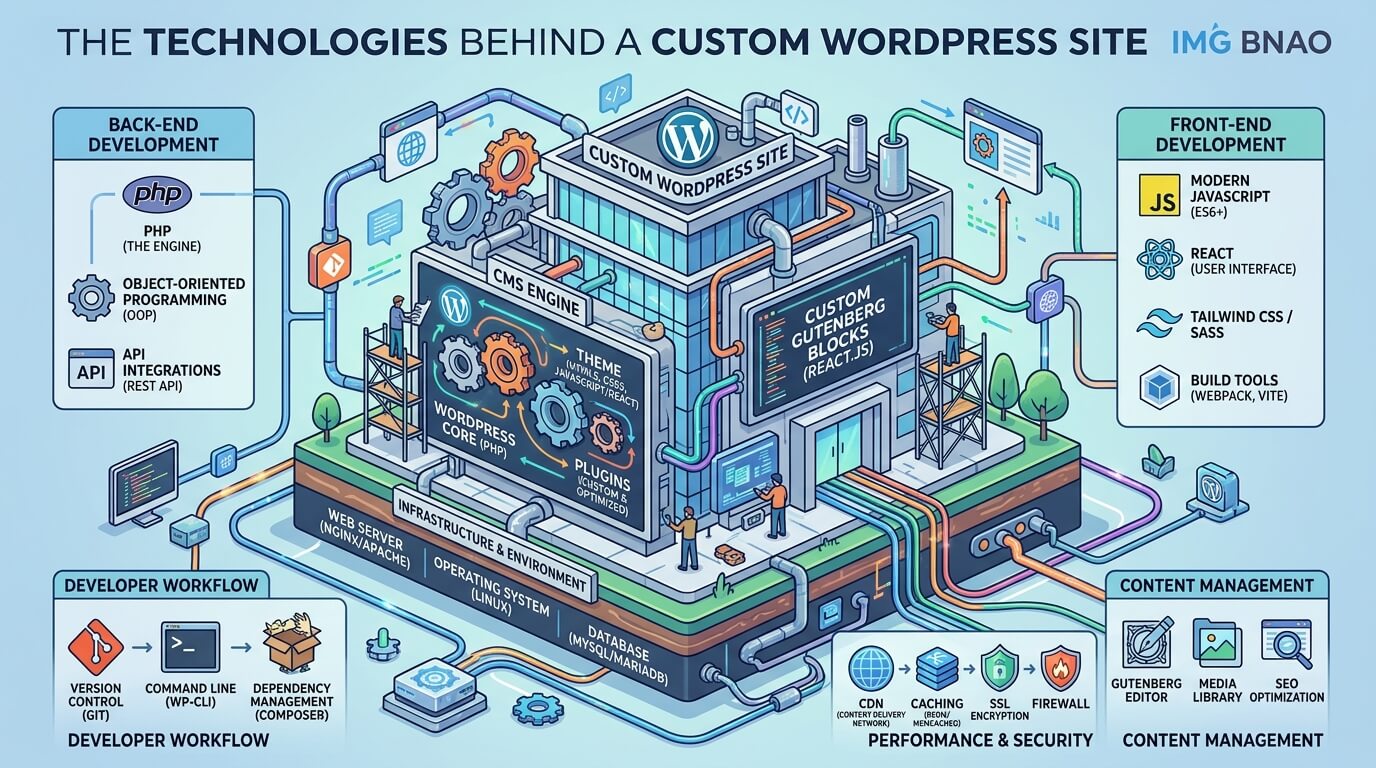
A custom WordPress theme is built primarily from four technologies working together: HTML structures the content, CSS handles the visual styling, JavaScript adds interactivity, and PHP (WordPress’s core programming language) connects the theme to WordPress’s database and features. None of this needs to make sense to you as a business owner, but it’s useful to know these are standard, widely used web technologies, not something proprietary to one developer or agency.
Modern custom development often also involves WordPress’s REST API, which lets the site exchange data with other tools and services (a booking system or a CRM, for example), and custom post types, a way of organizing content beyond standard blog posts and pages, useful for a portfolio or a listings directory.
Developers building on WordPress’s newer block theme system work within Full Site Editing rather than writing every template from scratch, which can make certain custom builds faster than fully hand-coded development, though it remains a specialized skill.
There’s also a middle ground worth knowing about: a custom build on top of a page builder’s framework. Instead of writing every template file, a developer uses the builder’s underlying structure but customizes it far beyond what a non-developer typically would, combining some of the speed of page-builder tools with more tailored results than an off-the-shelf template. It’s not as fully custom as a hand-coded theme, but it’s worth asking a prospective developer about if a fully custom build feels like more than you need.
Real Benefits of Custom WordPress Development
Performance and Core Web Vitals
Pre-built themes and page builders often load more code than a given site actually needs, since they’re built to support features every possible user might want, not just the ones you use. A custom theme includes only what the site requires, which typically means faster load times.
This matters for more than user experience: Google uses a set of page-experience metrics called Core Web Vitals, covering loading speed, interactivity, and visual stability, as one input among many in how it evaluates and ranks pages (Google Search Central). A leaner, custom-built site has an easier time meeting those benchmarks than one carrying unused theme code.
Security
No WordPress site, custom or otherwise, is immune to security issues, but custom development reduces one common source of them: outdated or poorly maintained third-party theme and plugin code. A custom theme has a smaller codebase to secure, compared to a general-purpose theme built to support far more features than any one site uses. This is a reasonable security advantage, not a guarantee; a poorly maintained custom theme can end up less secure than a well-maintained popular one. The advantage comes from having less unnecessary code to secure, not from custom development being inherently safer by design.
Brand-specific design and scalability
A custom theme can reflect a business’s exact visual identity rather than working within a template’s existing structure, and it can be built with room to add features (a booking system, a members’ area, a custom product configurator) as the business grows, rather than running into a pre-built theme’s built-in limits.
That room to grow is the part easiest to underestimate early on: a template that fits a five-page brochure site can become a genuine obstacle once that same business needs a member login area or a multi-step quote form two years later, and retrofitting those features onto a theme that wasn’t built for them is often harder than building them in from the start.
The Real Costs and Tradeoffs
Custom WordPress development costs more upfront than a pre-built theme or page builder, and the honest range is wide because it depends entirely on project scope. Several 2026 industry pricing guides place typical custom WordPress projects somewhere between roughly $2,000 for a straightforward small-business site and $15,000 or more for a complex build involving e-commerce or custom integrations (FatLab Web Support; ProjectCostEstimator). Treat any number you see, including this range, as a starting reference rather than a quote, since actual pricing depends on the developer you hire, the project’s complexity, and your location.
Beyond the upfront cost, a custom theme carries an ongoing responsibility a pre-built theme doesn’t: someone needs to keep it compatible with WordPress core updates over time. A popular pre-built theme has a team maintaining it for compatibility; a custom theme’s maintenance depends entirely on you or your developer staying on top of it, a real, recurring cost that’s easy to underestimate when budgeting only for the initial build.
What the Development Process Actually Looks Like
A professional custom WordPress build typically moves through a consistent set of stages, though the names and order vary somewhat by developer:
- Discovery and strategy: defining what the site needs to do, who it’s for, and what “done” looks like before any design work starts.
- Design and wireframing: planning the layout and user experience, usually starting with rough sketches before visual design.
- Development: the actual coding of the theme, templates, and any custom functionality.
- Quality assurance testing: checking the site across browsers and devices, and testing performance and security before launch.
- Launch: moving the finished site to a live server and confirming everything works in production.
- Post-launch support: fixing issues that surface after real users start using the site, and beginning the ongoing maintenance work covered above.
Timelines vary too much by project scope to state a single reliable number here; a simple custom site and a complex e-commerce build with custom integrations are different projects entirely, and any developer quoting a fixed timeline without knowing your requirements first is worth treating with some skepticism.
When Custom Development Makes Sense (and When It Doesn’t)
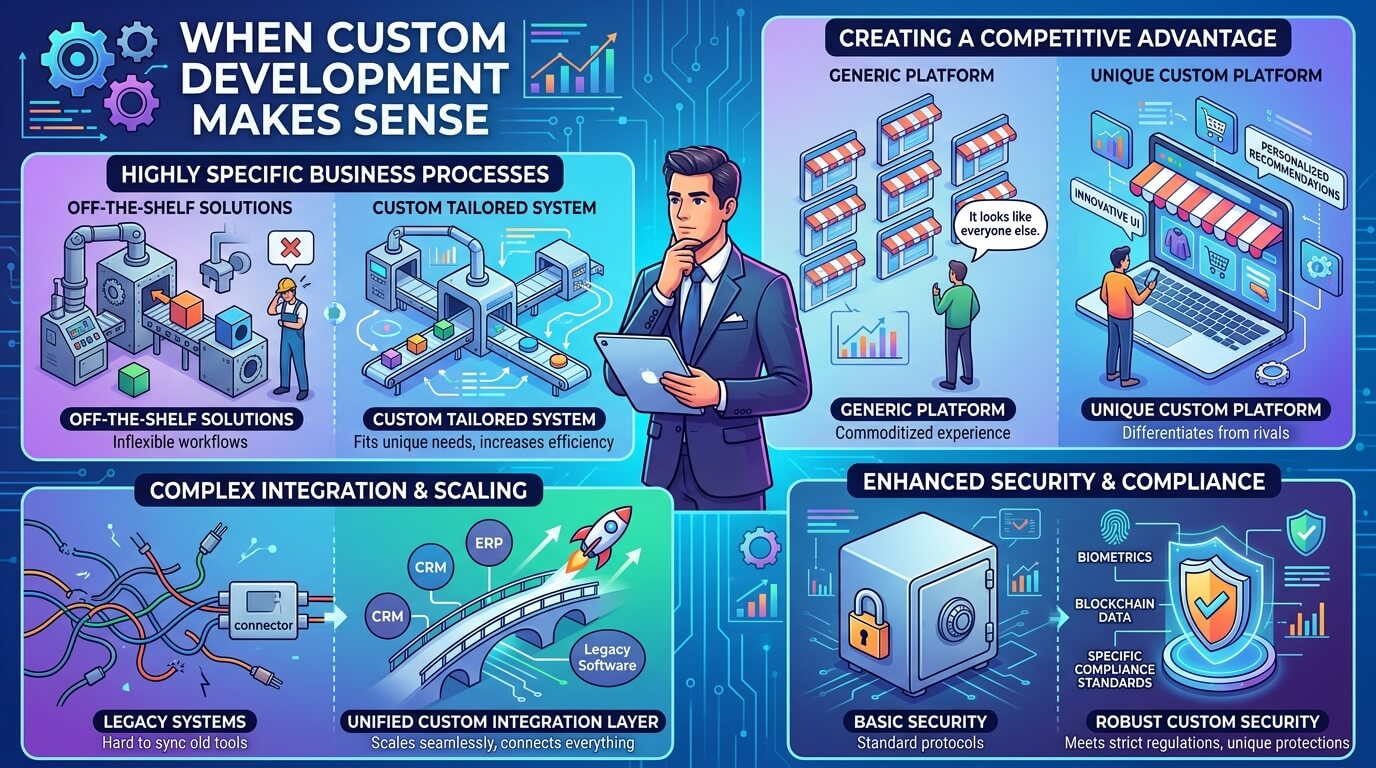
Custom development isn’t automatically the better choice; it’s the right choice in certain situations:
It makes sense when:
- Your brand needs a genuinely distinct look competitors can’t replicate by installing the same theme.
- You need functionality no plugin or page builder combination handles well.
- Your current site’s performance is measurably hurting conversions or rankings.
- You’re planning enough future growth that a template’s limits would become a real constraint.
It doesn’t make sense yet when:
- You’re testing a new business idea and don’t yet know what the site actually needs to do.
- Budget is tight and a well-configured page builder site would meet your needs for now.
- Your current template-based site’s problems are more about content and marketing than the underlying theme itself.
A reasonable approach for many growing businesses is starting on a page builder or a solid pre-built theme, then moving to custom development once concrete limitations show up, rather than committing to a custom build before knowing exactly what’s needed.
Choosing a Development Partner
Since custom development depends heavily on the skill of whoever builds it, vetting a developer or agency matters more here than it does for a pre-built theme. A reasonable evaluation covers:
- Portfolio of past custom WordPress work, not just theme customizations of existing templates.
- Clear explanations of their process, in plain language rather than jargon.
- How they handle post-launch support and maintenance, since the project doesn’t end at launch.
- Whether they ask about your business goals first, before jumping straight to technical solutions.
A developer who can’t clearly explain what they’d build and why is worth treating cautiously. WordPress-specific developer marketplaces (Codeable is one example) are one route to finding vetted talent, alongside referrals and agency portfolios; none of these guarantees quality on their own, so reviewing actual past work still matters most.
It’s also worth asking directly who owns the finished code and who’s responsible for updates once the project ends. Some developers hand over full ownership and step away; others expect an ongoing retainer for maintenance. Neither approach is wrong, but it should be agreed on before the project starts, not discovered after launch when something needs fixing.
Frequently Asked Questions
What’s the real difference between custom WordPress development and a premium theme?
A premium theme is still a pre-built product used by many other sites, even if it’s paid and feature-rich; you’re customizing its settings, not its underlying code or structure. Custom development builds the code and structure specifically for your site alone.
How much does custom WordPress development actually cost?
It varies widely by scope. Industry pricing guides from 2026 commonly place simpler custom projects in the low thousands of dollars, rising to $15,000 or more for complex builds with e-commerce or custom integrations (FatLab Web Support; ProjectCostEstimator). Get a scoped quote from a developer for an accurate number rather than relying on general ranges.
Is custom WordPress development better for SEO than a template?
It can be, mainly through performance: a leaner custom theme tends to load faster, which supports the page-experience signals Google factors into ranking. It isn’t automatically better for SEO on its own; good SEO also depends on content, site structure, and technical setup regardless of which theme approach you use.
How long does a custom WordPress project typically take?
This depends too much on project scope to state a reliable general timeline. A simple custom site and a complex e-commerce build are different projects with very different timelines; ask a developer directly for an estimate based on your actual requirements.
Can a custom WordPress site still use WooCommerce and other plugins?
Yes. Custom development replaces or heavily modifies the theme, not WordPress’s plugin system, so WooCommerce and most well-built plugins still work normally on a custom theme.
Do I need ongoing maintenance after a custom theme is built?
Yes, and this is often underestimated. A custom theme needs someone keeping it compatible with WordPress core updates over time, unlike a popular pre-built theme that has its own maintenance team doing that work for every site using it.
Read More: https://linkneon.com/best-free-blogging-sites-2026/
Conclusion
Custom WordPress development is a genuine investment, in both upfront cost and ongoing maintenance, that pays off specifically when a business has outgrown what a template or page builder can offer: a distinct brand look, particular functionality, or performance needs that a general-purpose theme can’t meet. It isn’t automatically the better choice for every business, and a template or page builder is a reasonable starting point for many.
The practical next step: list the specific things your current site can’t do or doesn’t look like, and use that list, not a general sense of wanting something “custom,” to brief any developer you talk to. A concrete list produces a more accurate quote and a more useful build than a vague request for a custom website.