

Architecture firms sell what they design, and a website that looks generic undercuts that pitch before a visitor reads a single project description. A free architecture WordPress theme solves the immediate problem: a portfolio-ready site without paying a designer or a premium theme license before you know whether WordPress is even the right tool for your firm.
The core tradeoff is the one every free tool carries: lower upfront cost against less flexibility, fewer premium integrations, and support that leans on community documentation instead of a paid help desk.
This guide uses Themeignite’s own free architecture theme as a concrete example to show what a free architecture WordPress theme actually includes, how it compares to paid alternatives, and how to set one up without needing to write code. By the end you should know whether a free theme covers what your firm needs or whether the limitations push you toward a paid option sooner rather than later.
What Makes a WordPress Theme Work for Architecture Firms
Architecture is a visual business before it’s anything else, so a theme built for it has to prioritize large, high-quality images over dense text blocks. A portfolio grid that displays completed projects cleanly, without competing decoration, matters more here than in most niches, because the images are doing the persuading, not the copy around them.
Beyond the visuals, a handful of structural features separate a genuinely usable architecture theme from a generic one repurposed for the job: dedicated project pages that pair images with details like location, scope, and completion date; a responsive design that holds up on a tablet during a client meeting as well as on a desktop; and a contact or inquiry form that doesn’t require a separate plugin hunt to set up.
Typography also matters more than it first appears: architecture audiences tend to notice clean, restrained type choices, and a theme that leans on heavy decoration usually works against the firm’s own design credibility.
Navigation deserves the same attention as the visuals. A prospective client browsing an architecture site is usually comparing a handful of firms in one sitting, so a portfolio that’s easy to filter by project type, whether residential, commercial, or renovation work, keeps a visitor looking rather than clicking away to the next tab.
Load speed matters for the same reason: a portfolio page stacked with unoptimized renderings can take several seconds to appear, and most visitors won’t wait that long to judge whether your work is worth exploring further.
Inside the Free Architecture WordPress Theme
Themeignite’s free architecture theme, built specifically for architects, architectural firms, and design studios, is one concrete example of what a no-cost option can offer. It’s available through the WordPress.org theme repository and, according to the product page, is licensed under GPL, meaning it can be used, modified, and installed on an unlimited number of domains without additional fees.
Key features and layout
The theme is described as having a clean layout with stylish typography, built around image galleries for showcasing completed projects alongside detailed project information and client testimonials.
It’s fully responsive across desktops, tablets, and smartphones, and it comes with a set of integrations that matter for a working business site rather than just a portfolio shell: Contact Form 7 for inquiries, WooCommerce if you plan to sell plans or consultations directly, WPML for multilingual firms, and GDPR compliance tools.
It also includes both Yoast SEO and Rank Math for search optimization, One Click Demo Import, which loads a pre-built layout you can edit rather than starting from a blank page, and schema-ready markup, which helps search engines understand project and business information without extra manual setup.
Free updates are provided for a full year, and the listing states downloads are verified and safe, distributed through the standard WordPress.org repository rather than a third-party file host.
Who this theme fits best
This kind of free architecture theme fits a small firm, a solo architect, or a design studio that needs a professional-looking, portfolio-first site now and isn’t ready to commit budget to custom development. It’s a weaker fit for a larger firm that needs bespoke branding or animation-heavy interactions, where the theme’s basic customization options run out quickly.
The product page also doesn’t state whether any portfolio or gallery features are capped on the free tier and reserved for a paid add-on. That’s worth confirming directly on the listing before assuming full access, rather than treating an unstated limit as a guarantee that none exists.
Free vs. Premium Architecture Themes: What You Actually Give Up
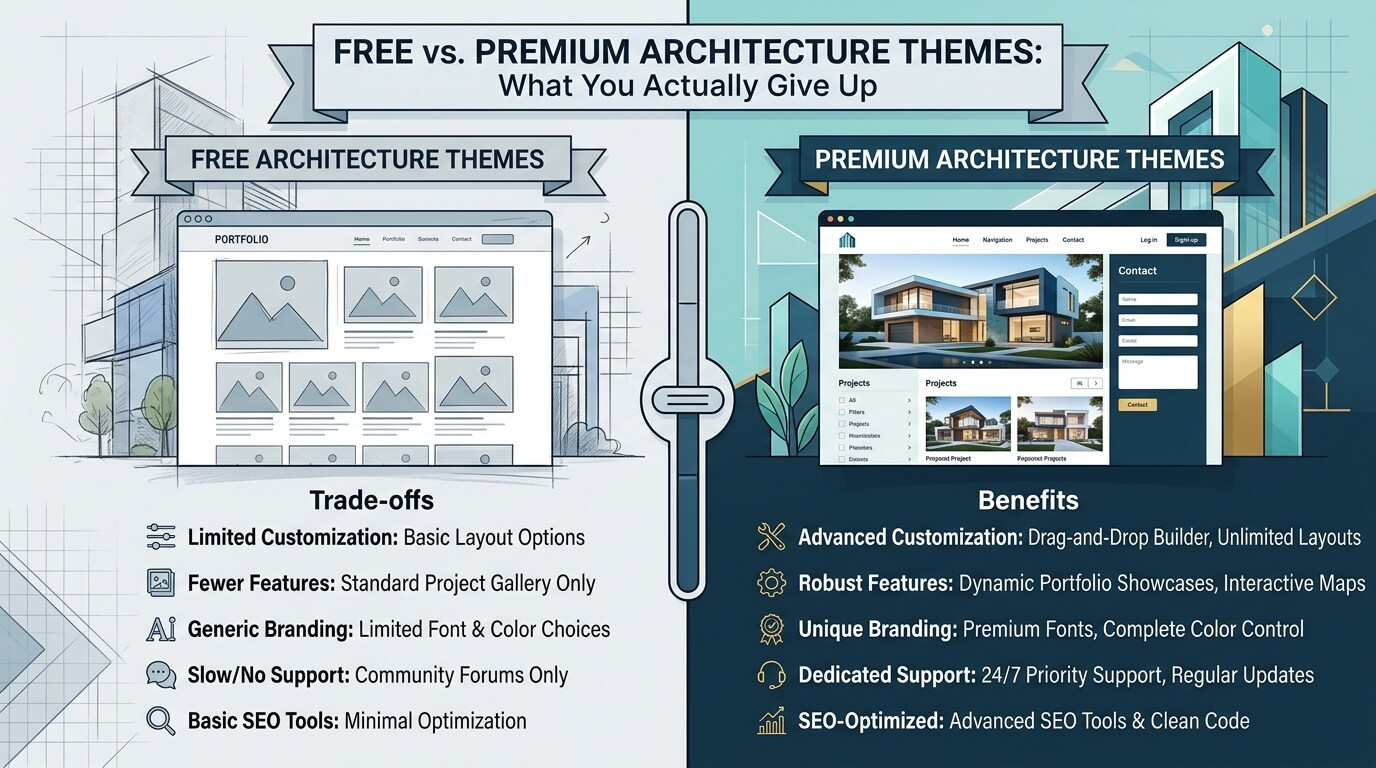
Free and premium architecture themes solve the same basic problem, a professional portfolio site, but they diverge in what’s included around that core function.
| Factor | Free architecture theme | Premium architecture theme |
| Upfront cost | $0 | Typically $30–$70 one-time, or a subscription |
| Updates | Often time-limited (e.g., one year) | Ongoing, tied to license renewal |
| Support | Community forums, documentation | Direct developer or ticket-based support |
| Customization depth | Basic color, layout, and typography options | Extensive, often with a dedicated theme options panel |
| Page builder support | Not always stated or included | Commonly built for Elementor or a bundled builder |
| Demo content | Sometimes included (One Click Demo Import) | Usually multiple demo layouts to choose from |
The honest way to frame this: a free theme is a legitimate way to launch, not a permanently inferior one, but the limitations tend to surface as a firm grows, specifically around page-builder flexibility, ongoing support, and how much visual customization is possible without editing code directly.
Support is the difference that catches people off guard most often. A free theme’s community forum can answer common setup questions well, but a firm relying on its website for client acquisition may not want to wait days for a volunteer answer if something breaks during a launch week. That single factor, more than price, is usually what pushes a growing firm toward a paid theme with direct developer support before anything else does.
Setting Up and Customizing the Theme
Installation basics
Installing a free architecture theme follows the same path as any WordPress theme: download it from WordPress.org (or install it directly by searching the theme name inside the WordPress dashboard under Appearance, then Themes, then Add New), activate it, and use the built-in Customizer to adjust colors, logo, and menus.
If the theme includes One Click Demo Import, running that step first gives you a filled-in layout to edit rather than an empty one, which is considerably easier for a non-technical user to work from.
Page builder compatibility (Elementor/Gutenberg)
Since page-builder support isn’t explicitly listed for this particular theme, confirm compatibility with the block editor (Gutenberg, WordPress’s default editor) or with Elementor before relying on either for layout changes. Most modern WordPress themes work with the block editor at a basic level even without dedicated support, but a theme built specifically around Elementor or Gutenberg typically offers more layout flexibility, including custom sections and dynamic content, than one that simply doesn’t conflict with them.
Other Free Architecture and Portfolio Themes Worth Comparing
A single free theme is rarely the only reasonable option, and comparing a few before committing avoids rebuilding a site later. Astra and GeneratePress, while not architecture-specific, are widely used lightweight WordPress themes that pair well with a page builder and a separate portfolio plugin, giving more flexibility at the cost of more setup work. Purpose-built free portfolio and interior-design themes exist as well, generally trading the architecture-specific branding of a dedicated theme for broader customization options.
Before choosing among them, it’s worth checking three things directly on each theme’s listing page: how recently it was updated, its stated compatibility with your preferred page builder, and whether the “free” version gates key features, like unlimited portfolio items, behind a paid add-on.
The tradeoff between a dedicated architecture theme and a general-purpose lightweight theme comes down to how much setup time you’re willing to spend. A dedicated theme like Themeignite’s arrives with the portfolio structure, testimonials layout, and project fields already built for the niche, so it’s usable within an hour of activation. A general-purpose theme paired with a separate portfolio plugin takes longer to configure but tends to age better, because it isn’t tied to one developer’s long-term maintenance schedule. Neither approach is wrong; it’s a question of whether you’d rather spend time now or keep more flexibility later.
SEO and Performance for Image-Heavy Architecture Sites
Architecture sites lean heavily on large images, which makes performance and SEO worth addressing deliberately rather than as an afterthought:
- Compress images before uploading. A project photo straight from a camera or rendering software is often several megabytes; compressing it to a reasonable web size (typically under 300–500KB) matters more for load time than almost any other single change.
- Use lazy loading so images load as a visitor scrolls to them, rather than all at once, which is standard in current WordPress core and most themes.
- Install an SEO plugin (Yoast SEO or Rank Math, both compatible with this theme) to manage meta titles, descriptions, and schema markup for each project page.
- Keep Core Web Vitals in mind, since Google factors real-world loading and interactivity performance into rankings, and an image-heavy portfolio is the type of site most likely to struggle with it if images aren’t optimized.
- Use descriptive, keyword-relevant file names and alt text for project images, because architecture searches are often visual, and alt text helps both accessibility and image-search visibility.
Which Option Fits Your Firm
- A solo architect or small studio starting out: a free architecture WordPress theme, since the cost of testing whether WordPress fits your workflow is zero.
- A firm that needs deep design control over layout: a premium theme built specifically around a page builder, because free options rarely offer that consistently.
- A firm planning to sell services or consultations online: confirm WooCommerce compatibility either way; it’s included with this particular free theme, but that’s not universal across free themes.
- A multilingual or international firm: check for WPML support specifically, as it’s a common gap in free themes generally.
- A firm that already has brand guidelines to follow closely: a custom-built or heavily customized premium theme, where free themes offer real but limited customization depth.
When to Move Beyond a Free Theme
A free theme rarely fails outright; it just gradually stops covering what the business actually needs. A few concrete signals suggest it’s time to consider a paid theme or custom development instead:
- You’ve outgrown the free year of updates and the theme hasn’t been maintained since.
- You need page-builder-level control over layout that the free theme doesn’t offer.
- Your brand requires visual details, animations, or interactions the theme simply can’t produce.
- You’re relying on community support and hitting technical issues you can’t resolve on your own.
- Your site’s growing complexity (more services, more locations, more staff) is straining a template built for a simpler structure.
Frequently Asked Questions
Is this free architecture WordPress theme really free, with no hidden costs?
According to its WordPress.org listing, yes: it’s licensed under GPL, distributed through the official repository, and stated to have no additional or hidden fees, with use permitted on an unlimited number of domains.
Does the free architecture theme work with Elementor or Gutenberg?
The product listing doesn’t explicitly state page-builder compatibility, so this should be confirmed directly before relying on it, particularly if Elementor-level layout control is a requirement.
Can I use a free architecture theme for a client-facing portfolio?
Yes. The theme includes image galleries, dedicated project pages, and client testimonial support, all built for exactly that purpose, though a growing firm may eventually want more customization than a free theme offers.
What’s the real difference between a free and premium architecture WordPress theme?
A free theme typically offers a working, professional layout with time-limited updates and community support. A premium theme usually adds deeper customization, direct support, and often built-in page-builder compatibility, in exchange for an upfront or recurring cost.
Do I need coding knowledge to customize it?
No. Basic customization, such as colors, logo, menus, and demo content, happens through the WordPress Customizer and the Add New Theme screen. Deeper layout changes may require a page builder or, in some cases, custom code.
How many portfolio projects can I add to the free version?
The product listing doesn’t state a hard cap on project entries, but it’s worth confirming directly, since some theme developers cap portfolio items or galleries on the free tier and reserve unlimited entries for a paid add-on.
Is a free WordPress theme good enough for an architecture firm’s SEO, or do I need extra plugins?
The theme itself is schema-ready and compatible with Yoast SEO and Rank Math, which covers the technical basics. Actual ranking performance still depends on image optimization, page speed, and the quality of the content on each project page, not the theme alone.
Read More: https://linkneon.com/best-wordpress-themes-artists/
Conclusion
A free architecture WordPress theme is a genuinely usable starting point for a firm that needs a professional, portfolio-first site without committing a budget before it’s justified. Themeignite’s free architecture theme, specifically, covers the essentials: responsive design, image galleries, project pages, SEO plugin compatibility, and a full year of free updates, licensed under GPL with no hidden fees. What it doesn’t confirm, page-builder support in particular, is worth checking directly if your firm needs that level of layout control.
The practical next step: install the theme, run the demo import if available, and build out two or three real project pages with your own photography before deciding whether its customization options are enough, or whether a premium theme is worth the cost. That test, run against real content rather than placeholder text, is the only reliable way to know if a free theme actually fits your firm.