

Introduction: LangGraph vs LangChain in 2026
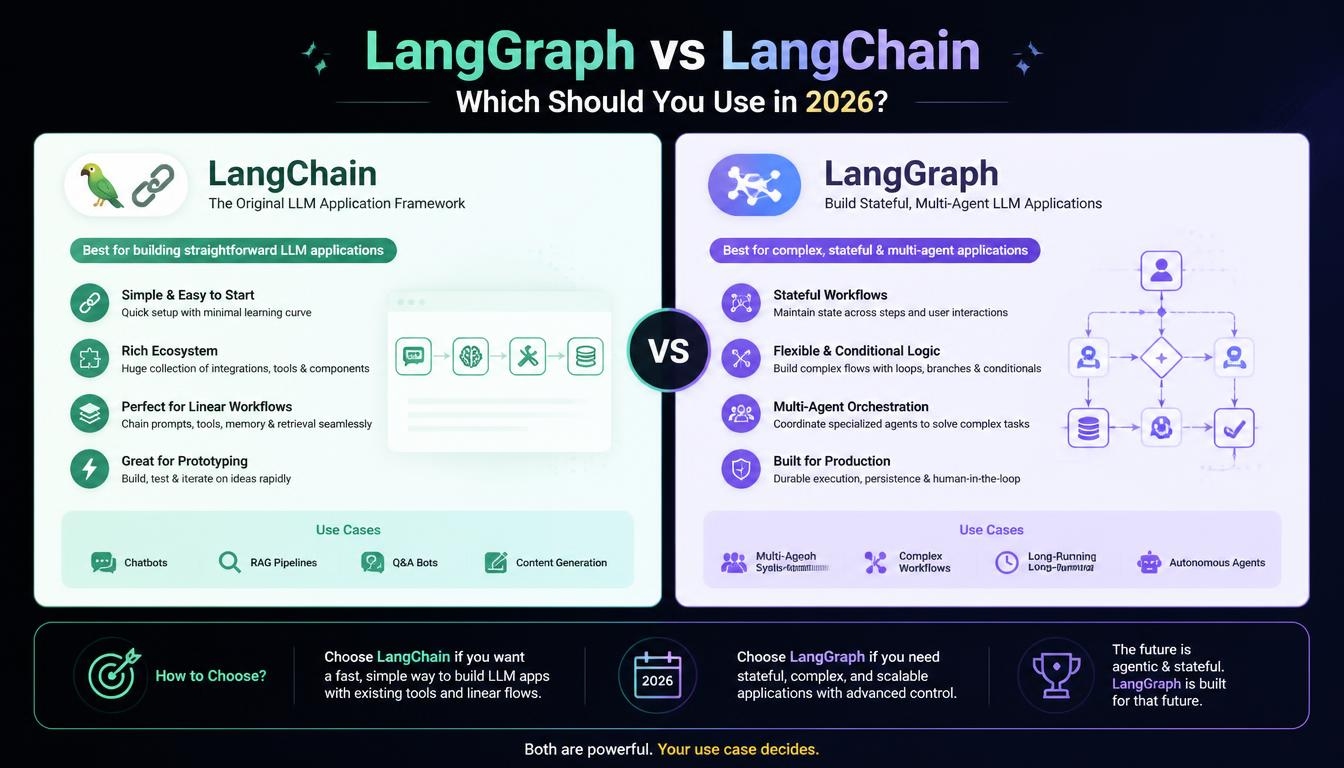
LangGraph vs LangChain is one of the most common questions in AI agent development, but it starts from a false premise. Both are open-source frameworks from LangChain Inc., and together they exceed 90 million monthly downloads, powering production agents at companies such as Uber, Klarna and LinkedIn. LangChain is the component layer that connects large language models to tools and data. LangGraph is the stateful orchestration runtime beneath it, built for agents that loop, branch, remember and pause for human approval.
This guide explains what each framework does, how they fit together, and what has changed heading into 2026. It compares architecture, state management, human-in-the-loop control, multi-agent support, performance and pricing, with a side-by-side code example. It then gives you a practical decision path, real production results and a clear verdict on which one to use.
LangGraph vs LangChain: The Quick Answer
The short version of LangGraph vs LangChain:
- Use LangChain for linear pipelines such as RAG, document Q&A, structured extraction and single-turn assistants.
- Add LangGraph when your agent needs cycles, retries, durable execution, multi-agent coordination or an approval step.
- Use both in most real products, since LangChain’s create_agent already runs on the LangGraph runtime.
- Skip both when you only need one or two model calls, because a direct provider SDK is simpler.
Comparison Table at a Glance
| Dimension | LangChain | LangGraph |
| What it is | High-level agent framework | Low-level orchestration framework and runtime |
| Primary job | Ship an agent fast | Control complex, long-running agents |
| Mental model | Linear chains (LCEL pipes) | Nodes, edges and shared state |
| Control flow | Standard model-to-tools loop | Graphs with cycles and conditional routing |
| State persistence | None by default | Built-in checkpointers (SQLite, Postgres, Redis) |
| Human-in-the-loop | Middleware | Native interrupts and resume |
| Multi-agent | Limited | Supervisor, swarm and hierarchical patterns |
| Streaming | Token streaming | Token, state and event streaming per node |
| Learning curve | Gentle | Steeper |
| License | MIT | MIT |
Use-Case Decision Matrix
Use this matrix to settle LangGraph vs LangChain for your own project:
| Situation | Best Choice |
| RAG pipeline, retrieval chain, document Q&A | LangChain |
| Tool-calling agent with 1–2 tools, linear execution | LangChain |
| Prototype or proof of concept | LangChain |
| Agent that branches on tool results | LangGraph |
| Human approval step mid-run | LangGraph |
| State that must survive restarts or span sessions | LangGraph |
| Parallel sub-tasks or multiple specialized agents | LangGraph |
| Strict latency budget with full control over error handling | Custom loop or direct SDK |
What Changed in 2026: Why the Answer Is Different Now
If you read a comparison from 2024, the LangGraph vs LangChain answer you got is now outdated. The changes that began with the October 2025 1.0 releases have reshaped the stack through 2026. LangChain’s new create_agent was built on the LangGraph runtime. The older AgentExecutor was deprecated, and legacy chains moved to a separate langchain-classic package.
In practice, every new LangChain agent is now a LangGraph agent underneath. The choice is no longer between two competing agent systems. It is about how much of the graph you want to control yourself. LangChain also committed to API stability across the 1.x line, ending years of v0.x churn. The managed hosting once called LangGraph Platform now lives inside LangSmith Deployment, which moved to resource-based pricing in July 2026.
What Is LangChain?
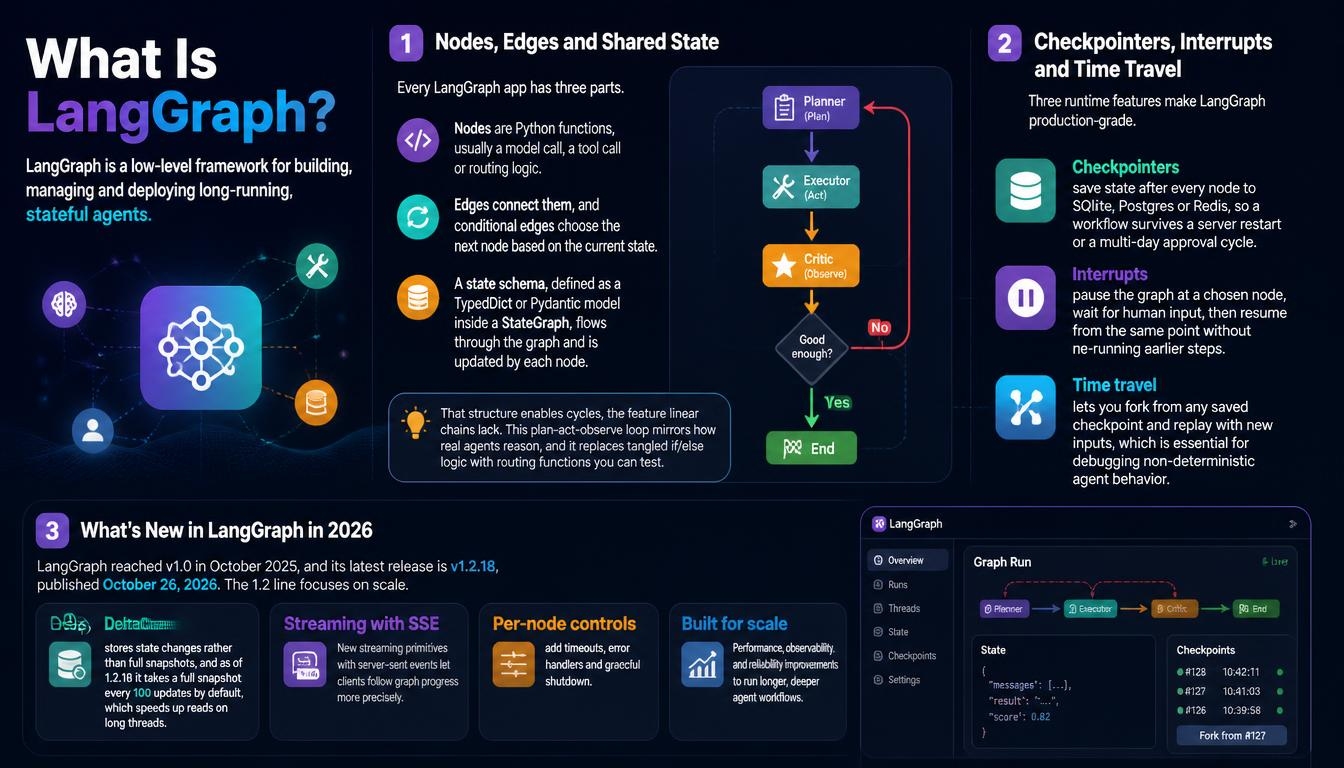
LangChain is a composability framework that connects language models with external tools, APIs and data sources. Harrison Chase launched it in 2022, and it quickly became the standard way to make models retrieve documents and call tools instead of answering single prompts. Its workflows are called chains: each step’s output feeds the next step’s input, so a chatbot can retrieve, summarize and answer in one pass.
LCEL, Runnables and Core Components
LangChain’s core syntax is LCEL (LangChain Expression Language), which composes steps with the pipe operator: prompt | model | parser. Every component implements the Runnable interface. Any chain therefore supports .invoke(), .stream() and .batch(), runs asynchronously, and is traceable in LangSmith without extra code.
The building blocks cover the routine parts of every LLM app. Prompt templates handle variable injection and chat history. Model wrappers such as ChatOpenAI and ChatAnthropic standardize providers, and retrievers wrap vector stores. Output parsers turn responses into Pydantic models or JSON, and tool decorators expose Python functions to the model.
create_agent and Middleware in LangChain 1.0
LangChain 1.0 shipped on October 22, 2025. Its headline feature, create_agent, builds a working ReAct-style agent in a few lines on top of the LangGraph runtime. Middleware lets you customize that loop with approval checkpoints, conversation summarization or PII redaction, without dropping into a graph. LangChain continues to ship regular releases on the 1.x line.
Integration Ecosystem
LangChain’s biggest practical advantage is its library of more than 1,000 integrations. It wraps all the major model providers, including OpenAI, Anthropic, Google Gemini, Mistral, Cohere, Amazon Bedrock and Google Vertex AI. It also connects to vector databases such as Pinecone, Weaviate, Qdrant, pgvector, Chroma, Milvus and FAISS. Document loaders pull from PDFs, websites, Notion, Confluence, Google Drive and S3. This breadth gives teams provider freedom, because switching models rarely means rewriting the application.
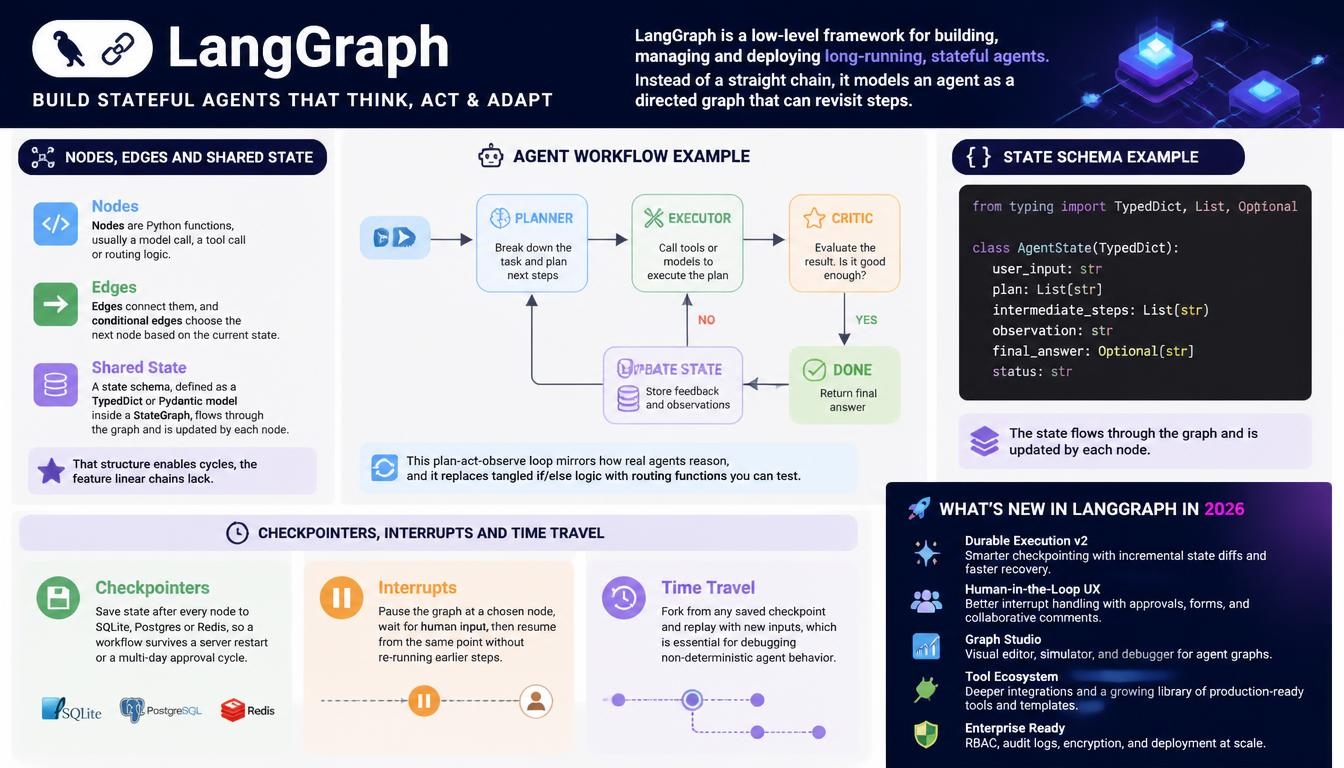
LangGraph is a low-level framework for building, managing and deploying long-running, stateful agents. Instead of a straight chain, it models an agent as a directed graph that can revisit steps.
Nodes, Edges and Shared State
Every LangGraph app has three parts. Nodes are Python functions, usually a model call, a tool call or routing logic. Edges connect them, and conditional edges choose the next node based on the current state. A state schema, defined as a TypedDict or Pydantic model inside a StateGraph, flows through the graph and is updated by each node.
That structure enables cycles, the feature linear chains lack. A planner node hands work to an executor, a critic checks the result, and control returns to the planner if the answer falls short. This plan-act-observe loop mirrors how real agents reason, and it replaces tangled if/else logic with routing functions you can test.
Checkpointers, Interrupts and Time Travel
Three runtime features make LangGraph production-grade. Checkpointers save state after every node to SQLite, Postgres or Redis, so a workflow survives a server restart or a multi-day approval cycle. Interrupts pause the graph at a chosen node, wait for human input, then resume from the same point without re-running earlier steps. Time travel lets you fork from any saved checkpoint and replay with new inputs, which is essential for debugging non-deterministic agent behavior.
What’s New in LangGraph in 2026
LangGraph reached v1.0 in October 2025, and its latest release is v1.2.18, published October 26, 2026. The 1.2 line focuses on scale. DeltaChannel stores state changes rather than full snapshots, and as of 1.2.18 it takes a full snapshot every 100 updates by default, which speeds up reads on long threads. New streaming primitives with server-sent events let clients follow graph progress more precisely. Per-node controls add timeouts, error handlers and graceful shutdown.
How LangChain and LangGraph Work Together
Same Company, Different Layers
The most important fact in LangGraph vs LangChain is that they are layers of one stack, not rivals. LangGraph was created after LangChain because linear chains could not handle agents that loop, hold state and wait for people. It is not a fork or a replacement. LangChain abstracts components such as models, retrievers, parsers and tools. LangGraph abstracts execution: what runs next, with which state, under which conditions.
That is why most LangGraph nodes still import LangChain pieces. A node that calls a model typically uses a LangChain model wrapper, and a retrieval node uses a LangChain retriever. Teams usually start with LangChain’s high-level APIs and drop into LangGraph only where they need tighter control, with no rewrite required.
Where LangSmith Fits: Observability and Deployment
Three related names often show up in the same search:
| Tool | Layer | Role |
| LangSmith | Observability | Tracing, debugging and evaluation |
| LangSmith Deployment (formerly LangGraph Platform) | Deployment | Managed hosting for LangGraph agents |
| LangFlow | Visual builder | Drag-and-drop flow builder, created by Logspace |
The simplest way to separate them: LangGraph is what runs, and LangSmith is what you see. With tracing enabled, every model call, tool call and node appears in a run tree with token usage and latency. LangGraph traces go further, showing the graph path taken, the state change at each node, and where interrupts paused execution. LangSmith also runs evaluations on datasets, using LLM-as-judge, custom code or human feedback, and can score live production traffic continuously.
Key Differences: LangGraph vs LangChain
Architecture and Control Flow
LangChain executes a directed acyclic graph: steps run in a fixed order from input to output, which suits Q&A bots and retrieval pipelines. LangGraph adds cyclic graphs with centralized state, so an agent can retry, branch and loop until a condition is met. This is the core of LangGraph vs LangChain. A chain follows a predetermined path, while a graph decides its next step from what just happened.
State Management and Memory
A LangChain chain passes data along but does not persist it between requests. Once you need conditional behavior across steps, the logic tends to spill into custom code outside the framework, and that code becomes harder to test than the chain itself. LangGraph makes state explicit and durable: every field is typed, every update is checkpointed, and you can inspect exactly what the agent knew at any step.
Human-in-the-Loop Support
LangChain supports approvals through middleware, but complex review flows usually need extra infrastructure such as polling loops and signals. LangGraph treats human review as a native feature. You compile the graph with a checkpointer, mark a node with interrupt_before, let a person approve or edit the proposed action, and resume with invoke(None). This matters most for high-stakes actions such as sending payments, emailing customers or approving loans.
Multi-Agent Support
Coordinating several LangChain agents historically meant wiring them together by hand and sharing state manually. LangGraph provides documented multi-agent patterns. A supervisor routes tasks to specialist agents, a swarm lets agents hand off to each other dynamically, and hierarchical graphs nest teams inside teams. A drug-discovery workflow, for example, could combine separate agents for molecular biology, pharmacology and toxicology.
Code Comparison: Chain vs Graph
The clearest way to see LangGraph vs LangChain is in code. A LangChain chain is a single pipeline that runs once from start to finish:
python
from langchain_core.prompts import ChatPromptTemplate
from langchain_core.output_parsers import StrOutputParser
from langchain_openai import ChatOpenAI
prompt = ChatPromptTemplate.from_template(“Summarize this text: {text}”)
chain = prompt | ChatOpenAI(model=”gpt-4o”) | StrOutputParser()
summary = chain.invoke({“text”: “…”})
A LangGraph agent defines state, nodes and a conditional edge that can loop back. Here a draft is rewritten until it passes review or hits three revisions:
python
from typing import TypedDict
from langgraph.graph import StateGraph, START, END
class State(TypedDict):
draft: str
approved: bool
revisions: int
def write(state: State) -> dict:
# call your model here to produce or improve the draft
return {“draft”: “…”, “revisions”: state[“revisions”] + 1}
def review(state: State) -> dict:
# call a reviewer model or rule check here
return {“approved”: False}
def route(state: State) -> str:
return END if state[“approved”] or state[“revisions”] >= 3 else “write”
graph = StateGraph(State)
graph.add_node(“write”, write)
graph.add_node(“review”, review)
graph.add_edge(START, “write”)
graph.add_edge(“write”, “review”)
graph.add_conditional_edges(“review”, route)
app = graph.compile()
result = app.invoke({“draft”: “”, “approved”: False, “revisions”: 0})
The chain is shorter and easier to read. The graph is longer, but it can loop, enforce a step limit, and later add a checkpointer or approval gate without restructuring.
Learning Curve
| Factor | LangChain | LangGraph |
| Concepts | Many small ones: prompt templates, Runnables, retrievers, parsers, tools | Fewer: StateGraph, nodes, edges, checkpointers, interrupts |
| Main challenge | Breadth of the API | Thinking in graphs: state shape, routing, loop exits |
| Ramp-up | A working agent comes together quickly | Quick for engineers with state machine experience, slower for those used only to request-response code |
Performance and Latency
Independent agent-framework benchmarks show no clear speed winner, and results vary by task. On simple linear tasks, LangChain’s lightweight state handling adds almost no overhead. On a complex multi-step task in one independent benchmark, LangGraph finished with a median of 70 seconds using 9,150 prompt tokens, while LangChain took 86 seconds using 10,070. In real agents, model calls and token usage dominate latency, so how you design the workflow matters far more than which framework runs it.
When to Use LangChain vs LangGraph
When LangChain Alone Is Enough
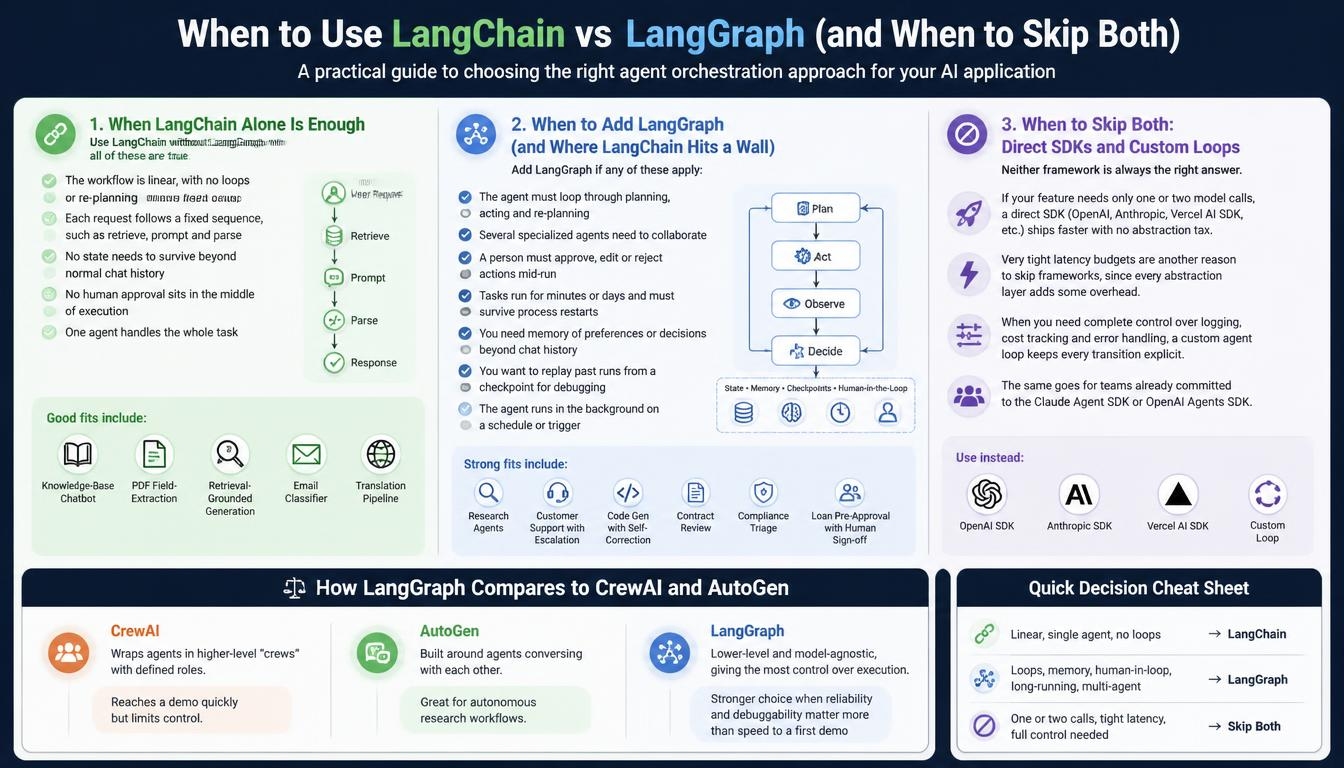
Pick LangChain without LangGraph when all of these are true:
- The workflow is linear, with no loops or re-planning
- Each request follows a fixed sequence, such as retrieve, prompt and parse
- No state needs to survive beyond normal chat history
- No human approval sits in the middle of execution
- One agent handles the whole task
Good fits include a knowledge-base chatbot, a PDF field-extraction service, retrieval-grounded content generation, an email classifier and a translation pipeline with terminology grounding.
When to Add LangGraph (and Where LangChain Hits a Wall)
LangChain’s high-level abstraction starts to fight you when logic becomes cyclic, must survive restarts, or needs structured error recovery. A tool failure at step 7 of 10 might need a retry with backoff, a different route, or a clean stop. Add LangGraph if any of these apply:
- The agent must loop through planning, acting and re-planning
- Several specialized agents need to collaborate
- A person must approve, edit or reject actions mid-run
- Tasks run for minutes or days and must survive process restarts
- You need memory of preferences or decisions beyond chat history
- You want to replay past runs from a checkpoint for debugging
- The agent runs in the background on a schedule or trigger
Strong fits include research agents, customer support with escalation paths, code generation with self-correction, contract review, compliance triage, and loan pre-approval workflows that wait for a compliance officer’s sign-off.
When to Skip Both: Direct SDKs and Custom Loops
Neither framework is always the right answer. If your feature needs only one or two model calls, a direct SDK such as the OpenAI SDK, Anthropic SDK or Vercel AI SDK ships faster with no abstraction tax. Very tight latency budgets are another reason to skip frameworks, since every abstraction layer adds some overhead on top of the model call. When you need complete control over logging, cost tracking and error handling, a custom agent loop keeps every transition explicit. The same goes for teams already committed to the Claude Agent SDK or OpenAI Agents SDK.
How LangGraph Compares to CrewAI and AutoGen
CrewAI wraps agents in higher-level “crews” with defined roles, which reaches a demo quickly but limits control. AutoGen is built around agents conversing with each other, which suits autonomous research workflows. LangGraph is lower-level and model-agnostic, giving the most control over execution. That makes it the stronger choice when reliability and debuggability matter more than speed to a first demo.
How to Choose: LangGraph vs LangChain
The right choice depends less on the framework and more on where your project is in its lifecycle. At the prototype stage, LangChain gets you to a working demo fastest. create_agent and the integration library cover most early experiments, and you avoid designing state schemas before you know what the agent needs.
As a project moves toward production, watch for the signals that it has outgrown linear chains. These include custom code accumulating around the chain, a request for human approval, or failures that need structured recovery. That is the point to move those specific workflows into LangGraph while simpler chains stay as they are. Because LangChain agents already run on LangGraph, this step is incremental rather than a rebuild.
For enterprise and regulated workloads, plan for LangGraph and LangSmith from the start. Durable state, approval gates, traces and evaluation datasets are what make an agent auditable. Remember that the framework covers the build, while production governance also needs approval workflows and an audit trail around it.
Many developers who have shipped both frameworks give similar advice: prototype in LangChain, then move the parts that matter to LangGraph once real state or branching appears. The common frustration is rarely having picked the wrong framework. It is lacking visibility into what the agent does once it is live, which is why observability belongs in the plan from day one.
LangGraph vs LangChain Pricing in 2026
Open-Source Framework Costs
On cost, LangGraph vs LangChain is a tie. Both frameworks are MIT-licensed and free to use, build on and self-host, with no licensing fees. You pay only for optional platform services and, of course, your model provider.
LangSmith and LangSmith Deployment Plans
The managed hosting formerly sold as LangGraph Platform is now LangSmith Deployment, billed by the resources an agent uses. Current plans:
| Plan | Price | Includes |
| Developer | $0/seat/month | 5,000 base traces/month, no deployment |
| Plus | $39/seat/month | 10,000 base traces/month, 1 free Serverless (Small) deployment |
| Enterprise | Custom | Custom limits, with cloud, hybrid or self-hosted options |
Additional deployments are billed by the resources they use. Runtime compute costs 0.0675 LSU per vCPU-hour and runtime memory 0.009 LSU per GiB-hour. Database compute costs 0.177 LSU per vCPU-hour and database memory 0.025 LSU per GiB-hour. One LSU (LangChain Standard Unit) equals $1.00. LangSmith moved to this resource-based model on July 21, 2026, and existing customers kept their previous pricing until October 1, 2026. For most teams, LLM API costs and cloud infrastructure far outweigh these platform fees.
LangGraph in Production: Results, Patterns and Pitfalls
Real Results: Rexera, AppFolio and Klarna
Production numbers are where the LangGraph vs LangChain debate becomes concrete. According to LangChain’s published customer case studies, teams running LangGraph in production report measurable gains:
| Company | Result |
| Rexera (real estate quality control) | Single-prompt LLM checks produced 35% false positives and 10% false negatives. CrewAI cut these to 8% and 5%. LangGraph brought both down to 2% |
| AppFolio Realm-X | Started on LangChain and moved to LangGraph as requirements grew. Early users report saving more than 10 hours per week, and dynamic few-shot prompting lifted text-to-data performance from about 40% to about 80% |
| Klarna | Its AI assistant, built on LangGraph and LangSmith, serves 85 million active users, cut average query resolution time by 80%, and does work equivalent to 700 full-time staff |
A common thread across these results is precise control over decision paths, which a single prompt or a linear chain cannot easily provide.
Three Proven Production Patterns
The first pattern is a research agent with a step limit. A counter in state, such as sources_checked, and a routing function cap how many sources the agent searches. When sessions keep hitting the cap, it usually means the question is too broad or the search tool returns weak results.
The second is parallel branches. LangGraph’s Send API fans a task out to concurrent nodes, for example separate financial, technical and market analysts, and merges their findings. This suits competitive analysis and due diligence, but branches that write to the same state keys need explicit merge functions.
The third is an approval gate before high-impact actions. Marking a node such as send_email_node with interrupt_before, backed by a Postgres checkpointer like AsyncPostgresSaver, pauses the agent until a reviewer approves the draft, then resumes it.
Common Pitfalls to Avoid
LangGraph’s state inspection via app.get_state() is not a full debugger, so add explicit logging inside every node. Keep state values as plain Python types, because complex objects such as NumPy arrays can break serialization and cause silent failures when resuming from a checkpoint. Use Postgres rather than the in-memory MemorySaver in production. Combine node-level unit tests with a few full-graph integration tests. Design every graph with idempotency and retry behavior in mind. Most production issues come from graphs built without those safeguards, not from bugs in the framework.
Migrating from LangChain to LangGraph
Migration is worth it only when a concrete need appears, such as retries, approvals, long-lived context or persistent sessions. If an existing LangChain agent works and ships on time, leave it. When you do migrate, move the workflows that need those features first and keep simple chains unchanged. Design the state schema before writing node code, since getting the state shape right early saves the most rework.
FAQs
Does LangGraph replace LangChain?
No. In LangGraph vs LangChain, the two are complementary layers from LangChain Inc. LangGraph handles orchestration, while LangChain still supplies the models, retrievers, parsers and integrations. Only the legacy AgentExecutor was deprecated in favor of LangGraph.
Do I need to learn LangChain before LangGraph?
No, there is no hard prerequisite, and LangGraph works on its own. Knowing LangChain’s component model still helps, because LangGraph nodes often wrap LangChain model calls, retrievers and tools.
Is LangChain still relevant in 2026?
Yes. LangChain 1.0 brought a stable API, and its create_agent runs on the LangGraph runtime. It remains the component layer most teams build with.
Is LangGraph production-ready?
Yes. LangGraph has been stable since v1.0 in October 2025 and powers agents at companies such as Klarna. Use a Postgres checkpointer in production and confirm that your state serializes cleanly.
Are LangChain and LangGraph free to use?
Yes. Both are open source under the MIT license. LangSmith Plus ($39 per seat per month) and LangSmith Deployment are optional paid services.
Does LangGraph work outside Python?
Yes. The @langchain/langgraph package provides a TypeScript version with most of the same capabilities, although the Python version usually receives new features first.
Are there vendor lock-in risks with either framework?
The risk is low. Both frameworks are open source and model-agnostic, so you keep control over your models, infrastructure and deployment choices.
Read More: https://linkneon.com/enjoyhq-vs-aurelius/
Final Verdict: Which Should You Use in 2026?
The real answer to LangGraph vs LangChain is not “one or the other” but which layer your use case needs. Choose LangChain for linear pipelines, RAG and fast prototyping on proven patterns. Choose LangGraph when your agent needs durable state, loops, multiple agents or human checkpoints. For most production systems, use both together, with LangSmith providing observability, and reach for a direct SDK only when a framework adds more weight than value.
The teams seeing the strongest results do not pick one framework forever. They start simple, prove value, and adopt LangGraph as complexity and business risk grow.