

Finding the right WordPress themes for artists is harder than it sounds. Most general-purpose themes are built for blogs or business sites, and when you drop a painting, a photo series, or an illustration portfolio into them, something always looks off: the grid crops your images wrong, the gallery loads slowly, or the whole site just feels generic. A theme made for artists should do the opposite, getting out of the way and letting the work speak.
This article covers the 10 best WordPress themes for artists in 2026, split between premium and free options, plus a buyer’s checklist so you’re not just picking based on screenshots. If you’re a painter, illustrator, photographer, or musician trying to build a portfolio site that actually shows your work well, this should get you most of the way there.
Key Takeaways
- Not every “artist” theme is niche-built. Many are multipurpose themes with generic portfolio layouts, so check the maker’s own product page before assuming a specialized fit [Source: ThemeTrust, GraceThemes].
- Free tiers of Astra, Neve, and OceanWP are genuinely usable for a simple artist portfolio, and all include confirmed WooCommerce support [Source: WordPress.org, Themeisle, OceanWP.org].
- Heavy multipurpose themes, like Divi, can load more CSS and JavaScript than lightweight alternatives, which affects both speed and SEO [Source: PluginTheme.net].
- If you’re representing an institution, a gallery or museum, rather than a personal portfolio, a purpose-built theme like Carnival by GraceThemes fits better than a general artist theme [Source: GraceThemes].
- Compress images before upload. High-resolution art files are usually the single biggest factor slowing down a portfolio site.
What to Look for in a WordPress Theme for Artists
Before picking from any list, it helps to know what actually matters in WordPress themes for artists, because a lot of “artist” themes are really just multipurpose portfolio themes with different marketing copy stapled on. Strip away the demo screenshots and many of them share the same underlying builder (Elementor or WPBakery), the same Google Fonts library, and nearly identical feature lists.
That’s not necessarily bad; it just means the actual differentiators are narrower than the marketing suggests. Here’s what genuinely separates one WordPress theme for artists from another.
Portfolio & Gallery Layouts
The core job of any WordPress theme for artists is displaying images well. Look for:
- Masonry, grid, and list layout options (not just one fixed style)
- Lightbox support for full-screen viewing
- Filterable categories, so visitors can browse by medium or series
- Support for high-resolution images without crushing load speed
- Dedicated portfolio item pages, so each piece can have its own description, medium, and dimensions
Speed and SEO
This is the part most listicles skip. Many premium WordPress themes for artists are built on heavy multipurpose frameworks that include page builders, sliders, and animation libraries you’ll never use. That extra code slows the site down, and slower sites tend to rank worse and lose visitors, especially on mobile.
Independent testing of one popular multipurpose theme found it “generates more CSS and JavaScript than lightweight themes, resulting in larger page sizes,” though built-in performance features can mitigate the impact without eliminating it entirely [Source: PluginTheme.net]. A lighter theme with a dedicated portfolio module usually beats a bloated all-in-one theme, even if the all-in-one theme has more demo options.
Typography and Visual Restraint
Most WordPress themes for artists bundle access to Google Fonts, giving you hundreds of typefaces to choose from. That’s useful, but restraint matters more than selection here: a portfolio site should never compete visually with the artwork it’s displaying. When testing a theme’s demo, check whether the default typography and spacing feel calm enough to let images lead, or whether the layout itself is trying too hard.
Selling Art Online (WooCommerce)
If you want to sell prints, originals, or digital downloads, check that the theme is compatible with WooCommerce, the most widely used WordPress e-commerce plugin.
Most modern portfolio themes support it, but older or free themes sometimes don’t. Confirm this on the theme’s own current page before buying, since compatibility claims in older reviews can go stale as plugins update.
10 Best Premium WordPress Themes for Artists

Every theme below is sourced from its own official product page or documentation, cross-checked against at least one independent review where available. Where a competitor listicle’s framing didn’t match what the theme’s own maker describes, that’s noted rather than repeated.
1. Sydney
Sydney offers 30+ starter sites, including templates built specifically for artists and photographers [Source: WPBeginner]. It’s fully responsive, integrates with WooCommerce, and has a free version listed on WordPress.org [Source: WordPress.org].
2. Divi
Divi, from Elegant Themes, is a multipurpose theme and visual page builder in one, with 46+ content modules and inline text editing [Source: Elegant Themes, PluginTheme.net]. Pricing: Elegant Themes offers Yearly Access at $89/year or Lifetime Access at $249 one-time, both including the Divi theme, builder, and several companion plugins [Source: Elegant Themes]. Independent review testing found Divi “generates more CSS and JavaScript than lightweight themes,” so it’s worth checking site speed after setup [Source: PluginTheme.net].
3. Astra
Astra has over 1 million active installations and more than 6,000 five-star reviews on WordPress.org [Source: WordPress.org]. It’s lightweight and compatible with Elementor and other page builders. Pricing is tiered: the basic Astra Pro add-on runs roughly $47 to $69 per year depending on vendor and promotion, while the Essential and Business Toolkit bundles run higher, up to around $119 to $159 per year [Source: PluginTheme.net, EasyMCPAI]. The free version on WordPress.org is usable on its own.
4. Neve
Neve, from Themeisle, works with Gutenberg and popular page builders including Elementor, Beaver Builder, and Divi [Source: Themeisle]. It’s WooCommerce-ready out of the box, with a WooCommerce Booster add-on for product quick-view, sticky add-to-cart, and checkout customization [Source: Themeisle]. Pro pricing runs roughly $69 per year for the Personal plan up to $149 to $259 per year for Business and Agency tiers [Source: Ecommerce Paradise]. The free version alone covers most portfolio needs.
5. Indigo
Indigo, from Artisan Themes, is a module-based theme: you build pages by stacking pre-designed content blocks (sliders, portfolios, pricing tables, testimonials) without needing a separate page builder plugin [Source: ArtisanThemes.io]. It includes several customizable portfolio layouts and one-click demo site imports [Source: ArtisanThemes.io, CyberCashWorldwide].
6. Uncode
Uncode, from Undsgn, is a best-selling ThemeForest theme with over 137,000 sales, offering 20+ homepage layouts, dedicated portfolio templates, and WCAG 2.2 accessibility features built in [Source: ThemeForest/Undsgn]. It’s WooCommerce compatible and priced at $59 as a one-time purchase [Source: ThemeForest].
7. Bramble
Bramble is a multipurpose WordPress theme from ThemeTrust with 9 pre-built homepage layouts, a built-in drag-and-drop page builder (via SiteOrigin), and WooCommerce compatibility [Source: ThemeTrust]. It includes portfolio layouts with hover effects, lightbox, and filtering animations, which make it usable for gallery or creative-showcase sites, though it’s worth noting ThemeTrust markets it as a general business/portfolio theme rather than one built exclusively for art galleries or museums [Source: ThemeTrust, Frip.in]. It’s a one-time purchase at $58, including one year of support and updates.
8. OceanWP
OceanWP is a free, lightweight multipurpose theme with over 700,000 active installations, built-in WooCommerce support (quick view, mini cart, enhanced checkout), and compatibility with Elementor and other major page builders [Source: OceanWP.org, PluginTheme.net]. Premium extensions start at $35 per year for a single site, with the Core bundle (200+ templates) running around $47 per year [Source: PluginTheme.net].
9. Ultra (Themify Ultra)
Ultra, by Themify, includes its own built-in drag-and-drop Builder, an optional portfolio post type, and native WooCommerce integration matched to the theme’s overall styling [Source: Themify.me, WPMayor]. A single-theme license runs around $49, including one year of support and updates [Source: KasaReviews].
10. Lense
Lense is a minimalist theme designed for artists and photographers, with a two-column layout: navigation on one side, galleries and sliders on the other [Source: WPBeginner]. It has built-in e-commerce support and minimal setup requirements.
Bonus Pick: Carnival by GraceThemes (For Galleries & Museums)
If your site represents an institution rather than a single artist, Carnival by GraceThemes is worth a separate look. It’s built specifically for art galleries and museums, uses the WordPress block editor (Full Site Editing) instead of a third-party page builder, and includes CTA buttons suited to ticket bookings or membership sign-ups, along with WooCommerce compatibility for online ticket or merchandise sales [Source: GraceThemes]. It’s priced as a one-time $29 purchase [Source: GraceThemes].
Carnival isn’t the right fit for an individual artist’s personal portfolio; it’s built around institutional needs like bookings and multi-artist exhibits. For a personal portfolio, Sydney, Lense, or Indigo (above) remain better starting points.
Best Free WordPress Themes for Artists
If the budget is tight, several free options can still deliver a professional-looking site, with the tradeoff of less support and fewer built-in features than the premium WordPress themes for artists listed above.
- Avik — A free theme for artists, photographers, and creative agencies with a fullscreen image background designed to showcase your top work immediately [Source: WPBeginner].
- Euphony — Built specifically for artists, musicians, and visual content producers, with a sticky playlist and content slider useful for music-adjacent creative sites [Source: WPBeginner].
- Artist Portfolio — A free theme suited to artists, designers, and illustrators, using featured images to build a grid carousel on the homepage [Source: WPBeginner].
- ePortfolio — A minimalist, SEO-ready free template aimed at personal and creative portfolios [Source: Envato].
- Astra (free tier) — Confirmed free listing on WordPress.org with 1M+ active installs; works with Elementor and the native block editor [Source: WordPress.org].
- Neve (free tier) — Confirmed free listing from Themeisle; WooCommerce-ready without upgrading [Source: Themeisle].
- OceanWP (free tier) — Confirmed free listing with 700,000+ installs and built-in WooCommerce support [Source: OceanWP.org].
Free WordPress themes for artists are a reasonable starting point if you’re testing whether WordPress suits your workflow before investing in a paid theme. Just know that free themes typically come with limited customer support and fewer layout options than their premium counterparts.
Themes by Artist Type
Different creative fields lean toward different theme features, and picking a WordPress theme for artists without considering your specific medium usually means paying for features you won’t use. Here’s a quick reference:
| Artist Type | Priority Features | Example Themes |
| Photographers | Fullscreen sliders, lightbox, proofing galleries | Sydney, Uncode, Lense |
| Illustrators/Designers | Masonry grids, category filtering | Indigo, Artist Portfolio |
| Musicians/Bands | Audio players, event listings | Euphony |
| Art Galleries/Museums | Elegant layouts, ticketing/CTA support | Carnival (GraceThemes); Bramble also works but isn’t gallery-exclusive |
| Multi-artist collectives | Team/roster pages, flexible categorization | Bramble, Uncode |
| Mixed-media/experimental | Heavy customization, custom post types | Divi, Ultra |
This isn’t a strict rule. Most multipurpose WordPress themes for artists can be adapted across categories with the right plugins.
How to Set Up Your Artist Website on WordPress
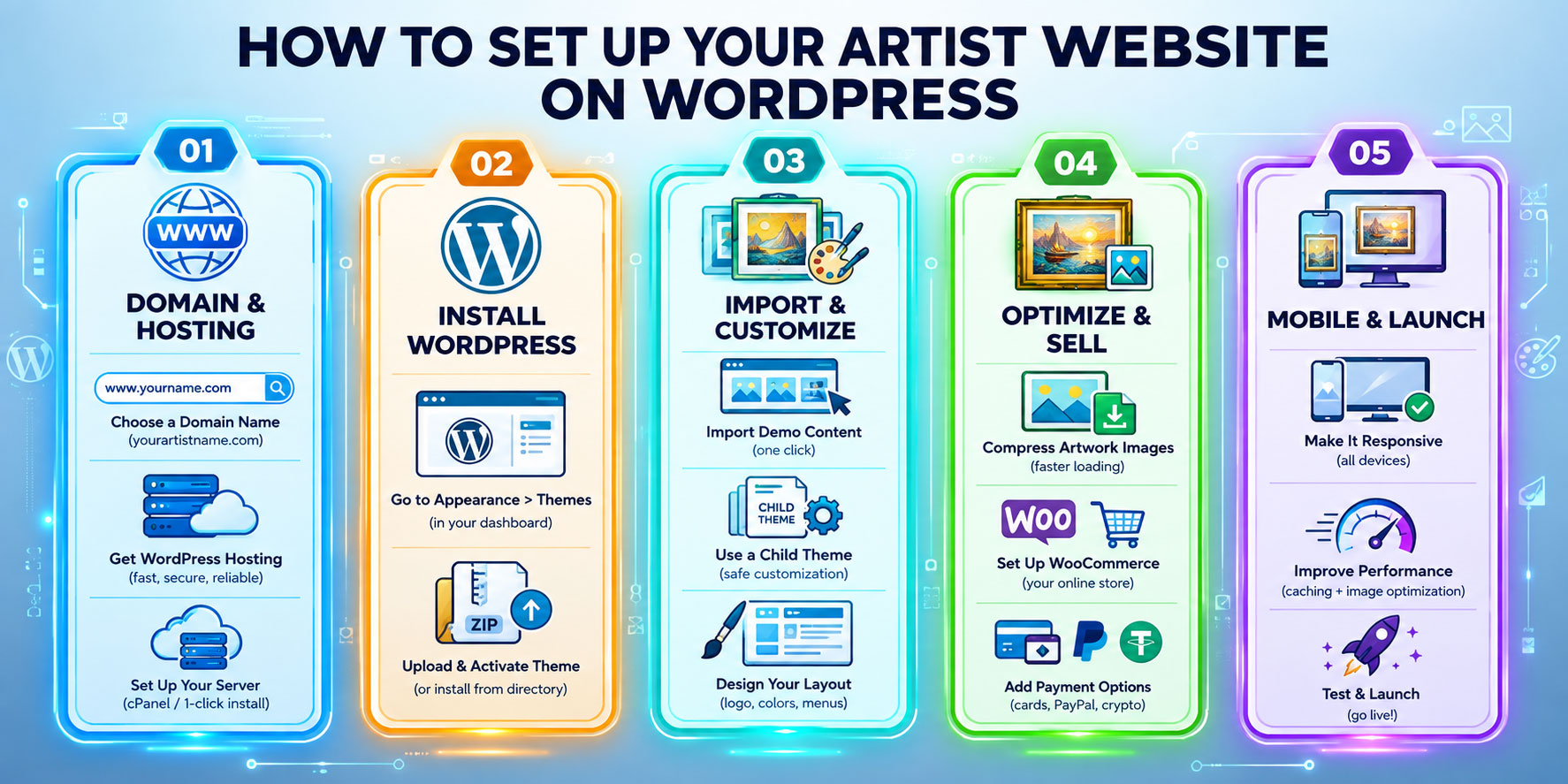
Once you’ve picked from the WordPress themes for artists above, setup follows a fairly standard path:
- Get hosting and a domain. Any WordPress-recommended host will work for a portfolio site; you don’t need premium hosting to start.
- Install WordPress, then go to Appearance > Themes and install your chosen theme directly, or upload it as a ZIP file if it’s premium.
- Import demo content if the theme offers it. This gives you a working layout to edit instead of starting from a blank page.
- Create a child theme before making custom code changes, so your edits survive future theme updates.
- Optimize your images before uploading. High-resolution art files can be several megabytes each; compress them so your gallery pages load quickly.
- Set up WooCommerce, if selling art, and connect a payment processor before going live.
- Test on mobile before launch. A large share of portfolio traffic comes from phones, and even well-reviewed WordPress themes for artists can render galleries differently on smaller screens.
Frequently Asked Questions
What is the best free WordPress theme for artists?
There’s no single “best.” Avik and Artist Portfolio are built specifically around visual showcases [Source: WPBeginner], while Astra, Neve, and OceanWP are general-purpose free themes with confirmed free tiers and strong WooCommerce support if you want to sell work later [Source: WordPress.org, Themeisle, OceanWP.org].
Do I need a page builder to use an artist WordPress theme?
Not always. Astra and Neve’s free versions work fine with the native WordPress block editor [Source: WordPress.org, Themeisle]. Divi, Uncode, and Bramble are built around their own page builders and lose most of their flexibility without them [Source: Elegant Themes, ThemeForest, ThemeTrust].
Can I sell my artwork directly through a WordPress theme?
Yes, if the theme supports WooCommerce. Confirmed WooCommerce compatibility includes Sydney, Neve, OceanWP, Uncode, and Bramble [Source: respective official pages]. You’ll still need to install WooCommerce separately and connect a payment gateway like Stripe or PayPal.
Will a heavy portfolio theme slow down my site?
It can. Independent testing of Divi confirmed it generates more CSS and JavaScript than lightweight alternatives [Source: PluginTheme.net]. If site speed matters, test the theme’s demo with a speed tool before committing.
What’s the difference between a portfolio theme and a multipurpose theme?
A portfolio theme is built around displaying creative work specifically. A multipurpose theme (Divi, Astra, OceanWP, Bramble) can be configured for a portfolio but is designed for blogs, business sites, and stores too. The tradeoff is flexibility versus setup simplicity.
Do WordPress artist themes work for musicians and photographers too?
Yes. Neve and Sydney explicitly support artists and photographers [Source: WPBeginner, Themeisle]. Euphony is built specifically with musicians in mind [Source: WPBeginner].
How much should I expect to pay for a premium art portfolio theme?
Pricing varies by license type. One-time ThemeForest purchases: Uncode $59 [Source: ThemeForest], Bramble $58 [Source: ThemeTrust], Carnival $29 [Source: GraceThemes], Ultra around $49 [Source: KasaReviews]. Subscriptions: Divi $89 per year or $249 lifetime [Source: Elegant Themes], Neve Pro from $69 per year [Source: Ecommerce Paradise], Astra Pro from $47 per year up to $159 per year for bundles [Source: PluginTheme.net], OceanWP from $35 per year [Source: PluginTheme.net]. Always check the vendor’s current pricing page before buying.
Read More: https://linkneon.com/magbook-wordpress-theme-review/
Conclusion
The right choice among these WordPress themes for artists comes down to two questions: how much customization do you actually need, and how much are you willing to trade site speed for design flexibility?
If you want something fast, free, and WooCommerce-ready, Astra, Neve, or OceanWP’s free tiers are all confirmed solid starting points. If you need deep customization for a gallery, agency, or e-commerce-heavy site, Sydney, Divi, or Uncode are worth the cost. For an institution rather than a personal portfolio, Carnival is purpose-built for that. Either way, install a child theme before customizing, compress your images before upload, and check the mobile view before launch.