

Your WordPress website can crash at 2 a.m., and you might not find out until a customer emails you the next morning. WordPress support plans exist to stop that from happening.
They put a team of WordPress experts in charge of your site’s updates, security, backups and troubleshooting, so problems are caught and fixed before your customers ever see them.
That protection matters more than most owners realize: nearly four in ten infected CMS websites in 2023 were running outdated software when attackers broke in.
This guide breaks down what WordPress support plans include, what they cost and how the plan tiers compare, from basic maintenance to enterprise support.
You’ll also learn which plan fits your business, the warning signs of a weak provider and exactly what to check before you sign.
Key takeaways
- Pricing: About 100/month for basic maintenance, 300/month for professional support and $300+/month for enterprise plans.
- Response times: 24–48 hours on basic plans, 2–4 hours on professional plans and 1 hour or less on enterprise plans.
- Security: WordPress accounted for 95.5% of detected CMS infections in 2023, and 39.1% of infected CMS applications were outdated at the time.
- Downtime: Being offline costs small companies about $8,581 per hour.
- Maintenance is not support: Automated updates keep a site from breaking; human expertise fixes it when it does.
What Are WordPress Support Plans?
A WordPress support plan is a subscription service in which a team of developers takes ongoing responsibility for your website’s health. Instead of fixing problems only after they appear, the team runs scheduled maintenance on a daily, weekly and monthly cycle, then steps in with hands-on help whenever something breaks or you need a change.
Think of it as moving from an emergency-only relationship with a developer to a proactive partnership in which someone is always responsible for keeping the site secure, backed up and working correctly.
How WordPress Support Plans Work
Most plans run on two layers of work that happen side by side. The first layer is scheduled maintenance: the team checks for WordPress core updates, plugin updates and theme updates, runs malware scans, takes backups and watches uptime around the clock.
Much of this runs on automated tools, but on a good plan a developer reviews the results rather than letting software decide everything on its own.
The second layer is on-demand support. When a form stops sending emails, a page layout breaks after an update or you need a new feature added, you raise a support ticket and a developer handles it. Many providers give you a real-time dashboard where you can see site health, track open requests and read monthly reports on the work completed.
Higher tiers usually add a dedicated account manager, a single person who knows your site’s history and your business goals, so you never have to explain the same problem twice.
WordPress Maintenance vs Technical Support
The most common mistake site owners make is assuming that maintenance and technical support are the same thing. Maintenance is automated and preventive: it keeps the site from breaking. Technical support is human problem-solving: it fixes the site when it does break, and it answers the questions that no automated tool can.
| Maintenance | Technical support |
| Automated, preventive tasks | Human expertise solving problems |
| Updates, backups, security scans | Troubleshooting, fixes, guidance |
| Keeps the site from breaking | Fixes the site when it breaks |
| Runs on a schedule | Responds on demand |
| Usually included in basic plans | Quality varies widely by provider |
Maintenance is a bit like an oil change for your car: necessary, predictable and increasingly commoditized, because almost any provider can set up automatic updates. Support is what separates a strong provider from a weak one.
It is the developer who works out why a WooCommerce checkout fails only for customers using Safari on an iPhone, or why the site slows down every afternoon. Many plans marketed as “support” are really maintenance plans in disguise, and site owners only discover the gap when something breaks and they face a 48-hour wait or a per-incident fee.
WordPress Hosting vs WordPress Support Plans
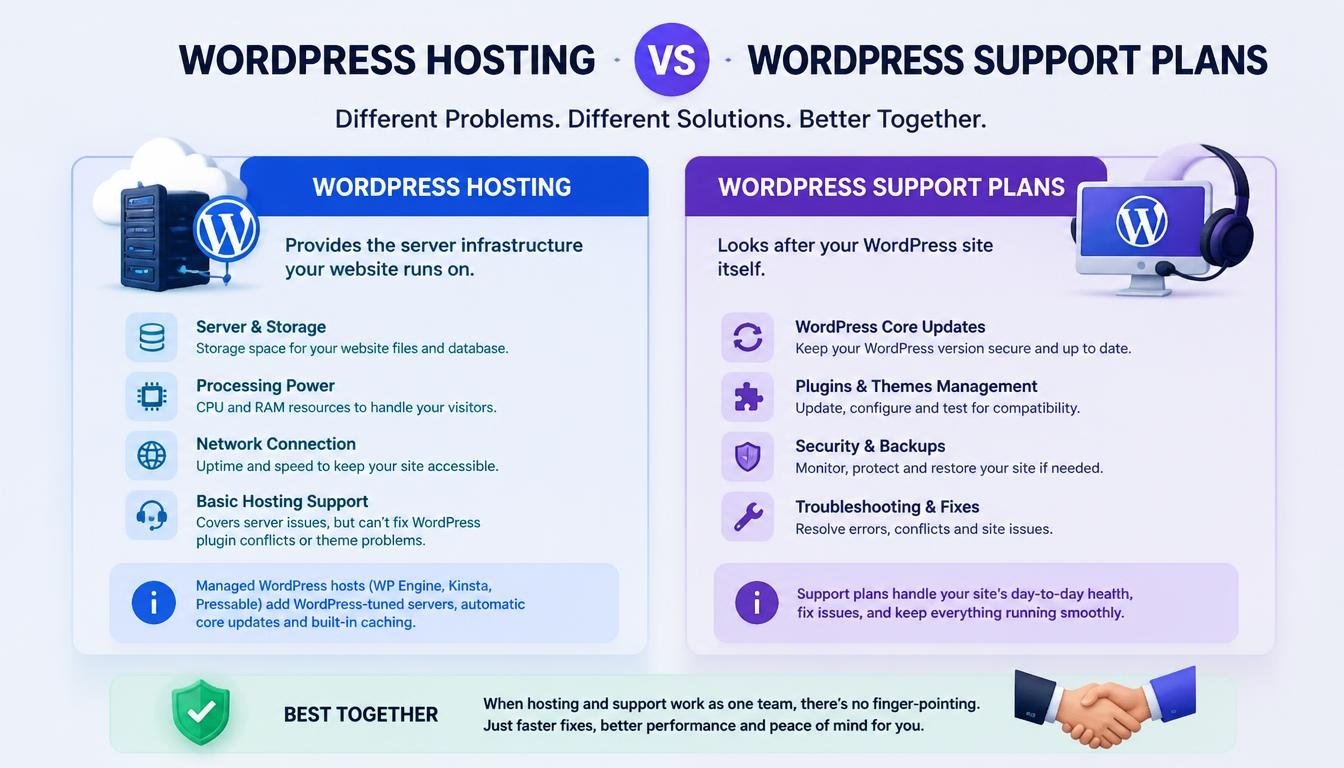
WordPress hosting and WordPress support plans solve different problems, even though people often confuse them. Hosting provides the server infrastructure your website runs on: the storage, processing power and network connection that keep it online.
A support plan looks after the WordPress site itself, including its core software, plugins, themes, security and day-to-day troubleshooting.
Basic hosting usually covers the server only, and its help desk can rarely diagnose a plugin conflict or a broken theme. Managed WordPress hosts such as WP Engine, Kinsta and Pressable go further with WordPress-tuned servers, automatic core updates and built-in caching, but they still do not fix your contact form or test a plugin update against your custom code.
Some providers now bundle managed hosting with support under one team. The main advantage is accountability: when the site goes down, there is no finger-pointing between a host that blames the plugins and a developer who blames the server.
Support Plans vs Support Packages vs Care Plans
Providers use the terms plans, packages, care plans and maintenance plans almost interchangeably, and in practice they describe the same thing: a recurring subscription that bundles maintenance, security and support. The label tells you very little.
What matters are the actual deliverables: how quickly the team responds, how many development hours are included, whether hosting is part of the price and how thorough the security monitoring really is. Always compare plans line by line rather than by name.
Who Needs a WordPress Support Plan?
Any business that relies on a WordPress website benefits from professional support, regardless of industry or size. The need becomes urgent once the site starts generating leads, sales, bookings or donations, because at that point every hour of downtime and every security incident has a direct cost.
A simple portfolio site can survive a slow repair; an online store or a nonprofit in the middle of a fundraising campaign cannot.
Signs Your Website Needs a WordPress Support Plan
- Updates are piling up in your dashboard because nobody has time to run and test them.
- Your site has been hacked, flagged by Google Safe Browsing or infected with malware before.
- Customers tell you the site is down or slow before you notice it yourself.
- A plugin conflict or critical error takes hours of guesswork to resolve.
- Pages take more than 3 seconds to load, which hurts both Core Web Vitals and conversions.
- You do not have a recent, tested backup that you could restore today.
DIY WordPress Maintenance vs a Professional Support Plan
Managing WordPress yourself can work for a small, simple site, but the hidden costs add up quickly. Every update needs testing, every security alert needs investigating and every error needs diagnosing, often at the worst possible moment. The table below shows how the two approaches compare.
| Factor | DIY maintenance | Professional support plan |
| Time | Hours every month on updates and checks | Experts handle routine work, so you get those hours back |
| Update safety | Risky one-click “update all” | Tested updates with human checks |
| Security | Reactive, after a problem appears | 24/7 monitoring and malware cleanup |
| Expertise | Limited to your own knowledge | Access to experienced WordPress developers |
| Cost | Low upfront, expensive when things break | Predictable monthly cost |
The real question is not whether you can maintain WordPress yourself, but whether that is the best use of your time. For most business owners, the hours saved and the risk removed are worth more than the monthly fee.
Why WordPress Support Plans Matter
WordPress support plans protect three things no website owner can afford to lose: security, speed and revenue. Problems will always happen on a live website, but most small disasters are entirely avoidable with consistent preventive maintenance and a team that responds quickly when something does go wrong.
WordPress Security Risks: Hacks, Malware and Vulnerable Plugins
WordPress powers 39.5% of all websites and holds 58.2% of the market among sites with a known content management system. That popularity is exactly what makes it the web’s biggest hacker target. Attackers write automated tools that scan millions of WordPress sites at once, looking for a single outdated plugin or weak password to exploit.
The numbers show how real the threat is. WordPress made up 95.5% of all detected CMS infections in 2023, and 39.1% of the infected CMS applications were outdated at the time they were compromised. In other words, many hacks succeed simply because nobody installed an available update.
One campaign, the Balada Injector malware, exploits vulnerabilities in outdated plugins and themes and redirects visitors to scam sites such as fake tech support pages. In September 2023 alone, it infected more than 17,000 WordPress sites. The good news is that most of these attacks are preventable with timely updates, security monitoring and regular backups, which is exactly what a support plan provides.
The Cost of Website Downtime
When a website goes offline, the losses start immediately. Research from Aberdeen Group found that downtime costs small companies about $8,581 per hour. For an online store, that means abandoned carts and refunds. For a service business, it means missed leads and bookings. For a nonprofit, it can mean lost donations during the one week of the year that matters most.
The damage also outlasts the outage. A hacked site may need days of malware cleanup, and Google can flag it with a warning that scares visitors away even after it is fixed. Repeat outages slowly erode customer trust, which is far harder to rebuild than a broken plugin.
A support plan shortens every one of these incidents, because the problem is detected sooner and handled by someone who already knows the site.
How Slow Websites Hurt SEO Rankings and Conversions
Speed is not just a technical detail; it directly shapes how many visitors stay and buy. A study by Deloitte, commissioned by Google, found that improving mobile site speed by just 0.1 seconds raised conversion rates by 8.4% for retail sites and 10.1% for travel sites. Google has also used page speed as a ranking factor for desktop search since 2010 and for mobile search since 2018.
Sites without ongoing care tend to get slower over time. Plugins pile up, images go unoptimized, the database fills with clutter and nobody revisits the caching setup. This slow build-up of technical debt shows up as lower search rankings and fewer sales, often without the owner realizing why. A good support plan treats speed as ongoing work rather than a one-time fix.
Key Benefits of a WordPress Support Plan
The biggest benefit is peace of mind. You no longer have to wonder whether updates ran, whether backups exist or whether the site is quietly down at midnight, because a team is watching it for you. That frees your time and attention for growth, which is a far better use of a business owner’s day than troubleshooting plugin errors.
A support plan also improves security through constant monitoring and prompt updates, and it improves performance through regular optimization that keeps load times fast. Finally, it makes costs predictable. Preventing problems with a fixed monthly fee is almost always cheaper than paying for emergency repairs after a hack or a long outage.
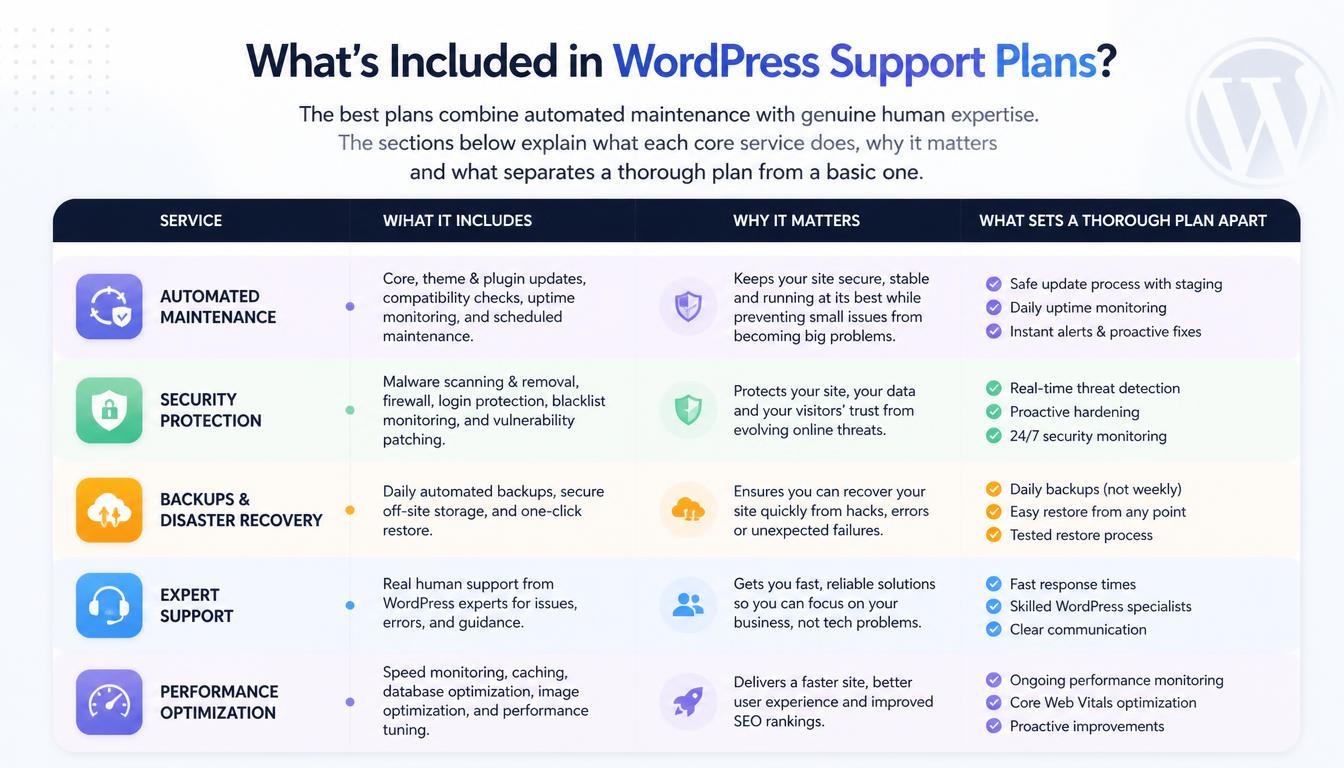
The best plans combine automated maintenance with genuine human expertise. The sections below explain what each core service does, why it matters and what separates a thorough plan from a basic one.
WordPress Core, Plugin and Theme Updates
Updates are the foundation of every support plan. WordPress releases core updates several times a year, and popular plugins and themes push new versions even more often. Most of these releases include security fixes, so every week an update sits uninstalled is another week your site carries a known vulnerability.
A good provider checks for plugin updates and theme updates at least weekly and applies them on a schedule. Better providers also review the plugins you use, replacing abandoned or unsupported plugins with well-maintained alternatives before they become a security risk. This kind of judgment is what you are really paying for, because automatic updates alone cannot tell you when a plugin is no longer safe to keep.
Manual Human Checks After Updates
The riskiest moment in WordPress maintenance is right after an update. A new plugin version can clash with your theme, break a layout or stop a form from sending, and automated tools rarely notice. Clicking “update all” and walking away is how many site owners discover a broken checkout from an angry customer.
That is why strong plans include manual human checks. After each round of scheduled updates, a developer opens the site, tests key pages and confirms that forms, menus and checkout still work. If something breaks, they roll back to a backup or fix the compatibility issue before visitors notice. This step costs providers more time, which is exactly why cheaper plans tend to skip it.
24/7 Security Monitoring and Firewall Protection
Security monitoring works like an alarm system for your website. Real-time malware scanning checks files for malicious code, vulnerability assessments flag plugins with known weaknesses and instant alerts notify the team the moment something suspicious happens, such as a burst of failed logins.
A web application firewall (WAF) adds a second layer by filtering harmful traffic before it reaches your site, blocking common attacks and brute-force login attempts. When comparing plans, ask whether scanning runs continuously or only once a day, and whether a firewall is included or sold as an extra. Continuous monitoring with a firewall is the standard you should expect from a professional plan.
Malware Removal and Hack Recovery
Even well-protected sites can be compromised, so what happens next matters. On a quality plan, the support team removes malicious code, restores clean files from a backup if needed, finds out how the attacker got in and closes that gap with security hardening. They should also check whether Google has flagged the site and request a review once it is clean.
Not every plan includes this. Some providers bill malware cleanup per incident on top of the monthly fee (see hidden fees below), which can turn a cheap plan into an expensive one overnight. Always confirm in writing that malware cleanup is covered before you sign.
Daily Off-Site Backups and Site Restores
Backups are your safety net when everything else fails. Daily backups are the industry standard, and many plans add more frequent snapshots for busy stores where a single day of lost orders would be painful.
Where backups are stored matters as much as how often they run. Copies kept on the same server as your site disappear in a server failure, so look for off-site, geographically distributed storage.
A backup is only useful if it can be restored quickly. The best plans include unlimited site restores, test their backups regularly and let the support team handle the restoration for you. Ask how long backups are kept and how quickly the team can bring the site back after a problem.
Uptime Monitoring and Emergency Support
Uptime monitoring checks your website from outside every few minutes, much like a visitor would. The moment it stops responding, the support team receives an alert, which means they often start working on the problem before you, or your customers, notice anything is wrong.
Monitoring is only half the job, though. It must be paired with emergency support that can actually act on the alert, including outside business hours. An alert that fires at 9 p.m. on a Friday is useless if nobody looks at it until Monday morning, so check what hours your plan covers.
Speed Optimization and Core Web Vitals
Comprehensive plans treat performance optimization as ongoing work. That includes configuring caching so pages load from memory instead of being rebuilt on every visit. It also covers compressing and resizing images, cleaning up a cluttered database, setting up a content delivery network (CDN) to serve files from locations close to visitors and trimming unnecessary code.
The goal is to improve your Google PageSpeed Insights scores and Core Web Vitals, the metrics Google uses to measure loading speed, responsiveness and visual stability. Because new content, plugins and features constantly add weight to a site, regular optimization keeps it fast rather than letting it slowly degrade.
Technical SEO Maintenance
Many support plans include technical SEO maintenance: keeping load times fast, maintaining a clean site structure, fixing broken links and crawl errors and making sure updates do not accidentally block search engines. These tasks protect the rankings you already have.
It is worth knowing where the line sits, though. Content strategy, keyword research and link building are marketing work, not maintenance, and they usually require a separate SEO service. A support plan keeps the technical foundation healthy so that your SEO efforts can pay off.
Staging Environments for Safe Testing
A staging site is a private copy of your website where developers can test updates, new features and design changes without touching the live site. If an update breaks something on staging, it is fixed there first, and visitors never see the problem. Once everything works, the changes are pushed to the live site.
Staging is especially valuable for e-commerce stores and complex sites, where a broken page during business hours means lost revenue. It is usually reserved for higher-tier plans, so if your site handles payments or memberships, make sure the plan you choose includes it.
Development Hours and Website Edits
Many plans include a monthly allowance of development hours that you can spend on improvements rather than just upkeep. Typical uses include adding a new landing page, adjusting a layout, editing content, setting up a new plugin or building a small custom feature.
Allowances commonly range from 1 to 8 hours per month, depending on the tier. These hours turn your support plan from a purely defensive service into one that steadily improves your site. If you regularly need changes, a plan with included hours is often cheaper than paying for each small job separately.
Monthly Reports and Site Health Dashboards
Good providers show their work. A monthly report should list which updates were applied, how many threats were blocked, what the site’s uptime was and what support requests were completed. This transparency proves the plan is delivering value and helps you spot recurring issues early.
Many providers also offer a site health dashboard where you can raise requests, track their progress and check your site’s status at any time. If a provider cannot show you clearly what they did last month, treat that as a warning sign.
What WordPress Support Plans Usually Don’t Cover
Knowing the limits of a plan prevents surprises later. Support plans are designed to keep an existing site healthy and make small improvements, so full website redesigns and large new builds are normally quoted as separate projects. Content writing, content strategy and link building usually fall under marketing services rather than support.
Work that goes beyond your monthly allowance of development hours is typically billed at an hourly rate, and on plans that do not bundle hosting, your hosting fees remain a separate bill. Ask each provider for a written list of exclusions so you know exactly where the plan ends.
Types of WordPress Support Plans
Most providers sell support plans in three or four tiers, and many also offer hosting bundles and white-label options for agencies. The tiers differ mainly in three ways: how fast the team responds, how many development hours are included and whether you get dedicated resources such as an account manager.
Understanding each tier helps you avoid paying for coverage you do not need or, worse, choosing a plan too thin for the risks your site faces.
Basic WordPress Maintenance Plans
Basic plans are built for solopreneurs and small business owners with simple brochure sites, portfolios or blogs that do not process payments. They usually cover the essentials: weekly updates, daily backups, 24/7 monitoring, proactive security and a monthly report.
Responses typically arrive within one business day, which is fine for routine questions but slow for an outage. A basic plan is a sensible starting point when the website supports your business but does not directly generate revenue.
Professional Support Plans
Professional plans suit growing businesses and nonprofits whose websites actively drive leads, sales or donations. On top of the basic services, they usually add a dedicated account manager, ongoing speed optimization, mobile optimization, analytics setup and 1–3 hours of monthly edits. Response times are much faster, often within a few hours. This is the tier most businesses grow into, because it combines protection with steady improvement.
Enterprise Support Plans
Enterprise plans serve complex, high-traffic and mission-critical websites, such as large online stores, membership platforms and sites with custom code. They typically include staging environments, SEO audits, custom SLAs, compliance documentation, multi-site management and 5–8 hours of monthly development.
Responses for critical issues are often guaranteed within an hour. If your organization has security reviews, legal requirements or several websites to manage, this is the level of service built for you.
Managed Hosting + Support Plan Bundles
Some providers include managed hosting in every plan, so a single team owns everything from server performance to plugin conflicts. These bundles often add an enterprise-grade CDN and firewall, such as Cloudflare Enterprise, and target 99.9%+ uptime.
The main advantage is simplicity: one invoice, one point of contact and no disputes between a host and a separate maintenance provider about whose fault a problem is. The trade-off is less freedom to choose your own host, so check whether the provider will also support a site hosted elsewhere.
White-Label Support Plans for Agencies
White-label plans are designed for digital agencies that build websites for clients but do not want to staff an in-house maintenance team. The provider does the technical work behind the scenes, while the agency presents the service under its own branding, keeps the client relationship and sends monthly performance reports in its own name.
Most white-label providers give the agency a shared control panel to manage every client site in one place, which lets the agency offer ongoing care as a recurring revenue stream.
WordPress Support Plan Tiers Compared
The table below summarizes how the three main tiers typically compare.
| Tier | Typical features | Typical response time | Development hours | Best for |
| Basic | Updates, backups, monitoring, security, reports | 24–48 hours | None | Small, low-traffic sites |
| Professional | Basic + account manager, speed work, monthly edits | 2–4 hours | 1–3 hours/month | Growing businesses, nonprofits |
| Enterprise | Professional + staging, SEO audits, custom SLAs, compliance | 1 hour or less | 5–8 hours/month | Complex, mission-critical sites |
How Much Do WordPress Support Plans Cost?
WordPress support plans typically cost between $30 and $300+ per month, depending on the tier, the response time guarantee and whether hosting is included. Across the wider market, prices range from roughly $30/month for simple maintenance services to $500+/month for enterprise partnerships. The cheapest plan is rarely the best value, so it pays to understand what drives the price.
WordPress Support Plan Pricing by Tier
| Plan level | Typical monthly price | Best for |
| Basic maintenance | 100 | Small websites with low traffic |
| Professional support | 300 | Businesses with meaningful website revenue |
| Enterprise support | $300+ | High-traffic or mission-critical sites |
Factors That Affect Support Plan Pricing
Several factors push the price of a plan up or down. Traffic volume and site complexity come first: a busy online store with dozens of plugins needs far more care than a five-page brochure site. Response time guarantees also matter, because promising a one-hour response at any hour requires staff on call around the clock.
Plans that include development hours or managed hosting naturally cost more, but they often replace bills you would otherwise pay elsewhere. Sites with e-commerce, membership or online course functionality usually sit in higher tiers because the stakes of downtime are higher. Finally, providers often offer multi-site discounts when you place several websites on the same plan.
Hidden Fees: Per-Incident Charges, Malware Cleanup and Overages
A low monthly price can hide significant extra costs. Some providers charge $150 or more per hour for emergency support and 500 per incident for malware removal. Some also bill separately for plugin troubleshooting, any task that takes longer than about 15 minutes, or work done on evenings and weekends. Others add a one-time setup or onboarding fee, often around $199 on entry-level plans.
The smarter way to compare plans is by total cost of ownership rather than headline price. A plan with unlimited support and malware cleanup included may cost more each month, yet it usually works out cheaper and far more predictable across a full year, especially if your site ever gets hacked.
Hourly Rates Beyond Included Development Time
When you use up your monthly development hours, extra work is commonly billed at around $150 per hour. Some providers bill in 15-minute increments or use fractional-hour billing, so a small fix does not cost a full hour. Reputable providers always send an estimate for your approval before starting billable work, which protects you from surprise invoices. If you regularly exceed your allowance, moving up a tier is often cheaper than paying hourly.
Monthly vs Annual Billing and Nonprofit Discounts
Most providers let you choose between monthly and annual billing. Paying annually can save around 15%, which is worthwhile once you are confident in the provider. Month-to-month plans cost a little more but give you the freedom to leave without a long-term contract, which makes them a safer choice while you are still testing the relationship.
Nonprofits should always ask about special pricing. Some providers offer around 20% off for registered nonprofits, even when the discount is not advertised on their pricing page.
WordPress Support Plan Response Times and SLAs
Every provider promises fast responses, but only some put that promise in writing through a service level agreement (SLA). An SLA defines how quickly the team must respond to different kinds of issues and what happens if it fails to. The right response time for your business depends on one simple question: how much does an hour of downtime cost you?
Typical Response Times by Plan Level
| Plan level | Typical response time | Suitable for |
| Basic | 24–48 hours | Non-urgent questions and simple sites |
| Professional | 2–4 hours | Revenue-generating business sites |
| Enterprise | 1 hour or less for critical issues | Mission-critical and high-traffic sites |
A 48-hour response is perfectly acceptable for a request to update a page, but it is far too slow when your checkout is broken during a sale. Match the guarantee to the most expensive problem your site could realistically face.
What Counts as a “Response” in an SLA
The word “response” can mean very different things. Some providers count an automated ticket acknowledgment, the instant “we received your request” email, as their response. Others only start the clock when a human developer has actually reviewed your issue. Neither definition tells you when the problem will be fixed, which is a separate commitment called resolution time.
Before you sign, ask the provider exactly how they define a response, how often they meet their own targets and what remedies, such as service credits, apply when they miss them. A provider that answers these questions clearly is usually one that takes its commitments seriously.
Business Hours vs 24/7 Emergency Coverage
Many plans only provide support during business hours, typically on weekdays, with requests sent through a dashboard or email. That works well for sites that are mostly informational, but it leaves a gap if your site goes down on a Friday evening. If your website earns money on weekends, during holiday sales or while running campaigns, you need 24/7 emergency coverage that guarantees someone will act on an alert at any hour.
It is also worth checking how you contact the team. Not every plan includes phone support; many route every request through a ticket system, which creates a clear record but can feel slow in a crisis.
Best WordPress Support Plans by Business Type
The right plan depends on how your website earns, sells or serves. A local bakery, an online store, a charity and a global company all face different risks, so each needs a different balance of response speed, features and budget.
Small Business and Brochure Websites
If your website supports your business rather than being the business itself, such as a local service company, consultant or restaurant, your priorities are simple. You need reliable uptime, solid security that keeps your site off Google’s blocklist and a dependable person to contact when something breaks. Uptime alerts, guaranteed malware cleanup and backups that can actually be restored matter far more than enterprise features. A plan in the 150/month range usually covers these needs well.
E-commerce and WooCommerce Stores
Online stores carry the highest cost of downtime, because every minute offline is a minute without sales. A 4-hour outage during business hours can easily cost thousands in lost revenue.
Store owners should budget around 300/month and look for priority support with 2–4 hour response times, ongoing performance optimization to protect conversion rates and a staging environment for testing updates safely.
Above all, choose a provider with proven WooCommerce experience, because payment gateways, inventory plugins and checkout flows are exactly where generic support teams struggle.
Nonprofit Organizations
Nonprofit websites often handle donations, event registrations, membership management and communication with supporters, yet they usually run on tight budgets. Downtime during a fundraising campaign can cost more than a full year of support fees, so reliability during peak periods matters enormously.
Look for providers that offer nonprofit pricing, understand donation platform security and can support integrations with nonprofit CRMs such as Bloomerang, Blackbaud and Salesforce Nonprofit. Experience with WCAG accessibility compliance is another valuable bonus, since many nonprofits serve audiences with diverse accessibility needs.
Digital Agencies Managing Client Sites
Agencies evaluate support differently, because they need a partner that makes them look good to their own clients. White-label support lets the agency deliver maintenance under its own brand, while multi-site management and multi-site pricing keep costs predictable as the client portfolio grows.
Direct access to technicians, rather than only a generic ticket queue, helps the agency resolve client issues quickly, and overflow development capacity lets it take on extra projects without hiring.
Enterprise and Multi-Site Organizations
Large organizations need more than fast fixes. They require guaranteed uptime, clear governance, compliance support and dedicated resources across multiple websites.
Enterprise-level providers offer a dedicated account manager, custom SLA terms with real accountability, compliance documentation and help completing vendor security questionnaires. Many also provide multi-site management with pooled development hours and strategic consulting that goes beyond simple break-and-fix support.
| Business type | Typical budget | Must-have features |
| Small business | 150/month | Uptime alerts, malware cleanup, restorable backups |
| E-commerce | 300/month | 2–4 hour response, staging, performance optimization |
| Nonprofit | Ask for nonprofit pricing | Donation security, CRM integrations, WCAG accessibility |
| Agency | Varies by site count | White-label, multi-site pricing, overflow development |
| Enterprise | $300+/month | Custom SLAs, compliance documentation, account manager |
How to Choose the Right WordPress Support Plan
Choosing a support plan is really choosing a long-term technical partner, so look well past the monthly price. The right plan matches your risk profile, gives you access to genuine WordPress expertise and spells out exactly what you are paying for. The criteria below will help you separate providers who deliver from those who simply market well.
WordPress Expertise vs Tier-1 Script Support
The biggest difference between support providers is not speed but expertise. Budget providers and many generic hosting companies route your request to tier-1 support staff who follow prepared scripts. They can reset a password or point you to a help article, but they struggle to diagnose why your site slows down every afternoon or why a plugin conflict only appears for one type of user.
A strong provider gives you access to developers who can read PHP error logs, understand WordPress architecture and recognize the quirks of popular plugins because they have seen the same problem on other sites. That experience solves issues in one conversation instead of five. Before you sign, ask who will actually handle your requests and whether you can speak with them directly.
Clear Scope: What the Monthly Fee Actually Covers
Many disappointments come from unclear scope, so get it in writing before you commit. A useful test is to ask: if my site is hacked at 11 p.m. on a Saturday, what will you do, how quickly, and what will it cost? The answer quickly reveals whether malware removal, emergency response, plugin troubleshooting and after-hours support are genuinely included or quietly billed as extras. A trustworthy provider answers this question clearly and without hesitation.
Backup Retention and Restore Terms
Every provider claims to take backups, but the details decide whether those backups will save you. Ask how often backups run, how long each copy is kept and whether they are stored off-site in geographically distributed locations rather than on the same server as your website.
Then ask about the restore process: who starts it, how long it takes and whether there is a restore fee. A backup that takes two days to restore, or costs extra every time you need it, offers far less protection than it seems.
Development and Customization Capabilities
Your website’s needs will grow over time. A contact form may need conditional logic, a membership plugin may need a CRM integration or a redesign may require moving content to a new theme.
Some providers only handle maintenance, which means you must find, brief and coordinate a separate developer for every change. Others include monthly development hours or offer clear hourly rates for extra work. Neither model is wrong, but knowing which one you are buying prevents frustration and finger-pointing between vendors later.
Contract, Cancellation and Refund Policies
Contract terms reveal how confident a provider is in its own service. Many reputable providers offer month-to-month plans with no long-term contract, trusting that good work will keep clients loyal.
Others require a signed contract but balance it with a money-back guarantee for the first month and a reasonable notice period for cancellation. Whichever model you choose, confirm that you can upgrade or downgrade your plan as your needs change, and be cautious of any provider that locks you in for a year with steep exit fees.
Reviews, Reputation and Client References
A provider’s marketing tells you what it promises; its clients tell you what it delivers. Read independent customer reviews, check how the company responds to criticism and ask for references from organizations similar to yours in size and industry.
When you speak with those references, ask about real experiences, such as how the team handled their last emergency, rather than simply whether they would recommend the service.
Questions to Ask Before Signing Up
A short conversation can tell you more than any pricing page. Ask the provider what WordPress-specific experience its team has and who exactly will work on your site. Ask how it handles emergencies and what it counts as one.
Ask for a clear list of what is included and what costs extra. Ask for references from comparable clients, and finally ask how it reports on the work done each month. A provider that answers all five clearly and confidently is usually one worth trusting.
Red Flags to Avoid in WordPress Support Plans
Not every support plan delivers what its marketing promises. Watch for these warning signs before you commit.
Pricing and Contract Red Flags
- Per-incident charges on top of the monthly fee, which means you are paying for monitoring rather than real support
- Low traffic caps with automatic overage billing
- Long lock-in contracts with limited cancellation rights
- Unexplained setup fees for basic services
Service Quality Red Flags
- No direct access to technical staff who actually fix problems
- Outsourced support with obvious script-reading
- Repeated requests for information you already provided
- Vague response times, such as “we usually reply within 24 hours”
- No emergency support outside business hours
Communication and Reporting Red Flags
- No regular reporting or visibility into the work done
- No consistent contact person, with tickets bouncing between agents
- Defensive answers to detailed questions about the service
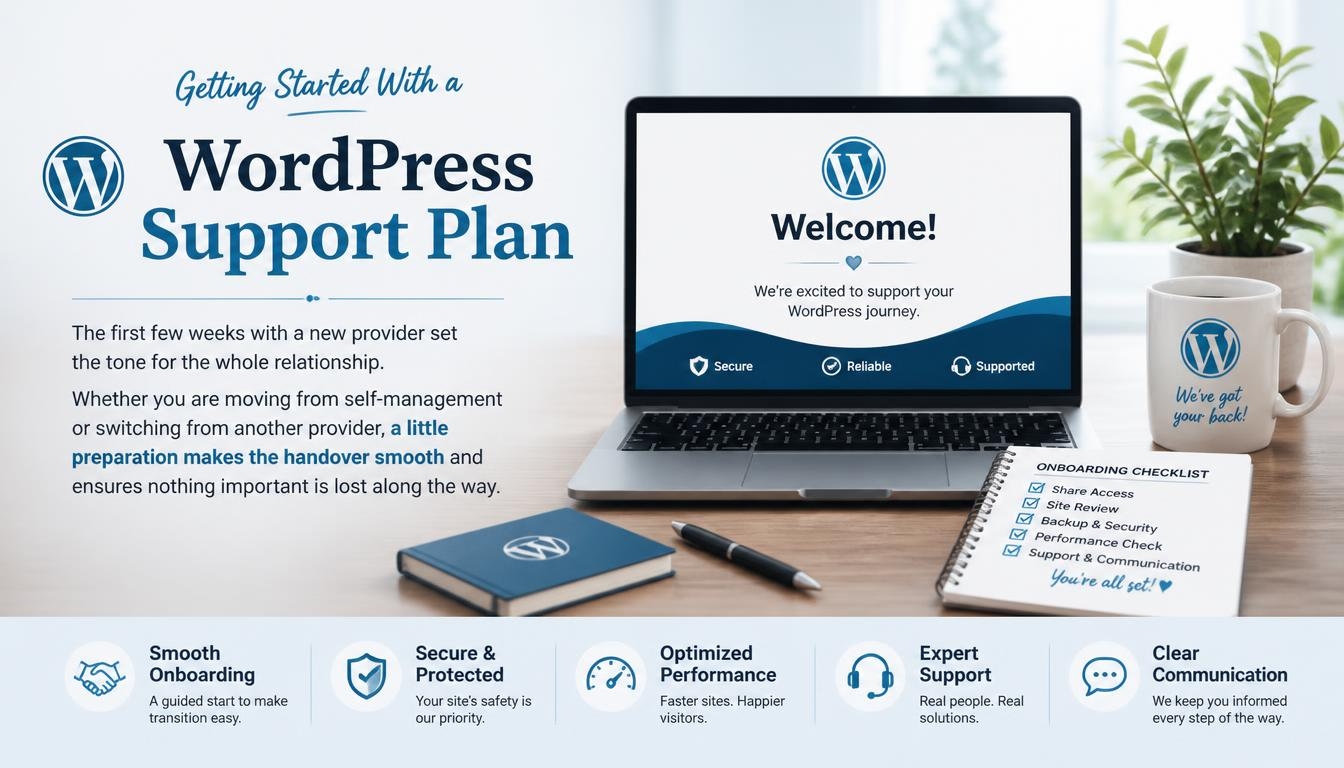
Getting Started With a WordPress Support Plan
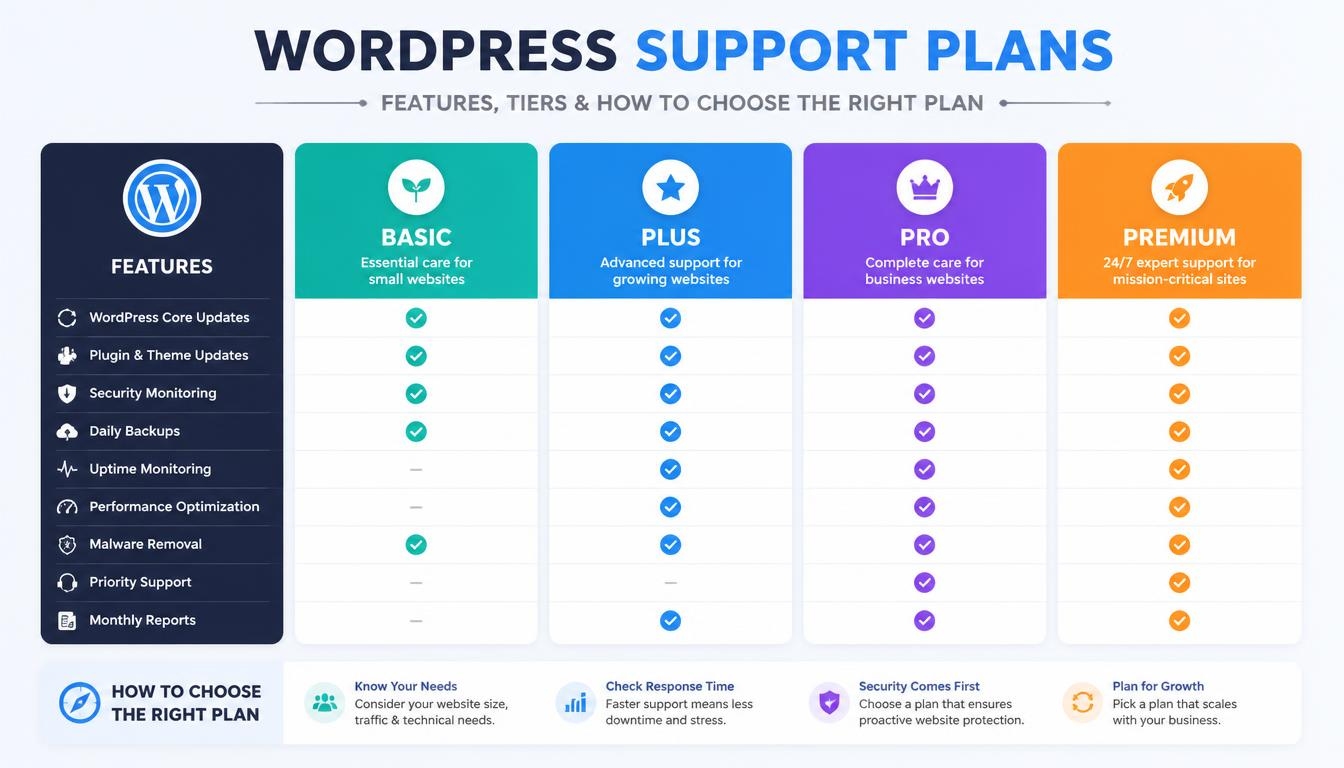
The first few weeks with a new provider set the tone for the whole relationship. Whether you are moving from self-management or switching from another provider, a little preparation makes the handover smooth and ensures nothing important is lost along the way.
Pre-Signup Checklist: Audit, Backup and Credentials
Before you sign up, take stock of what you currently have. Audit your site so you know which plugins, themes and custom features it relies on, and document any special configurations, integrations or quirks that a new team would need to understand.
Take a full backup of the website and store it somewhere you control, so you have a safe copy no matter what happens during the transition. Finally, gather every access credential you will need, including hosting, domain and admin logins, and pay special attention to any accounts your current provider controls on your behalf.
What Happens During Onboarding
Onboarding usually begins with you granting the new team full access to your hosting account and WordPress admin. The provider then connects your site to its maintenance dashboard and runs a complete site audit. During this audit, the team typically updates WordPress and outdated plugins, removes unused plugins that add risk, optimizes the database and images, and installs its security and monitoring tools.
Once the technical setup is complete, a good provider will review the audit findings with you, explain any risks it discovered and recommend priorities for the coming months. This is also the right moment to share your business goals and agree on the best communication channels for everyday requests and emergencies.
Best Time to Start or Switch Plans
Timing matters more than most people expect. Schedule the transition for a low-traffic period, when a small hiccup would affect the fewest visitors. Avoid your peak seasons entirely, such as year-end giving for nonprofits or the holiday shopping rush for online stores, because that is exactly when you can least afford disruption while a new team learns your site.
WordPress Support Plan Checklist
Use this checklist to compare plans side by side before you decide:
- Weekly core, plugin and theme updates with human checks
- 24/7 uptime and security monitoring
- Malware removal at no extra cost
- Daily off-site backups and free restores
- A written SLA with response times that fit your risk
- Direct access to experienced WordPress developers
- Clear pricing with no hidden per-incident fees
- Ongoing performance optimization and Core Web Vitals work
- A staging environment for e-commerce or complex sites
- Monthly reports and a site health dashboard
- Fair contract, cancellation and refund terms
Are WordPress Support Plans Worth It?
For most businesses, yes. Given how much a single hour of downtime can cost, a support plan in the 150/month range often pays for itself the first time it prevents an outage or a hack.
WordPress support plans turn unpredictable emergency fixes into a predictable monthly cost, and they return the hours you would otherwise spend on updates, troubleshooting and worrying about whether your site is still online.
The value, however, depends entirely on choosing well. A cheap plan that hides fees, skips human checks or leaves you waiting two days for help can cost more than it saves.
Judge every option by what is genuinely included, the expertise you can actually reach, how responsive the team is and whether it understands businesses like yours. Choose carefully, and a support plan becomes one of the smartest investments you can make in your website’s security, performance and long-term growth.
Frequently Asked Questions About WordPress Support Plans
Can I upgrade or downgrade my WordPress support plan?
In most cases, yes. Providers generally let you upgrade or downgrade as your needs change, and month-to-month plans make switching tiers especially simple. If you are on a contract, check whether a notice period applies before you change levels.
Can one WordPress support plan cover multiple websites?
Most providers price plans per website, so each site usually needs its own paid plan. However, many providers offer multi-site discounts when you bring several sites, and enterprise plans often include multi-site management with pooled development hours that can be shared across all your properties.
Do WordPress support plans work with any hosting provider?
Most providers will support your website on your current host, especially if you use a quality managed host such as WP Engine, Kinsta or Pressable. If your host is the source of slow speeds or reliability issues, the provider may recommend a migration to faster, more secure hosting, and some include that move in their onboarding.
Can I get a WordPress support plan if my site is already hacked?
Yes. Many providers will take on a hacked site immediately. They remove the malware and malicious code, find the cause of the breach, apply the missing security updates and add firewall protection before regular monitoring begins. Expect this first cleanup to be the most intensive part of the relationship.
Is there a free WordPress support plan?
Not in the full sense. Hosted platforms such as WordPress.com include automatic WordPress updates, brute-force protection, Akismet spam protection and an activity log on their free plan, but 24/7 expert human support requires a paid plan. For a self-hosted site, professional hands-on support always comes at a cost.
Do unused development hours roll over to the next month?
It depends on the provider. Some let you build up banked hours that you can use later before any extra time is billed at the hourly rate, while others reset your allowance each month. Ask how rollover works before you sign, especially if your needs vary from month to month.
Do WordPress support plans include phone support?
Not always. Many providers handle every request through a support dashboard or email, which creates a clear written record of each issue. If speaking to someone by phone matters to you, particularly during emergencies, confirm that it is included in the tier you choose.
Read More: https://linkneon.com/most-customizable-wordpress-themes/
Final Thoughts
Your website works around the clock, so its care should not depend on whether you remember to check it. WordPress support plans give you a team that keeps your site updated, secure and fast, and that steps in the moment something breaks.
The right plan is not the cheapest one; it is the one that matches your risk, spells out exactly what is included and gives you direct access to real WordPress expertise.
Start by working out what an hour of downtime would cost your business, then use the checklist above to compare two or three providers side by side. Ask the hard questions about response times, malware cleanup and backups before you sign.
Choose carefully, and your website becomes one less thing to worry about and one more thing working in your favor.