

The most customizable WordPress themes let you change colors, typography, headers, footers and page layouts without writing code, while still giving developers room to extend them. They combine a strong settings panel, a header and footer builder or full Site Editor support, and good compatibility with page builders and WooCommerce.
This article compares ten of the most customizable WordPress themes for 2026, covering both classic themes and block themes, free and premium. For each theme you will see where you customize it, what the free version includes and who it suits best. This is an editorial selection based on features, not a paid or tested ranking.
What Makes a Theme One of the Most Customizable WordPress Themes?
We judged the most customizable WordPress themes on these criteria:
- Global design controls: site-wide colors, fonts, buttons and container width
- Header and footer builder or full Site Editor support
- Per-page settings to hide titles, sidebars or headers on landing pages
- Starter templates that import full demo sites
- Page builder compatibility with Elementor, Beaver Builder and the block editor
- Performance: features you can switch off when you do not need them
- Child theme support for developers
Many options only help if they are well organized. Clear documentation, regular updates and an active support forum make customization easier long after launch.
Also look at how a theme handles its own updates. Well-maintained themes keep your saved options when they add new features and publish a clear changelog, so you know what changed before you update a live site.
The Most Customizable WordPress Themes for 2026
The list below mixes classic and block themes, because both can rank among the most customizable WordPress themes when used with the right tools. The themes are listed in no particular order, and features and plans change over time, so confirm current details on each developer’s website.
Most themes here have a free version, so you can try them before paying. Divi is the main exception: it is sold only as a paid product, with a money-back guarantee instead of a free tier.
1. Astra
- Type: Classic theme by Brainstorm Force
- Customize in: the Customizer, with global settings, a Header Builder and a Footer Builder
- Free version: yes; Astra Pro adds modules such as a sticky header, mega menu and custom layouts
- Best for: blogs, business sites and WooCommerce stores, with any page builder
Good to know: Astra is built to work smoothly with page builders such as Elementor and Beaver Builder. Its per-page settings let you turn off the title, sidebar or header on builder pages, so you get a full-width canvas without fighting the theme’s default layout.
Skip it if: you want a pure block theme and plan to design every template in the Site Editor.
2. Kadence
- Type: Classic theme
- Customize in: the Customizer, with a free header and footer builder and a global color palette
- Free version: yes; Kadence Pro adds conditional headers and hooked elements
- Best for: users who design with blocks through the Kadence Blocks plugin
Good to know: the global palette also feeds Kadence Blocks, so page content and theme colors stay in sync. When you change a palette color in the Customizer, the buttons, rows and other Kadence blocks that use it update across the site automatically.
Skip it if: you build every layout with a page builder such as Elementor, because much of Kadence’s value comes from Kadence Blocks.
3. GeneratePress
- Type: Classic theme with a minimal free version
- Customize in: the Customizer; GP Premium adds Elements, the Site Library and extra controls
- Free version: yes
- Best for: developers who like hooks and sites that load only the features they need
Good to know: it pairs with GenerateBlocks, a companion plugin for building layouts with blocks. Together they suit developers who want a small set of tools, precise control through hooks and Elements, and no heavy page builder on most pages.
Skip it if: you want many visual options in the free version, because most advanced controls sit in GP Premium.
4. Blocksy
- Type: Classic theme
- Customize in: the Customizer, with a visual header and footer builder
- Free version: yes, with the Blocksy Companion plugin; a Pro version adds more features
- Best for: designers who want many layout options in the free version
Good to know: optional extensions in the Companion plugin load only when you turn them on. This lets you add features such as a cookie notice or a newsletter form when you need them, while keeping the rest of the site free of code it does not use.
Skip it if: you do not want to install a companion plugin, because many of its free features depend on Blocksy Companion.
5. Neve
- Type: Classic theme by Themeisle
- Customize in: the Customizer, with a header and footer builder
- Free version: yes; Neve Pro adds extra modules
- Best for: small business sites and quick launches with starter sites
Good to know: the header builder has separate desktop and mobile layouts, so you can show a full menu on large screens and a compact menu on phones. Its starter sites cover many business types, which helps small teams launch a complete site quickly.
Skip it if: you want to design every template with blocks, because the classic Neve theme keeps its main controls in the Customizer.
6. OceanWP
- Type: Classic theme
- Customize in: the Customizer, plus the Ocean Extra plugin for per-page settings and demos
- Free version: yes; premium extensions add features
- Best for: WooCommerce and multipurpose sites
Good to know: it includes many shop layout and product page settings for stores. Free and premium extensions add more features over time, so you can expand the theme as your store grows instead of switching to a new theme and rebuilding the design.
Skip it if: you prefer a minimal setup, because many features depend on the Ocean Extra plugin and separate extensions.
7. Divi
- Type: Premium theme by Elegant Themes
- Customize in: Theme Options, the Visual Builder and the Theme Builder
- Free version: no
- Best for: users who want one all-in-one design tool
Good to know: layouts depend on the Divi Builder, so switching themes later usually means rebuilding pages. In return, you get one interface for page design, templates and global presets, which many designers find simpler than combining a theme with a separate page builder.
Skip it if: you might change themes in the future, because pages built with the Divi Builder do not move cleanly to other themes.
8. Hello Elementor
- Type: Minimal classic theme made by the Elementor team
- Customize in: Elementor’s Site Settings and Theme Builder
- Free version: yes
- Best for: sites designed entirely in Elementor
Good to know: it has almost no styling of its own, so Elementor controls the design. This keeps the theme light and avoids conflicts with builder settings, but you will need Elementor Pro’s Theme Builder for fully custom headers, footers and post templates.
Skip it if: you do not plan to use Elementor, because the theme offers almost no design settings on its own.
9. Twenty Twenty-Five
- Type: Block theme and the current WordPress default theme
- Customize in: the Site Editor, Global Styles and style variations
- Free version: yes, included with WordPress
- Best for: blogs and simple business sites that want native full site editing
Good to know: as of October 2026, it is still the default theme. WordPress skipped a Twenty Twenty-Six theme, and Twenty Twenty-Seven is planned for WordPress 7.2, with release targeted for December 2026.
Skip it if: you need a ready-made header builder or detailed store settings, which multipurpose classic themes provide out of the box.
10. Ollie
- Type: Free block theme
- Customize in: the Site Editor, with a large collection of block patterns
- Free version: yes
- Best for: users who want to customize everything with blocks and no page builder
Good to know: its block patterns cover full page sections such as heroes, feature grids and calls to action. You insert them in the Site Editor, swap in your own text and images, and adjust colors through Global Styles, all without a page builder.
Skip it if: your team already relies on a page builder, because Ollie is designed around native blocks and patterns.
Comparison of the Most Customizable WordPress Themes
| Theme | Type | Main customization tool | Header and footer builder | Free version |
| Astra | Classic | Customizer | Yes | Yes |
| Kadence | Classic | Customizer | Yes | Yes |
| GeneratePress | Classic | Customizer | Settings; Elements in Premium | Yes |
| Blocksy | Classic | Customizer | Yes | Yes |
| Neve | Classic | Customizer | Yes | Yes |
| OceanWP | Classic | Customizer | Settings in Customizer | Yes |
| Divi | Classic, premium | Theme Options + builders | Theme Builder | No |
| Hello Elementor | Classic, minimal | Elementor | Elementor Pro Theme Builder | Yes |
| Twenty Twenty-Five | Block | Site Editor | Template parts | Yes |
| Ollie | Block | Site Editor | Template parts | Yes |
Pricing and plan details change often, so check each developer’s website before you buy. Narrow your options to two or three themes, then test each one on a staging site with your own content.
Pay close attention to the main customization tool column. It tells you where you will spend most of your editing time, which matters more in daily use than any single feature on a theme’s sales page.
Free vs Premium Customizable Themes
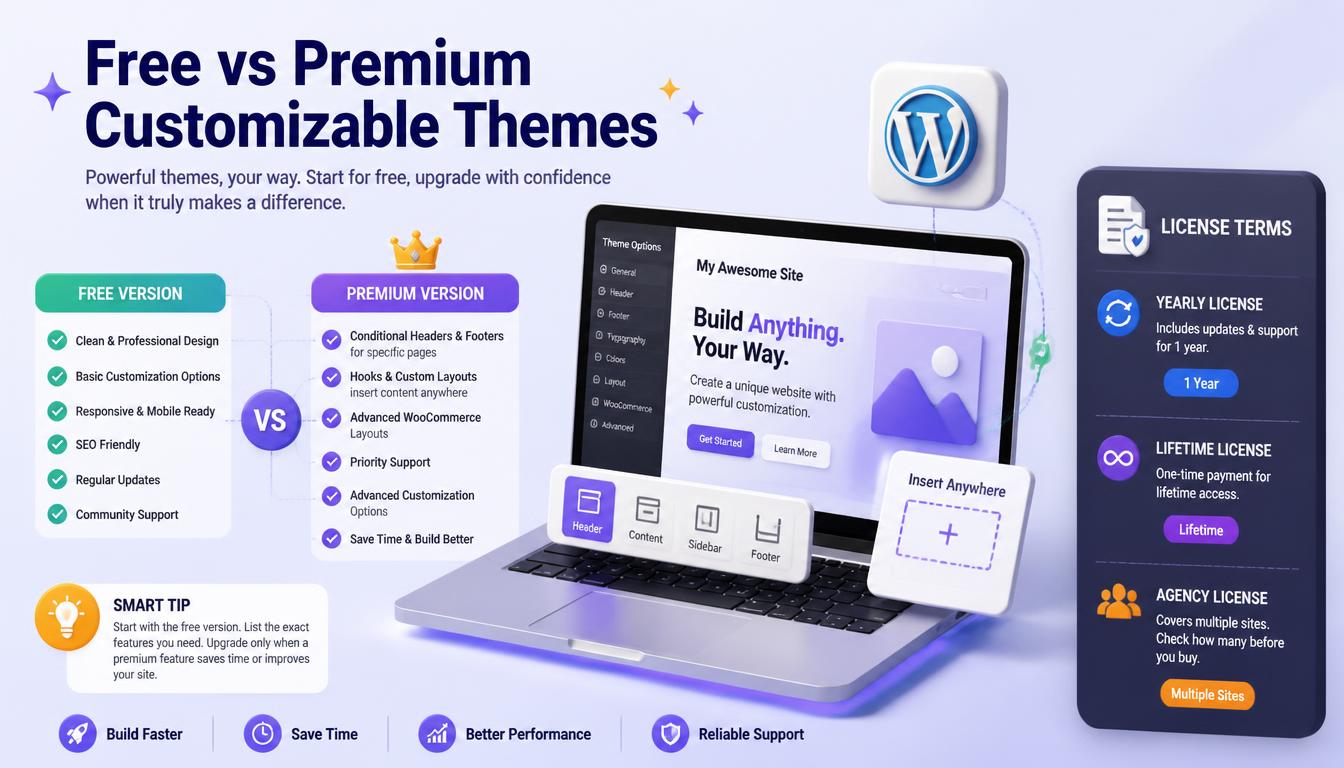
Many of the most customizable WordPress themes have a strong free version. Premium versions usually add:
- Conditional headers and footers for specific pages
- Hooks or custom layouts to insert content anywhere
- Advanced WooCommerce layouts
- Priority support
Start with the free version and list the exact features you need. Upgrade only when a premium feature clearly saves time or improves the site.
Check the license terms before buying. Many premium themes sell yearly licenses that include updates and support for one year, while some offer lifetime licenses at a higher upfront price; agencies should also confirm how many sites each license covers.
How to Choose Among the Most Customizable WordPress Themes
The best choice among the most customizable WordPress themes depends on how you plan to build:
| If you plan to build with | Consider |
| The block editor and Site Editor only | Twenty Twenty-Five, Ollie, Kadence |
| Elementor | Hello Elementor, Astra |
| A small, extendable code base | GeneratePress, Blocksy |
| One visual builder for everything | Divi |
| WooCommerce | Astra, Kadence, OceanWP |
Also consider who will maintain the site. If non-technical staff will edit pages, choose a theme and tools that match their skill level.
Think about the next two to three years as well. A theme that fits your current site but cannot grow with new needs, such as a store or membership area, may force a costly switch later, so choose with future growth in mind.
Warning Signs of a Theme to Avoid
Not every theme with many options is a good choice. Watch for these red flags before you install anything.
- Nulled or pirated copies: free downloads of premium themes from unofficial sites often contain malware.
- No recent updates: a theme that has not been updated in many months may not support current WordPress versions.
- Many required plugins: themes that force you to install a long list of bundled plugins add weight to every page.
- Theme-specific shortcodes: content built with a theme’s own shortcodes breaks when you switch themes.
- Poor support reviews: slow or missing support makes every problem harder to solve.
Check a theme’s page in the WordPress.org directory, where you can see the last update date, active installations and support forum activity. Choosing from the most customizable WordPress themes on trusted sources protects your site from security risks and expensive rebuilds.
Best Theme by Use Case
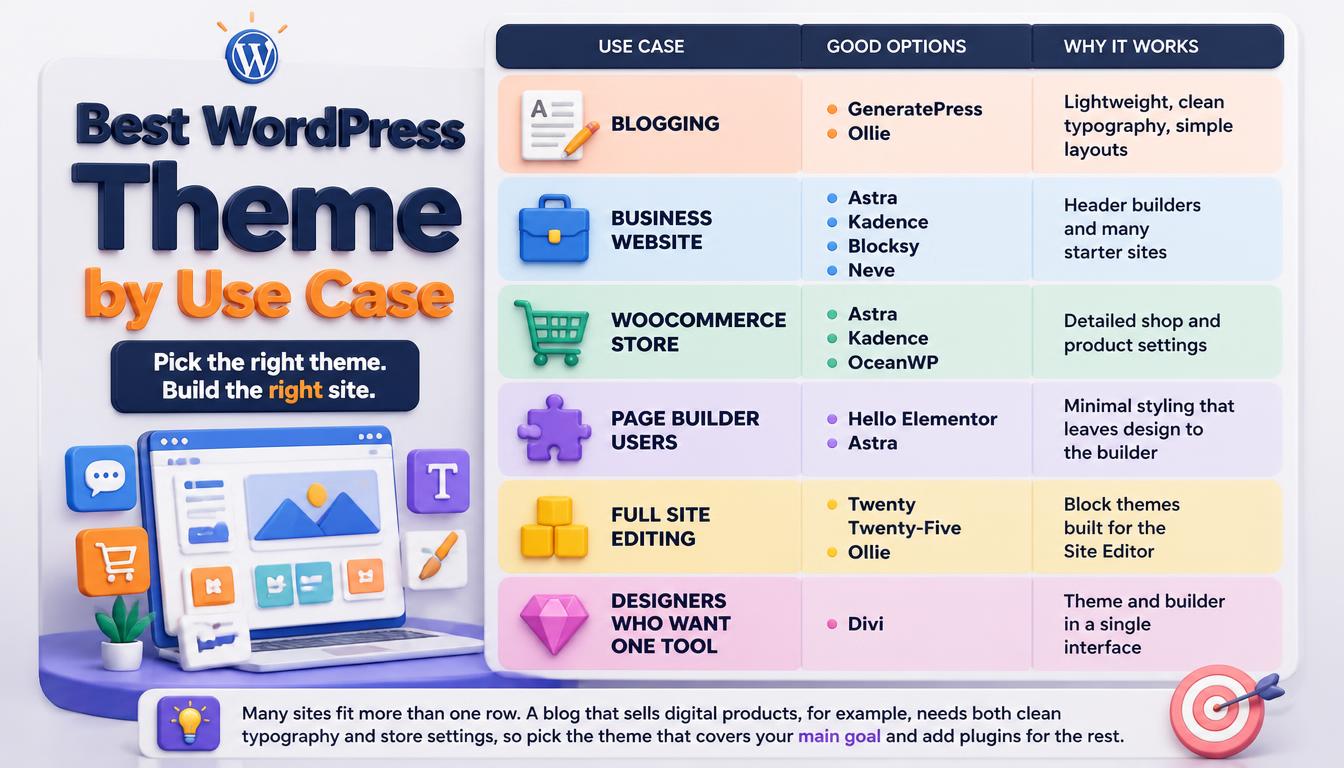
| Use case | Good options from this list | Why |
| Blogging | GeneratePress, Ollie | Lightweight, clean typography, simple layouts |
| Business website | Astra, Kadence, Blocksy, Neve | Header builders and many starter sites |
| WooCommerce store | Astra, Kadence, OceanWP | Detailed shop and product settings |
| Page builder users | Hello Elementor, Astra | Minimal styling that leaves design to the builder |
| Full site editing | Twenty Twenty-Five, Ollie | Block themes built for the Site Editor |
| Designers who want one tool | Divi | Theme and builder in a single interface |
Many sites fit more than one row. A blog that sells digital products, for example, needs both clean typography and store settings, so pick the theme that covers your main goal and add plugins for the rest.
How to Switch to a New Theme Safely
Changing themes affects menus, widgets and design settings, so follow a careful process.
- Back up your files and database.
- Install the new theme on a staging site first.
- Use the live preview to check key pages before activating.
- Note which menus, widgets and settings need to be rebuilt.
- Activate the theme on staging, fix layout issues, then push the changes to the live site.
Plan the switch for a quiet traffic period, such as late evening or a weekend. A calm launch window gives you time to fix small issues, such as spacing or missing menu items, before most of your visitors arrive.
Frequently Asked Questions
What are the most customizable WordPress themes for beginners?
Astra and Kadence are beginner-friendly because every setting has a live preview in the Customizer and both offer starter templates.
Are the most customizable WordPress themes slow?
Not necessarily. Themes such as GeneratePress, Kadence and Blocksy let you switch off features you do not use. Heavy page builders and many plugins usually affect speed more than the theme.
Is a block theme or a classic theme more customizable?
Block themes let you edit every template visually in the Site Editor. Classic themes with header builders offer more ready-made settings. Both can be fully customized.
Can I switch themes later?
Yes, but Customizer settings and Additional CSS do not transfer between themes. Plan time to redo the design after a switch.
Do customizable themes work with WooCommerce?
Most themes on this list support WooCommerce. Astra, Kadence, OceanWP and Blocksy include dedicated store settings, while block themes such as Twenty Twenty-Five style shop pages through templates in the Site Editor.
Read More: https://linkneon.com/customize-the-astra-theme/
Final Thoughts
The most customizable WordPress themes for 2026 include Astra, Kadence, GeneratePress, Blocksy, Neve, OceanWP, Divi, Hello Elementor, Twenty Twenty-Five and Ollie. Pick one of the most customizable WordPress themes that matches your building style, and test the free version with real content before you commit.
Remember that a theme is a long-term decision, not a quick download. Look at its update history, developer reputation and how quickly support answers questions, because a well-maintained theme protects your customizations for years while an abandoned one can force a costly rebuild.