

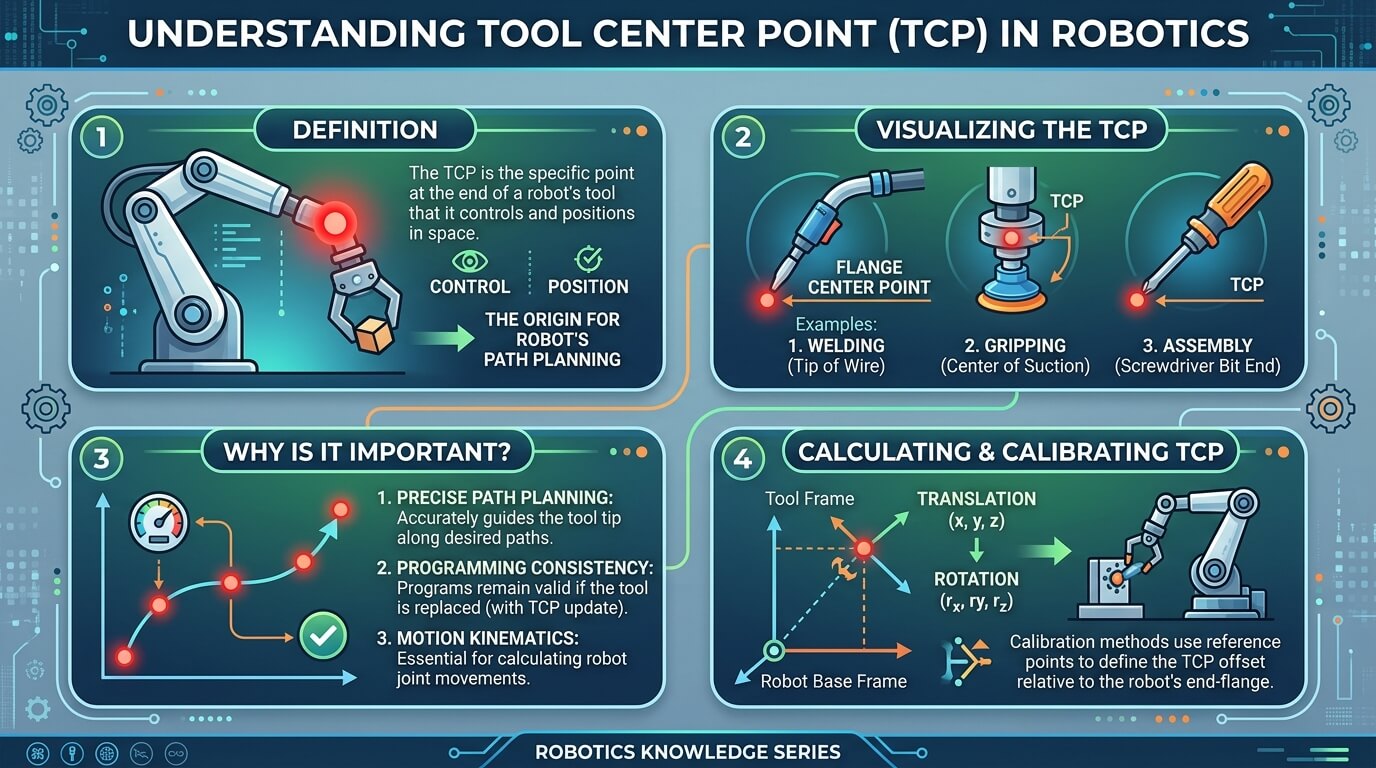
A tool center point is the specific spot on a robotic tool, not on the robot’s wrist, that the robot’s controller actually tracks and moves. Get this wrong and every weld lands off-target, every pick misses the part, and every path the robot draws in space is measured from the wrong place.
This guide explains what a tool center point actually is, how it’s calibrated in practice on brands like ABB and Universal Robots, what accuracy you can realistically expect, and why it needs to be checked again long after the initial setup is done.
What Is a Tool Center Point (TCP)?
Every industrial robot arm ends in a flange, a flat mounting plate where a tool gets bolted on: a welding torch, a gripper, a spray nozzle, a drill. The flange has its own fixed position that the robot’s internal software always knows.
The problem is that the flange itself rarely does the actual work. The welding arc happens an inch or two past the torch tip, and the gripper’s real “working point” is between its fingers, not at the mounting bracket.
If the robot only ever tracked the flange, every motion command would be off by whatever distance and angle separates the flange from where the tool actually interacts with the part. A tool center point solves this by defining an offset, a small transformation in position (X, Y, Z) and orientation, from the flange to the tool’s actual working point.
ABB documents this offset using its own W/P/R (rotation, pitch, roll) parameter naming, while other manufacturers use different labels for the same underlying idea, which is one reason the terminology can look inconsistent between robot brands even though the concept is identical.
Once that offset is set, the robot’s motion commands describe where the tool tip should go, and the controller does the math to figure out how the arm’s joints need to move to put it there. This translation from a desired tool-tip position back into joint angles relies on inverse kinematics, the calculation that works backward from “where do I want the tip” to “how do I bend each joint to get it there.”
It helps to keep three coordinate systems straight, since robot documentation uses all three and they’re easy to confuse:
- Base frame: fixed to the robot’s mounting point and never moves.
- User frame (sometimes called a work object): set relative to the workpiece or fixture, not the robot itself.
- Tool frame: contains the TCP itself, moving with whatever tool is currently attached.
A tool center point, in other words, isn’t a standalone number; it’s the anchor point of that tool frame.
Why TCP Matters for Robotic Accuracy and Safety
A correctly defined tool center point affects three things directly, and each one causes a different kind of downstream problem when the TCP is wrong:
- Path accuracy. Program a straight-line weld from point A to point B, and the robot only draws that line accurately at the tool tip if the controller knows exactly where the tip is relative to the flange. A TCP that’s off by even a few millimeters turns a straight seam into a curved one, because the arm compensates for a working point that doesn’t match reality.
- Manufacturing lines run the same motion thousands of times a day, and a robot that’s accurate but inconsistent is arguably worse than one that’s consistently slightly off, since inconsistency is harder to diagnose and correct downstream. A stable, well-calibrated TCP is part of what keeps a robot’s hundredth pass as accurate as its first.
- Safety margins. Collision-avoidance zones, safe-approach paths, and speed limits near operators are all calculated relative to where the robot’s software believes the tool tip is. If that belief is wrong, the safety margin the programmer designed around is wrong too, even though nothing about the robot’s programming looks incorrect on screen.
None of this requires exotic equipment to get right for most applications; it requires calibrating the TCP properly in the first place and treating it as something that can drift over time, which the next two sections cover.
How TCP Calibration Works
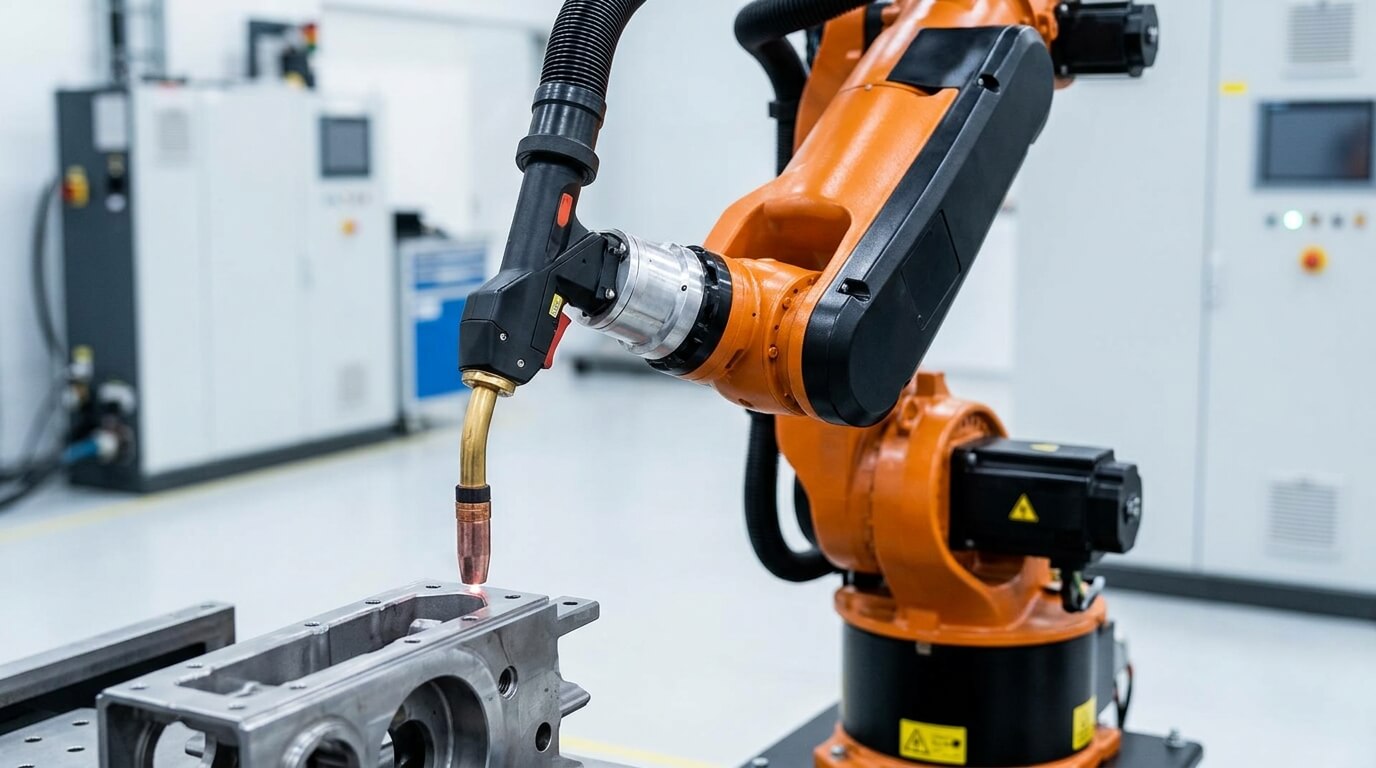
TCP calibration is the process of teaching the robot controller exactly where the tool tip sits relative to the flange. Conceptually, it works by moving the robot to touch or align on the same physical point, or plane, from multiple different orientations. Because the flange rotates around the true tool tip during these moves, the controller can compare several sets of flange coordinates and calculate the one offset that stays constant relative to the tip across all of them, arithmetically working backward from “where was the flange each time” to “what single offset from the flange explains all these positions.”
The two broad approaches are manual calibration, using the robot’s own teach pendant and a fixed reference point, and automated calibration, using dedicated sensors or optical equipment. Which one makes sense depends on the required accuracy, how often tools get swapped, and what hardware is already available on the line.
Manual Calibration Methods
Manual methods are the default on most industrial robots and don’t require extra equipment beyond a fixed pointer or pin.
- Three-point method: The simplest approach. The operator jogs the tool tip to touch the same fixed reference point from three different arm orientations. This establishes position (X, Y, Z) but not orientation, so it’s suited to symmetrical tools like a simple welding torch tip where rotation around the tip doesn’t matter.
- Four-point method: Adds one more approach angle beyond the three-point method, generally used to improve confidence in the calculated offset since more data points reduce the effect of any single inaccurate touch.
- Six-point method: Extends the same idea to also define orientation, not just position, by adding points that establish the tool’s X and Z axis directions. This matters for asymmetrical tools, grippers with a defined “front,” or spray nozzles where rotation affects the spray pattern.
- Plane-based calibration: Instead of touching a single point, the tool touches a flat surface from varied orientations. Some workflows use this with a spherical probe tip, which simplifies contact detection.
An experienced operator can typically complete manual calibration in around ten minutes, though the exact time depends on the robot brand’s interface and how many approach points the procedure calls for. Simulation platforms like RoboDK offer a software-based version of the same point-and-plane calibration approach for offline programming and testing before it’s run on the physical robot.
Automated Calibration Methods
Automated calibration replaces manual jogging and touching with dedicated hardware: laser-based systems, optical or camera-based systems, or photogrammetric sensors that triangulate the tool tip’s position from multiple angles automatically. These systems can complete a calibration cycle in well under a minute in many setups, considerably faster than a manual pass, and they reduce the human error that comes from imprecise touch alignment.
The tradeoff is cost and setup complexity. Automated calibration hardware is worth it primarily for high-precision applications (laser cutting, fine assembly) or for cells with frequent tool changes, where the time saved across many recalibrations adds up.
A cell that swaps tools rarely and doesn’t need micron-level precision usually doesn’t justify the equipment, and the manual methods above remain accurate enough. Some modern robotics software stacks, MoveIt Pro among them, document their own guided TCP calibration workflows, reflecting how this process has moved beyond purely manual, brand-specific procedures.
TCP Accuracy: What Tolerance Should You Expect?
Required TCP tolerance varies significantly by application, and it’s worth setting expectations against the actual task rather than assuming every robot needs the tightest possible accuracy:
| Application | Typical tolerance |
| Spot welding | Roughly 0.5–1.0 mm |
| Arc welding | Roughly 0.5 mm or tighter |
| Precision assembly | Roughly 0.05 mm |
| Laser cutting/drilling | Roughly 0.01 mm |
These figures should be treated as general, commonly cited ranges rather than a fixed industry standard; the actual tolerance your application needs depends on the specific process, part tolerances, and the robot manufacturer’s own specifications.
A pick-and-place operation moving boxes has enormous tolerance for TCP error compared with a laser system cutting a precise pattern, which is why “how accurate does my TCP need to be” is really a question about the job, not a single universal number.
TCP Drift: Why Recalibration Is an Ongoing Task
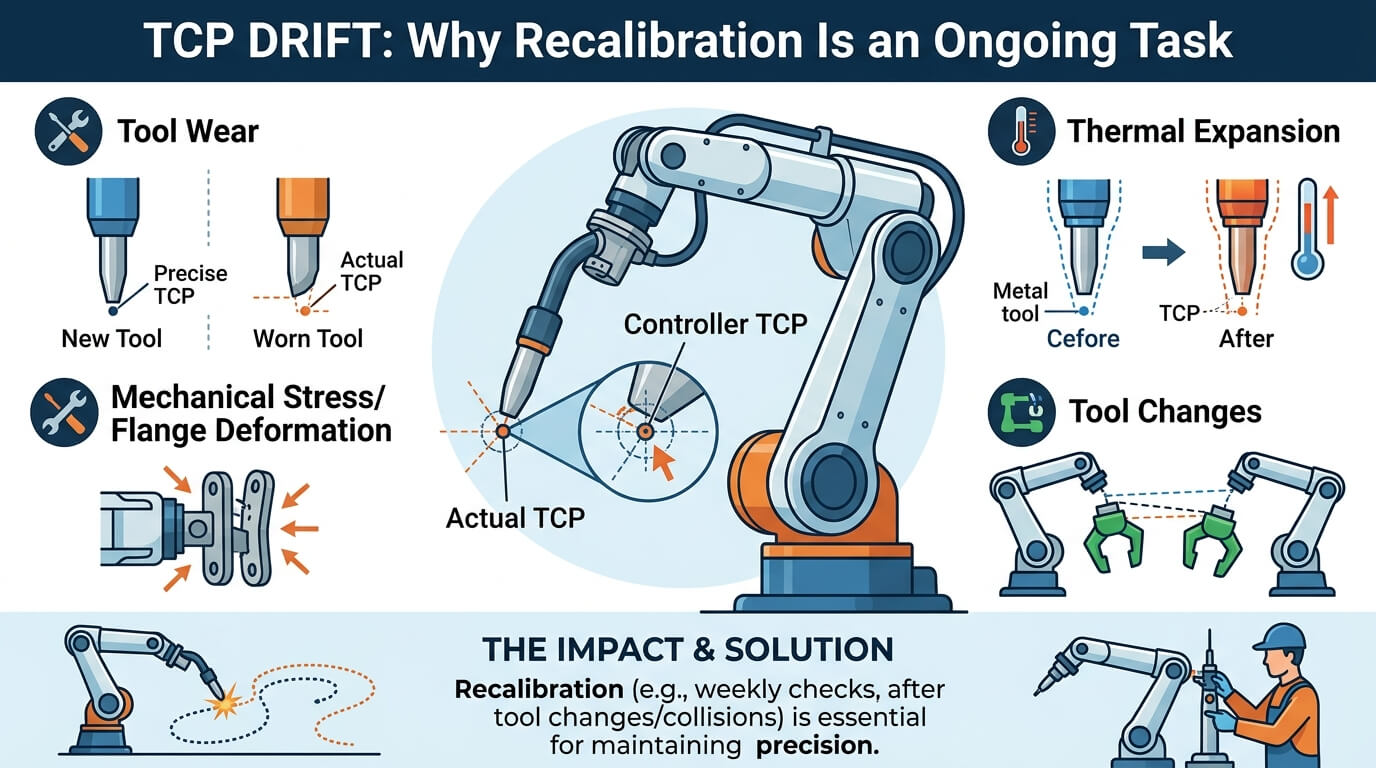
A tool center point isn’t a one-time setup. Several things cause TCP drift, pushing it out of alignment over time, and none of them show up as an error message, they just quietly make the robot’s actual tool position drift away from what the controller believes:
- Tool wear. A welding tip erodes, a drill bit shortens, a gripper’s contact surface deforms slightly from repeated use.
- Flange deformation. Repeated mechanical stress or an unnoticed impact can shift the tool’s mounting slightly.
- Thermal expansion. Metal tooling expands as it heats during operation, and a TCP calibrated cold won’t perfectly match the tool’s dimensions once it’s running hot.
- Tool changes. Any time a tool is swapped, even for an identical replacement part, the physical mounting is never perfectly identical to the last one.
For high-precision work, a routine of periodic checks, weekly in many shops, is a reasonable practice rather than assuming a calibration done at installation holds indefinitely. Recalibration is also standard practice immediately after any tool change or after a robot has been manually jogged following a collision or program error, since either event can shift the physical relationship between flange and tool tip.
Common TCP Calibration Mistakes
A handful of recurring errors account for most bad TCP calibrations:
- Too few calibration points, or points taken from angles too similar to each other. The math behind TCP calibration needs meaningfully different orientations to isolate the offset accurately; touching the reference point from nearly identical angles doesn’t give the calculation enough information.
- Loose tool mounting. If the tool isn’t rigidly fixed to the flange, the “constant” offset the calibration assumes isn’t actually constant.
- Unit or sign-convention mistakes. Mixing up millimeters and inches, or a rotation direction convention, produces an offset that looks plausible but is systematically wrong.
- Reusing an old calibration after a tool change. Even a nominally identical replacement tool can sit slightly differently on the flange.
- Skipping verification. Completing the calibration procedure isn’t the same as confirming it worked; running a quick accuracy check afterward, jogging to the reference point from a fresh angle and confirming the reported position, catches most calibration errors before they reach production.
TCP on Robot Arms vs. TCP Control on CNC Machines
The abbreviation “TCP” shows up in a related but distinct context: 5-axis CNC machining, where TCP control refers to real-time compensation technology that keeps the cutting tool’s tip accurately positioned as the machine’s rotary axes move during multi-axis cuts. Machine builders like Hartford CNC use this terminology for applications such as aerospace turbine-blade machining and semiconductor component manufacturing, where sub-10-micron accuracy is the target.
The underlying idea, tracking a working point rather than a fixed mechanical reference, is conceptually similar to robotic TCP, but the technology and terminology are specific to CNC machine tools, not articulated robot arms. If your search brought you here from a CNC or 5-axis machining context rather than robotics, the concept translates loosely but the calibration methods in this guide are written for robot arms specifically.
Frequently Asked Questions
What is a Tool Center Point (TCP) in simple terms?
It’s the exact point on a robot’s tool, not the robot’s wrist, that the robot actually tracks and moves when you program a path. It’s defined as an offset in position and orientation from the flange.
How is TCP different from the robot’s flange?
The flange is the fixed mechanical mounting plate at the end of the robot arm; its position is always known. The TCP is a separate, defined point that accounts for the actual tool’s shape and length, since the flange itself usually isn’t where the real work happens.
How often should a robot’s TCP be recalibrated?
There’s no fixed interval that fits every setup; a machine tending cell might go months without needing a check, while a laser-cutting application at micron-level tolerance often gets checked weekly. The event-based triggers (a tool change, a collision, a manual jog) matter more than a calendar date, since those are the moments most likely to actually move the offset.
What’s the most accurate way to calibrate TCP?
Automated calibration using laser, optical, or photogrammetric sensors is generally more accurate and faster than manual methods, particularly for high-precision applications, though it requires dedicated equipment that isn’t always justified for lower-tolerance tasks.
Can I use one TCP for multiple tools?
No, each distinct tool needs its own TCP definition, since each has a different shape, length, and mounting relationship to the flange. Robots with automatic tool changers typically store multiple TCPs and switch between them as tools change.
What causes TCP calibration errors?
Common causes include using too few or too-similar calibration points, a loosely mounted tool, unit or sign-convention mistakes, and reusing an outdated calibration after a tool swap.
Is “TCP” in robotics the same as TCP in networking?
No. In robotics, TCP means Tool Center Point. In networking, TCP means Transmission Control Protocol, an entirely unrelated concept. The two share only the acronym.
What accuracy can I expect from TCP calibration?
It varies by application: roughly 0.5–1.0 mm is typical for spot welding, tighter for arc welding, around 0.05 mm for precision assembly, and as tight as 0.01 mm for laser cutting or drilling. These are general ranges, not fixed standards, and actual requirements depend on your specific process and equipment.
Read More: https://linkneon.com/bernard-ai-explained/
Conclusion
A tool center point is a small piece of setup, an offset in position and orientation from the flange, that determines whether everything a robot does downstream, welding, picking, cutting, is actually accurate. Getting the initial calibration right matters, but treating it as a one-time task is the more common mistake: tool wear, thermal expansion, and tool changes all push a TCP out of alignment gradually, without any obvious warning sign.
The practical next step: if you’re setting up or maintaining a robotic cell, check what calibration method your specific robot controller supports, confirm the tolerance your application actually needs rather than assuming the tightest option, and build a routine recalibration check into your maintenance schedule instead of relying on the calibration done at installation.